


Participant
December 2, 2022
Question

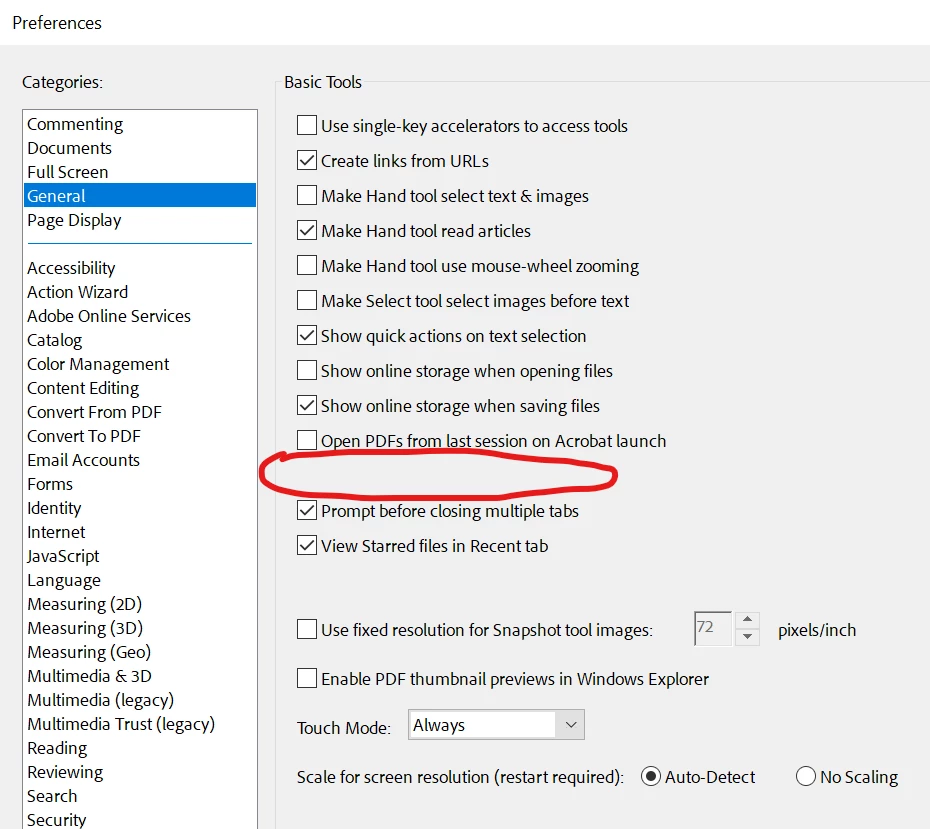
Missing option on latest version: "open documents as new tabs in the same window"

  • December 2, 2022
  • 5 replies
  • 8687 views

I have Adobe Acrobat Pro 2022.003.20282, just installed this week and is up to date.  On my previous computer I was able to uncheck the box for "open documents as new tabs in the same window" to prevent new documents from opening as tabs.  I prefer them to open in their own new window.  Does the newest version remove this option and force users to use tabs?  Or am I missing something here..?  Thx
 

This topic has been closed for replies.

5 replies

Participant
October 30, 2023

This is driving me crazy. I almost never want tabs--I want multiple pdfs right in front of me at the same time. Have they fixed this yet? I don't want to have to disable new acrobat, as I'm in the middle of an important project and I'm afraid I might lose something.


Participant
August 14, 2023

Be great if Adobe Acrobat Pro allowed the option to open in new windows.  So disappointing that they have removed this option.   Really bad way to have to work with all tabes in the one window, and have to repeatedly answer the question whether to close all tabs.  REally slows down when using multiple pdfs at a time.  shouldn't have to revert back to the older version of Acrobat just to keep a useful feature available.  ADOBE get your act together and think about what people want.  From fhe community pages I can see that many people want to keep this option. 

Also really hard to find how to contact ADOBE with suggestions.  

Abambo
Community Expert
Community Expert
August 14, 2023

You can close the tabs separatly, if you want. You can also disable the question in the properties, then you close all tabs. You can also use keyboard shortcuts to close the current tab. 

ABAMBO | Hard- and Software Engineer | Photographer
Participant
August 15, 2023

thanks for your reply Abanbo but of course you can close the tabs separate, or all at once, or disable the question.  The point is it was a very functional way to work being able (by preference) open new pdfs in new tabs (and of course close them).  I did revert back to the old version to avoid this issue but found by doing this, they'd removed the option of organise pages.  Which is a necessary function for my work, meaning that I had to go back to the new one.    Think ADOBE should just keep the good options that they had, not remove or omit in a newer version.  Why take out something that worked?  Preferences are for individual use preference so this is an easy way to give each user the option to work how they want .  


Participant
January 16, 2023

This option seems to have been completely removed from "new Actobat"
In order to get this option back you must disable new acrobat from the 'hamburger' menu on the top left.
this also affects 22.003.20310

Participant
March 10, 2023

Thank you, this worked pefectly!

Participant
January 8, 2023

I had this same problem, and apparently even Adobe employees in these forums don't realize that this is the default behavior of "new Acrobat." For now, the only way to fix it is to select "Disable new Acrobat," or something similar (I've already disabled mine and I'm never going back if I don't have to!) from the "hamburger menu." Just amazing customer care around here.

Participant
March 15, 2024

OMG, thank you!  I had no idea you can just disable.  I am never going to the new version.  Have been using it for months and it stinks.  (I am being nice.)

Meenakshi Negi
Community Manager
Community Manager
December 31, 2022

Hi Scott27373247h2uy,


Thank you for reaching out.


Please let us know if the option disappeared after updating the application.

Did you try preparing the application installation? If not, go to Help > Repair Installation.

Would you mind sharing the screenshot of the Acrobat window showing how it opens the PDF?

Did you notice any other changes?


Thanks,

Meenakshi