


Participating Frequently
February 1, 2010
Answered

Missing PDF Toolbar in IE8

  • February 1, 2010
  • 10 replies
  • 60499 views

Hi.

Running Win7 with IE8 and Acrobat 9 Standard.  For some reason after I installed Acrobat 9, IE8 does not load the Adobe tool bar.

In IE8 Under Tools > Manage Add-ons (Currently loaded add-ons) I can see the following:

1. Adobe PDF Link Helper
2. Adobe PDF Conversion Toolbar Helper

3. SmartSelect Class

What I do not see listed is just simply "Adobe PDF"

Anyone know how to get it back?

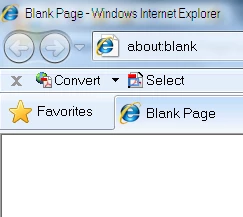
This is what it should look like (snap shot taken from another machine).
    This topic has been closed for replies.
    Correct answer

    I just found that the problem is the 64 bit version of IE 8.  When I switch to the 32 bit version, which is an option under "all programs," the missing toolbars are there.  Sheesh.  You'd think either Microsoft or Adobe would have figured this out.  There are a number of forums/blogs/support conversations where this problem is discussed and no solution offered.  They don't even identify the problem.

    10 replies

    Gremar17
    Participant
    October 21, 2011

    Confirming that the issue is related to the 32 vs 64 bit versions of IE. I can have both versions open and the 32bit version has the convert toolbar and the 64bit version does not. I am using AA X and a "repair" does not install the Adobe toolbar in the 64bit version of IE (currently using v9). I assume Adobe have not got the 64bit compatible add-on working, even if it links to the 32bit AA X tools.

    It would be nice to know when Adobe will have the 64bit versions of AA up and running.

    (I am also waiting for 64bit Creative Suite !!)

    Participant
    October 7, 2011

    Bob,  I am having a similar problem.  Here is what I have discovered:

    Down at the lower portion of the screen appears a "mini toolbar" with save, print, page up, page down, etc. icons.  The last Icon on the right "Adobe" symbol brings up the expected toolbar and navigation buttons.  F8 also works.  This is not on every pdf I open only certain ones (i.e. not opened in a new window, etc.)

    Many of the solutions above are helpful, and although good to know, do not solve the issue (at least not for me), and I presume not for you.

    I would like to see if there is a way to keep the toolbar set so it appears next time a pdf is viewed in the browser.  IE8, AAX, ARX

    Participant
    September 15, 2011

    I had this same problem with Adobe x Pro, IE8, and Windows XP.  I found my issue to be within IE.  I went to Tools>Internet Options>Advanced(tab) and enabled "Enable third party browser extensions*".  After restarting IE my Adobe toolbar was back!  Hope this helps.

    March 22, 2011

    BZ - Did switching to the 32 bit IE bring back the Adobe toolbar for you?

    Participant
    March 22, 2011

    I didn't need to. The solution that I posted above worked for me.

    March 22, 2011

    Sorry - I was trying to reach the original poster!

    SJB

    March 21, 2011

    I'm having the same problem, but I don't have Acrobat Reader installed, so that's not the issue.  What makes it stranger is that

    if I go to Help through Acrobat, the IE8 screen that comes up DOES have the Acrobat PDF bar and buttons and some others, and they all show up when I go to manage the tool bars.  In the "ordinary" IE8 window, the Acrobat tool bar and some others are completely absent and do not appear in any list of available tool bars.  What is going on?  Evidently Windows 7 now has a "Shadow" feature with the power to cloud men's minds. IE, it's really there but Win 7 isn't letting us see it.

    Participant
    March 21, 2011

    Try installing the reader and then go through the steps I mentioned above. Not sure it'll help but worth a try.

    taffybach

    Correct answer
    March 21, 2011

    I just found that the problem is the 64 bit version of IE 8.  When I switch to the 32 bit version, which is an option under "all programs," the missing toolbars are there.  Sheesh.  You'd think either Microsoft or Adobe would have figured this out.  There are a number of forums/blogs/support conversations where this problem is discussed and no solution offered.  They don't even identify the problem.

    Participant
    February 28, 2011

    I've just had the same problem with Adobe X.

    After a little digging on forums and finding no real answer I had a lateral think and found the problem.

    You need to fix this in the Adobe reader sofwtare NOT in IE8.

    Open up Adobe reader.

    Go to Edit -  Preferences

    Click on Internet

    Remove the Tick from the Display in read Mode by Default box

    You should now find that the toolbar is back when you open a PDF in IE8.

    Hope this works for you - it did for me.

    Rgds

    taffybach

    Sasha_G
    Participant
    February 22, 2011

    I've got the same issue with one user.

    Tried to reset IE 8 to default settings as per: http://windows.microsoft.com/en-GB/windows-vista/Reset-Internet-Explorer-8-settings

    No luck with that.

    I also did all updates for Adobe 9 Pro, and this didn't help either.

    What I noticed is that it works fine when you login under different user account. I understand that this isn't the best solution, but you might want to re create your account and see if it'll work.

    Regards,

    Sasha

    http://www.semargl.ca

    Participating Frequently
    January 1, 2011

    Having a similar problem with IE8. Have Acrobat Pro 9 too. I enabled in IE8

    pdf but no toolbar shows up anywhere. Have Windows 7 too. Also, in older IE version, when I right click the mouse, convert to pdf and append to pdf were there. With IE8, nothing. I know I can convert using Acrobat Pro 9, but prefer the convenience on IE8. Have you solved the problem yet?

    Participating Frequently
    January 1, 2011

    Having a similar problem with IE8. Have Acrobat Pro 9 too. I enabled in IE8 pdf but no toolbar shows up anywhere. Have Windows 7 too. Also, in older IE version, when I right click the mouse, convert to pdf and append to pdf were there. With IE8, nothing. I know I can convert using Acrobat Pro 9, but prefer the convenience on IE8. Have you solved the problem yet?

    Message was edited by: SLBseeker

    Bob_ZingoAuthor
    Participating Frequently
    January 1, 2011

    Nope... it remains an unsolved mystery.

    If I recall correctly, most of the methods that were suggested for "fixing" the

    problem were fairly involved, including re-installing windows.  So I just left

    it alone.

    Bernd Alheit
    Community Expert
    Community Expert
    February 1, 2010

    Activate 'Adobe PDF Conversion Toolbar Helper' or look at the other machine.

    Bob_ZingoAuthor
    Participating Frequently
    February 1, 2010

    Bernd thanks for the reply.

    All three of the items listed in my original note are already showing as "enabled" under Manage add-ons > Currently loaded add-ons.

    But still, no PDF tool bar in IE8.

    Inspiring
    February 1, 2010

    I went to VIEW>Toolbars and disabled the Adobe PDF toolbar. I then reenabled it and it came back. This is apparently and issue with an IE8 update.