


Inspiring
May 4, 2023
Answered

Multiple digital signature fields on a PDF document

  • May 4, 2023
  • 1 reply
  • 6822 views

Hi All! 🙂


I'm creating a Reader-enabled, fillable form that has three digital signature fields on it. The first signer fills in the terms & conditions and signs it. The second signer (and third if applicable) simply signs it, agreeing to the terms & conditions filled in by the first signer.


The info that the first signer fills in needs to be protected so that the second (and third) signer can't change it.


Is it possible for the first signature to lock/protect the form in such a way that the second signer (and third) can still sign it without having access to make any changes to it?


I'm using Adobe Acrobat Standard to create the form.


Thank you so much!!

Diane
Correct answer try67

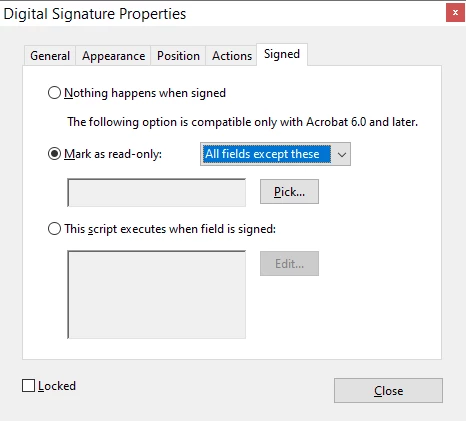
Yes, that's all possible. You can set which fields to lock (or not to lock) under the signature field's Properties, in the Signed tab:


1 reply

try67
try67Correct answer
Community Expert
May 4, 2023

Yes, that's all possible. You can set which fields to lock (or not to lock) under the signature field's Properties, in the Signed tab:


Inspiring
May 4, 2023

This is great, Try67, thank you so much!


I set it up so that after the first signer signs the form, all fields on the form are marked as read-only except for the 2nd and 3rd signature fields and a couple other fields that the 2nd and 3rd signers need to fill in - I'll call those couple fields FIELD21 and FIELD22.


I then opened the properties for the 2nd signature field and found that I have the same options that I did for the 1st signature field regarding which fields to mark as read-only - all fields are included in the list of fields that can be marked as read-only.


Because I set it so that many of those fields would be marked as read-only once the 1st signature field is signed, shouldn't those fields not be available in the properties for the 2nd signature field to be marked as read-only (or to mark any way at all)?


Shouldn't the only fields available in the properties for the 2nd signature field, to be marked as read-only, be the 3rd signature field, FIELD21, and FIELD22 that I mentioned above?


I hope that makes sense, lol. I'm wondering if I'm misunderstanding how it works.


Again, thank you so much! 🙂

Diane

try67
Community Expert
May 4, 2023

No, the list shows all fields, no matter what. You can just ignore all the fields that the first signature field is already locking, and only set signature field #2 to lock FIELD21 and FIELD22, if that's what you want to happen.