


Participant
August 18, 2022
Answered

My Acrobat DC is displaying incorrect text format.

  • August 18, 2022
  • 1 reply
  • 3953 views

My Acrobat DC is displaying incorrect text format in some files. Files with this error normally printed from Microsoft Dynamics AX.

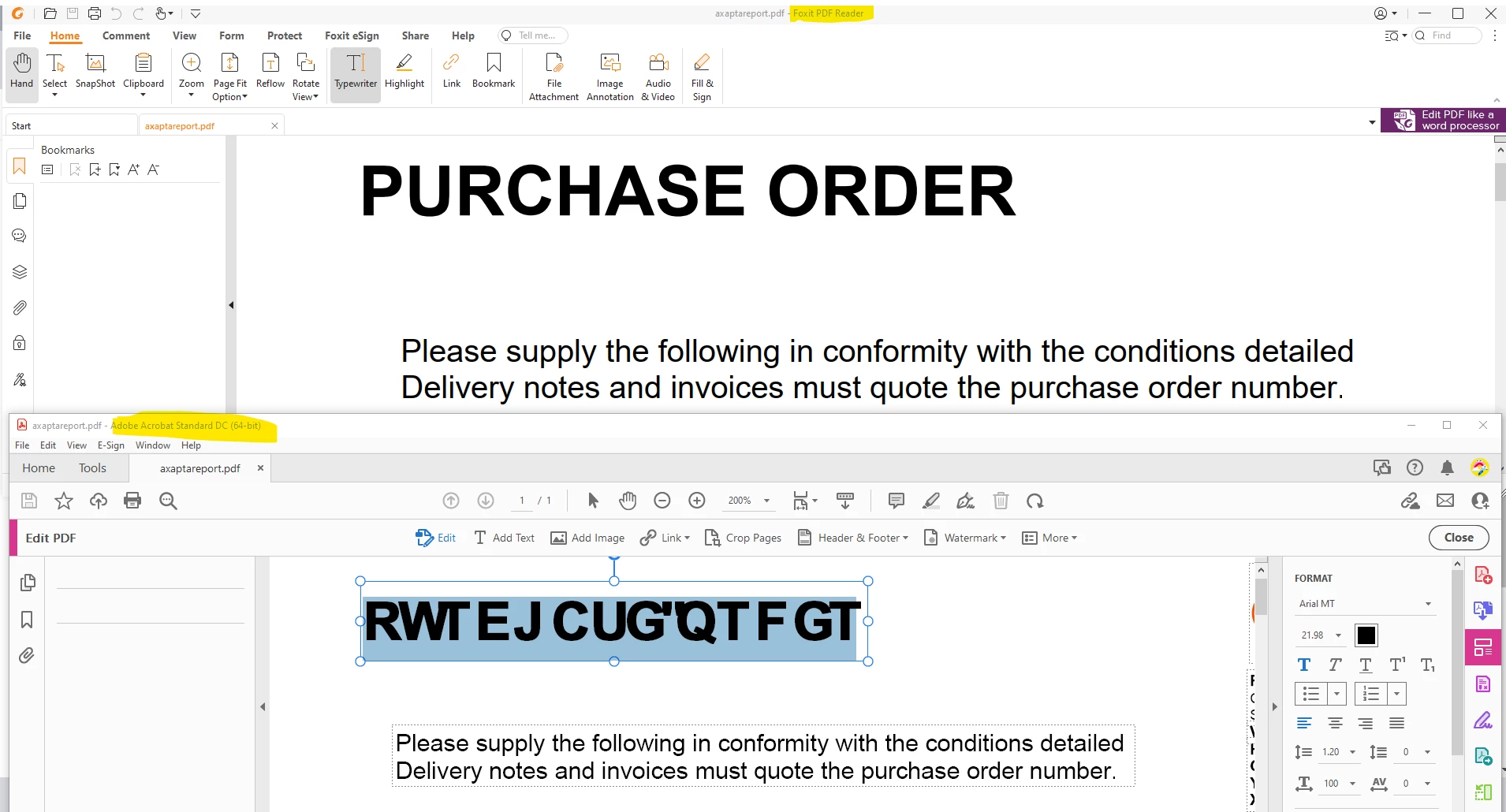
Letters are shifted 2 positions alphabetically along on some Arial MT bold text e.g. P>R or U>W or R>T etc..

When the pdf text is edited by switching bold or italic it corrects, therefore the underlying charcater codes are correct as copying out and pasting in Notepad shows correct text.

The pdf opens correctly in Foxit reader. see below or attached.

Acrobat has been uninstalled and reinstalled or repaired numerous times.

Does anyone have a solution or suggestion to correct this?

Thanks.
 

This topic has been closed for replies.
Correct answer Dave__M

Hi

I believe I have found the cause for the display error.

If report is emailled or printed directly from AX without embedding fonts then the display error shows on some computers but not all.

Only Acrobat shows the error, all other pdf readers and web browsers work fine whether embedded fonts or not.

So although it can be corrected at source, there is still some setting or information that Acrobat is not handling correctly on some receiving machines. Possibly some interaction between Adobe and MS.

The error is specific to ArialMT where letters are shifted & shown alphbetically 2 positions right. A to C, M to O, T to V, etc.

Thanks


Sounds right - embedding the fonts generally avoids these sorts of errors.  Because we inherit PDFs from all over, created by many techniques & utilities, this sort of issue shows up frequently (IMHO).  Also, there are too many fonts that are not official/authentic sets out there floating around, and embedding one of them can also create problems for users on another machine.

Dave

1 reply

Amal.
Community Manager
Community Manager
August 18, 2022

Hi there


Hope you are doing well and sorry for the trouble. As described


quote

My Acrobat DC is displaying incorrect text format in some files. Files with this error normally printed from Microsoft Dynamics AX


1. Would you mind sharing the steps you are doing to create the PDF file?


2. Is this an isue particularly with the PDFs created from Microsoft Dynamics AX? Please try with a different PDF file and check.


Please try to create the PDF file using Adobe Acrobat DC file menu > create > PDF from file and see if that works for you.


Regards

Amal

Participant
August 18, 2022

Hi 

Thanks for replying.

Files that have the problem are usually sent from other users in my company and have generally been generated as a report from AX. I haven't had trouble printing from other sources, Word, Excel, Autocad, etc..

As I siad the problem file displays perfectly on Foxit on my office machine but not on Acrobat, I have also downloaded the file to my home computer and it displays correctly on Acrobat reader at home. If I untick "use local fonts" then Acrobat cannot render the document font Arial-BoldMT, bold and only shows dots in place.

This seems to be a problem with the installation of Acrobat on my office machine only.

I have opened the file in Foxit, printed to Adobe pdf driver and this opens correctly in Acrobat.

Acrobat fails to print the file to any pdf driver, Adobe PDF, Cutepdf Writer, docprintpdf driver or Microsoft print to PDF.

file menu > create > PDF crashes Acrobat. Dialogue "An internal error occurred"

Tools > Create PDF from error file retains error does not correct.

Thanks.


Participant
August 19, 2022

Hi

I believe I have found the cause for the display error.

If report is emailled or printed directly from AX without embedding fonts then the display error shows on some computers but not all.

Only Acrobat shows the error, all other pdf readers and web browsers work fine whether embedded fonts or not.

So although it can be corrected at source, there is still some setting or information that Acrobat is not handling correctly on some receiving machines. Possibly some interaction between Adobe and MS.

The error is specific to ArialMT where letters are shifted & shown alphbetically 2 positions right. A to C, M to O, T to V, etc.

Thanks