


barryc24835328
Participating Frequently
November 13, 2018
Answered

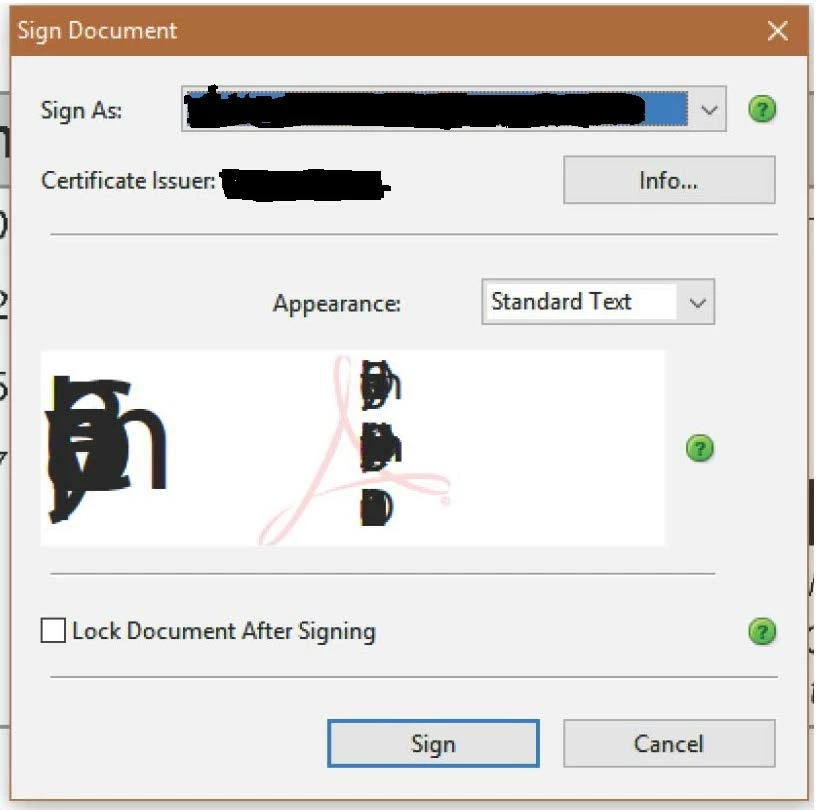
My signature is unreadable.

  • November 13, 2018
  • 3 replies
  • 12781 views

Suddenly my digital signature is corrupt.  I've uninstalled and reinstalled Acrobat XI Pro, but still the signature is unreadable.  I've deleted all digital signatures and recreated one and the same thing happens when I try to sign a document.

Does anyone know how to fix this issue??
This topic has been closed for replies.
Correct answer Jon26409116ljdu

Move or delete everything in the C:\Users\[Username]\AppData\Local\Adobe\Acrobat folder, if you are using Windows. Close and restart Adobe Acrobat Reader/ Adobe Acrobat Reader DC. Try to sign again, using digital certificates. See if it works.

3 replies

orion42
New Participant
July 19, 2023

Hi, 
I had the same issue, but the suggestions in this topic did not solve it. 
However, I found the solution in another thread: 
Solved: Appearance of electronic signatures destroyed (pro... - Adobe Support Community - 12838539
In short, in C:\Windows\Fonts there is a shortcut to the MyriadPro font used by Adobe for the signature that points somewhere else (in my case was another software). 
I deleted it, cancelled the files in the cache folder of C:\Users\YOURUSERNAME\AppData\Local\Adobe\Acrobat\DC\ and also a couple of old file font list (AdobeSysFntXX.lst AdobeCMapFntXX.lst in my case XX was 21 and 22, with 23 the latest version, also recreated into the cache folder later). 
Before staring this procedure, close adobe and other software that might interfere, possibly remove also the existing corrupted signature, and then after restarting Adobe, it should work! (at least in my case it did)

Jon26409116ljduCorrect answer
New Participant
October 3, 2022

Move or delete everything in the C:\Users\[Username]\AppData\Local\Adobe\Acrobat folder, if you are using Windows. Close and restart Adobe Acrobat Reader/ Adobe Acrobat Reader DC. Try to sign again, using digital certificates. See if it works.

New Participant
February 25, 2023

This solved the issue for me without reinstalling Adobe, thanks!

Adorobat
Community Manager
Community Manager
November 20, 2018

Hi barryc,

As per the issue description mentioned above, you are facing issue with digital signature appearance in Acrobat XI, is that correct?

Could you try changing the "text properties" for digital signature by clicking the drop-down ( standard text) next to appearance

Click create new appearance > and try chaging the options under "Digits". Does that help?

Below is a screenshot:

Let us know if you need any help.

Shivam

barryc24835328
Participating Frequently
November 20, 2018

Unfortunately that didn't fix the issue.  It did change the details of the signature to readable text, but my name was still garbage characters.

Adorobat
Community Manager
Community Manager
November 26, 2018

Shivam:

Thanks for the response, but no luck with moving the preferences folder.  Still have the same signature issue.


Hi barryc,

Could you try replicating the issue in a new user account by creating a new user account on the machine,  login into that account, launch Acrobat from there and check if this behavior continues?

-Shivam