

New Participant
January 23, 2018
Answered

need to add multiple pages into the existing file ?

  • January 23, 2018
  • 1 reply
  • 822 views

I just bought  acrobat 2017, I don't know how to insert (add) multiple pages into the existing file ?

This topic has been closed for replies.
Correct answer Adorobat

Hi,

As Bernd Alheit mentioned above, to insert multiple pages to an existing file, go to "Organize Pages" option in Acrobat.

You may refer to this tutorial which explains more on how to: Insert and organize pages in a PDF |

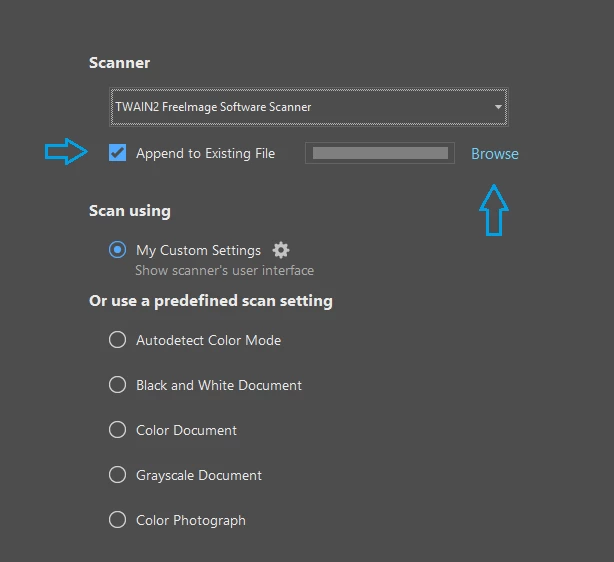
Could you please let us know if you are referring to add scanned pages into an existing pdf file? If yes, you can do that by selecting your scanner under "Scanner" > check the box next to "Append to existing file" option > and browse the file.

Below is the screenshot:
Let us know if that is not the case.

Shivam

1 reply

Bernd Alheit
Community Expert
Community Expert
January 23, 2018

Look at Tools > Organize Pages

New Participant
January 24, 2018

Hi Bernd,

I did that, but it just allowed me to scan one page at a time while I have more than one page. Do I have to set up somewhere ( Acrobat or printer HP 8715)

Previously, I used Acrobat X and I can scan as many as I needed.

Now I can not, it takes too long to do one at a time even I loaded all the pages in the feeder of the printer.

Thank you for your help. If you know how. please show.

Adorobat
Community Manager
AdorobatCommunity ManagerCorrect answer
Community Manager
February 12, 2018

Hi,

As Bernd Alheit mentioned above, to insert multiple pages to an existing file, go to "Organize Pages" option in Acrobat.

You may refer to this tutorial which explains more on how to: Insert and organize pages in a PDF |

Could you please let us know if you are referring to add scanned pages into an existing pdf file? If yes, you can do that by selecting your scanner under "Scanner" > check the box next to "Append to existing file" option > and browse the file.

Below is the screenshot:

Let us know if that is not the case.

Shivam