



Copy link to clipboard
Copied
Hello all,
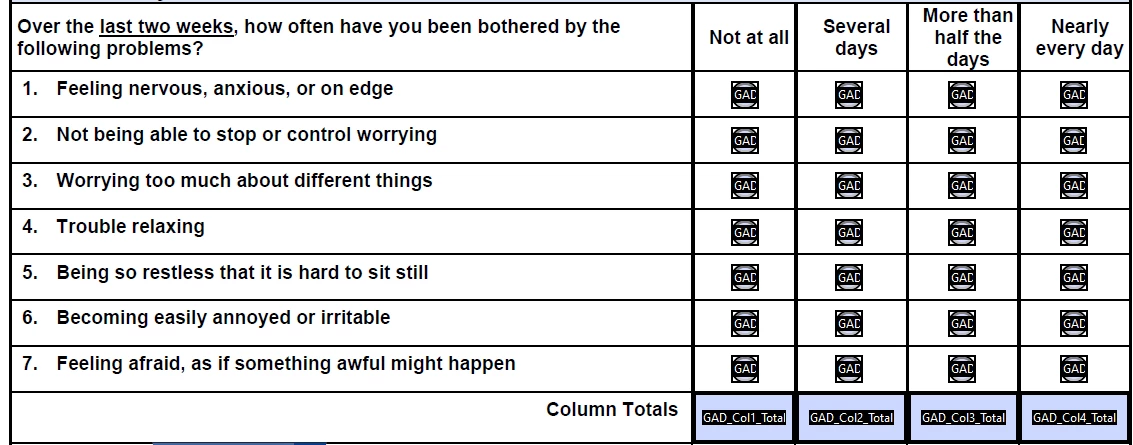
I need to calculate radio buttons based on their selection for scoring.
Questions are horizontal/rows, while scoring is vertical/columns. I've found similar questions, but not quite what I need. "Not at all" answers are 0, "Several Days" answers are 1, "More than Half the days" are 2, and "Nearly every day" are 3. Any assistance is greatly appreciated!
Question one group is named GAD01, question 2 is GAD02, etc to question 7 group named GAD07. I know the formula needs ot be plugged into the column total fields (GAD_Col1_Total, etc)
Your guidance is appreciated! Thank you
Copy link to clipboard
Copied
If you want to calculate a sum then there is no need to calculate the first column since it will always be zero.
Use this in "GAD Total Score" field;
var t1 = 0;
var t2 = 0;
var t3 = 0;
for(var i=1; i<=7; i++){
if(this.getField("GAD0"+i).valueAsString == "1")t1++;
if(this.getField("GAD0"+i).valueAsString == "2")
t2+= Number(this.getField("GAD0"+i).valueAsString);
if(this.getField("GAD0"+i).valueAsString == "3")
t3+= Number(this.getField("GAD0"+i).valueAsString);}
this.getField("GAD_Col2_Total").value = t1;
this.getField("GAD_Col3_Total").value = t2;
this.getField("GAD_Col4_Total").value = t3;
event.value = t1+t2+t3;
Copy link to clipboard
Copied
This code depends on the export value of the radio buttons being the numbers you've specified. You didn't explicitly say this was the case, but I'm assuming that's want you meant.
You also didn't specify what you meant by column total? Are you just counting the number of buttons checked in a column? or adding the export values?
The code below counts the buttons checked in the first column.
// Calculation for column 1, (Not at all) assuming export value is 0
var nSum = 0;
for(var i=1;i<=7;i++)
{
if(this.getField("GAD0" + i).value == 0)
nSum++;
}
event.value = nSum;
This code could be greatly simplified (and generalized) if group naming was used for the radio button fields.
Copy link to clipboard
Copied
Hi Thom,
Awesome! Thank you for your kindness in asking for clarification.
Yes, I need to total up the export values for each individual column. All export values in first column (titled "Not at all") are Zero. All export values in second column are 1, All export values in third column are 2, and all export values in last column (titled Nearly Every Day) are 3.
Group naming is used for the questions/field:
1 is named GAD01
2 is named GAD02
3 is GAD03
4 is GAD04
5 is GAD05
6 is GAD06
7 is GAD07
Thank you so much - this will make our non-profit therapist super happy to have it automatically score!
Copy link to clipboard
Copied
If you want to calculate a sum then there is no need to calculate the first column since it will always be zero.
Use this in "GAD Total Score" field;
var t1 = 0;
var t2 = 0;
var t3 = 0;
for(var i=1; i<=7; i++){
if(this.getField("GAD0"+i).valueAsString == "1")t1++;
if(this.getField("GAD0"+i).valueAsString == "2")
t2+= Number(this.getField("GAD0"+i).valueAsString);
if(this.getField("GAD0"+i).valueAsString == "3")
t3+= Number(this.getField("GAD0"+i).valueAsString);}
this.getField("GAD_Col2_Total").value = t1;
this.getField("GAD_Col3_Total").value = t2;
this.getField("GAD_Col4_Total").value = t3;
event.value = t1+t2+t3;
Copy link to clipboard
Copied
By group naming I mean using dot notation. For example "GAD.01", "GAD.02", etc.
This notation has special meaning for field names. It allows all the field with the prefix to be handled as a group, which creates more generalized compact code. In this case it would meant that the code would not need to be written for a specific number of fields. In fact, it would not matter how many line of radio buttons there were. Lines could be added or removed without changing the script.
Nesa's code will work fine. And she has a point about column #1. What's the point of a 0 sum?
Copy link to clipboard
Copied
THank you both Thom and Nesa - and I concur that it's odd to have the first column always total zero - it's the nature of scoring for the assessment.
I've utilize the code provided by Nesa. The last challenge I'm experiencing is that answers from the frist column are not adding up to zero - so any answers in column 1 are shoing a value of 1 each. How do I eithe rexclue the first column since it will always total zero, or edit the code to tell it to always add those answers to zero? (see screenshot below - column boxed in red should be zero).
Your assistance with this (and patience and kindness) is greatly appreciated!
Copy link to clipboard
Copied
You probably have some other script affecting that field.
Share your current file.
Copy link to clipboard
Copied
Yes! I found it and removed it, and it works perfect! Thank you 🙂
Copy link to clipboard
Copied
Thanks for the thread, helped me as well...
PS: I might have severe anxiety O.o
Get ready! An upgraded Adobe Community experience is coming in January.
Learn more