



Bevi Chagnon - PubCom.com
Brainiac
June 7, 2023
Answered

New bug in PDF Maker removes Alt Text.

  • June 7, 2023
  • 5 replies
  • 6331 views

Affects Windows Office users who use Adobe Acrobat PDF Maker (the Acrobat ribbon) to export PDFs from MS Office apps.


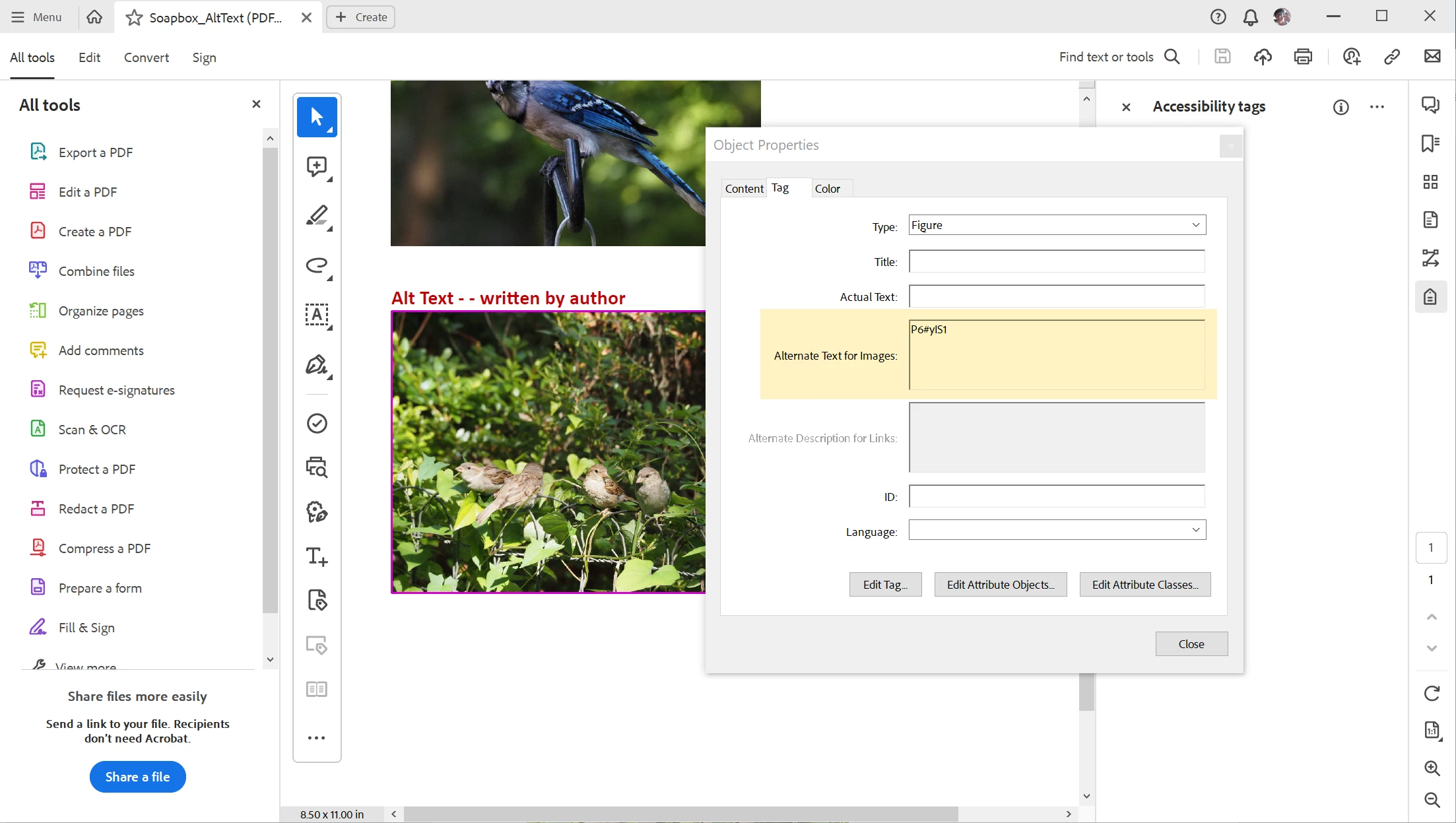
With the new Acrobat relase on June 6 (Acrobat ver. 23.003.20201 with PDF Maker 23  and Library 23.3.223/23.2.162), Alt Text is no longer retained and built into the exported tagged PDF. It's substituted with number/letter gibberish like "P57#yIS1".


Do not update Acrobat until Adobe releases a bug fix.

  1. Turn off AutoUpdate in your account management.
  2. Use Microsoft's built-in PDF export utility to create accessible PDFs:  File / Save As / PDF and check the option to tag the PDF file.


This is the second time this nasty little bug has surfaced in PDF Maker. It was fixed a couple of versions ago, but it's back again.


This topic has been closed for replies.
Correct answer Bevi Chagnon - PubCom.com

New patch repairs the bug! (June 21, 2023)


My Acrobat wasn't updating to the patch, so you can download and install it manually from this Adobe website: https://www.adobe.com/devnet-docs/acrobatetk/tools/ReleaseNotesDC/continuous/dccontinuousjune2023qfe.html#dccontinuousjunetwentytwentythreeqfe


Choose your operating system, and for Windows, whether you're 32-bit or 64-bit.


5 replies

Meenakshi Negi
Community Manager
Community Manager
June 27, 2023

Hi All,


Thank you for your patience.


There is an optional patch has been released that addresses this issue. Please try updating the application to the latest patch from Help > Check for updates in Acrobat.

For more information, refer to the following help document: https://www.adobe.com/devnet-docs/acrobatetk/tools/ReleaseNotesDC/continuous/dccontinuousjune2023qfe.html#dccontinuousjunetwentytwentythreeqfe


Let us know how it goes.


Thanks,

Meenakshi


Marking a reply or response “Correct” will help future users with the same issue quickly identify the correct answer.

Frans v.d. Geest
Community Expert
June 27, 2023

@Meenakshi Negi  Sure. Great update. But I can not choose my Mac OS version as possible update. Help does not show an update. Under Windows the Alt Text fields are still greyed out in non english versions after the update.

Some update...

Please try again! 🙎

Frans v.d. Geest
Community Expert
July 5, 2023
quote

@Meenakshi Negi  Sure. Great update. But I can not choose my Mac OS version as possible update. Help does not show an update. Under Windows the Alt Text fields are still greyed out in non english versions after the update.

Some update...

Please try again! 🙎

By @Frans v.d. Geest


Frans, I had a similar experience (English US / Windows 64). All of the Alt Text fields were grayed out, so no Alt Text could be added to graphics.

I rebooted my computer and it corrected the problem.


quote
quote


Frans, I had a similar experience (English US / Windows 64). All of the Alt Text fields were grayed out, so no Alt Text could be added to graphics.

I rebooted my computer and it corrected the problem.


By @Bevi Chagnon - PubCom.com


 Bevi, no restarting is no solution for non-English versions, it is an already acknowledged bug by Adobe and fixed in pre release m124 😉 So you had some luck, but not a solution for other languages...

Bevi Chagnon - PubCom.com
Brainiac
June 9, 2023

While we wait for Adobe's fix for this bug, Windows users should:

  • Either not update their Acrobat to version 23.003.20201, or
  • Not use PDF Maker from MS Office apps. Instead, use Microsoft's built-in export utility.


We have a free online tutorial on how to export accessible PDFs from Office at https://pubcom.com/blog/tutorials/ms-office/export-pdf/index.shtmlUse Method C described in the tutorial to get around this PDF Maker bug.


|    Bevi Chagnon   |  Designer, Trainer, & Technologist for Accessible Documents ||    PubCom |    Classes & Books for Accessible InDesign, PDFs & MS Office |
Frans v.d. Geest
Community Expert
June 24, 2023

Well, there is something else going wrong after this update: all Alt Text entries are greyed out, not possible to add any Alt text, neither to Figures or Links! Dutch version.


Frans v.d. Geest
Community Expert
June 24, 2023

Ah! Strange: I set my Mac OS to English, then started Acrobat in English: now my fields are there! Also entered Alt texts from InDesign show up again, in the Dutch version they are empty fields as well. So something in the translation when adding the new 'Alt text for hyperlinks' seem to have gone wrong. Adobe f*****d this up again! 🙎 This is SO bad!

Adobe Employee
June 8, 2023

Apologies for any inconvenience caused. I would like to inform you that our engineering team is currently working on a high-priority basis to address the issue at hand. We understand the importance of resolving it promptly and appreciate your patience during this process. Thank you for your understanding.


Regards,

Subrato

Bevi Chagnon - PubCom.com
Brainiac
June 8, 2023

Thanks, Subrato @SubratoNamata. Please let us know here when the hot fix is available.


|    Bevi Chagnon   |  Designer, Trainer, & Technologist for Accessible Documents ||    PubCom |    Classes & Books for Accessible InDesign, PDFs & MS Office |
Participating Frequently
June 7, 2023

Does update 23.003.20201 include security fixes? 

Frans v.d. Geest
Community Expert
June 7, 2023

Aaarrggh!! 🙎 

Bevi Chagnon - PubCom.com
Brainiac
June 7, 2023

Yes, I agree with aaarrrgh.

But my initial reponse was more "colorful" than I could put in my post!


|    Bevi Chagnon   |  Designer, Trainer, & Technologist for Accessible Documents ||    PubCom |    Classes & Books for Accessible InDesign, PDFs & MS Office |
Frans v.d. Geest
Community Expert
June 7, 2023

Another thing that bugs me is in InDesign; InDesign does not look if a element is nested or in root, so a Figure always gets Placement: block, same with Table (which is really stupid as it is always an anchored item in a text frame in InDesign) and a Link always get a Placement:inline, no matter if its true or not. Lazy. Anyway, this is not the place for this topic, but I thought as long as we are ranting... 😉