


Participant
September 21, 2023
Answered

No background showing in pdf

  • September 21, 2023
  • 1 reply
  • 1382 views

Somehow the dark background of my presentations turn to white when I convert them to PDF. Even older PDF's with a dark background at the time now all have a white background. Because I use white fonts for titles, this is not userfriendly at all for my students.

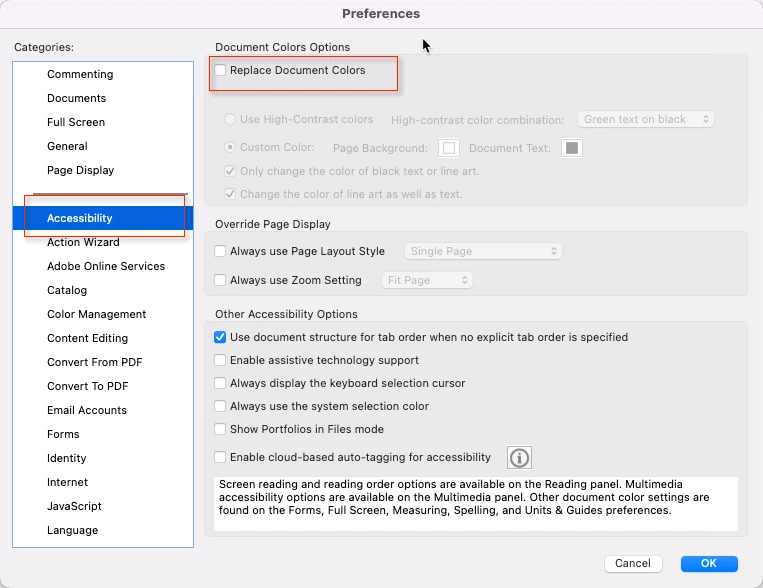
I thought I had found a solution: you should uncheck 'Replace document colors' in the accessibility options. Maybe it's because of the new interface of Adobe, but even by using the Help option I can't find this option. Can anybody please let me know what I can do to keep the dark background?

Thank you!
This topic has been closed for replies.
Correct answer Karl Heinz Kremer

You will find this option under the Accessiblity category in Acrobat's preferences. 


1 reply

Karl Heinz  Kremer
Community Expert
Karl Heinz KremerCommunity ExpertCorrect answer
Community Expert
September 21, 2023

You will find this option under the Accessiblity category in Acrobat's preferences. 


Participant
September 21, 2023

Thank you, Karl Heinz. That was the answer I found earlier, but somehow my interface is completely different. I have searched for preferences, I have searched for accessibility, but no such luck. What am I missing?


Participant
September 21, 2023

Found it! I was looking in the tools, but I had to go to the menu and select preferences there. Brain fog is a real thing, I'm afraid. ;^)