


Participant
January 15, 2025
Answered

No more option to change scale ratio

  • January 15, 2025
  • 1 reply
  • 836 views

Hi,


I don't see the option to change the scale ratio anymore with the new version of Adobe Pro. Has it been removed? 


This is what I see when I right-click somewhere after trying to measure something (it's in french).  There used to be at the top an option to change the scale ratio "Modifier la mise à l'échelle" where you could add scaling inputs. 
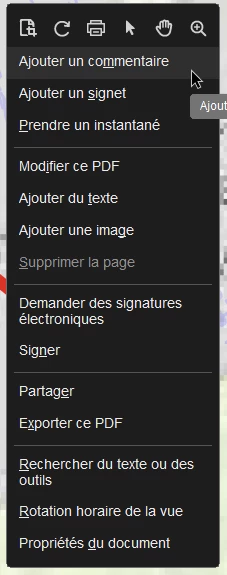


Has it been moved somewhere else? I don't see it in the measure preferences of the document either. 


Tried with multiple documents, including documents where I know I've been able to change the scale ratio before using the same technique. 


Thanks.

Correct answer RachitJain

Hi,

We have fixed the issue on our side. Please update the Acrobat to the latest version and check if the issue is resolved for you or not. 


Thanks

Rachit

1 reply

Adobe Employee
January 20, 2025

Hi,

Thanks for reporting the issue with us. Can you please confirm from where in Acrobat have you opened the Measure tool to process the document. This will help us identify the issue and resolve it on priority for you.


Thanks

Rachit

Participant
January 23, 2025

Hi,

I opened it from the left menu (the new left menu bar that used to be at the top with all the tools). 

Thanks.

Participant
February 6, 2025

Hi,

We have fixed the issue on our side. Please update the Acrobat to the latest version and check if the issue is resolved for you or not. 


Thanks

Rachit


Hi,

Yes, it has been resolved. 

Many thanks.