


Participating Frequently
December 20, 2016
Question

No pages selected error on printing PDF's

  • December 20, 2016
  • 2 replies
  • 3510 views

When I try to print Adobe Acrobat Reader files I get the following messages:

"The Document Could Not Be Printed"

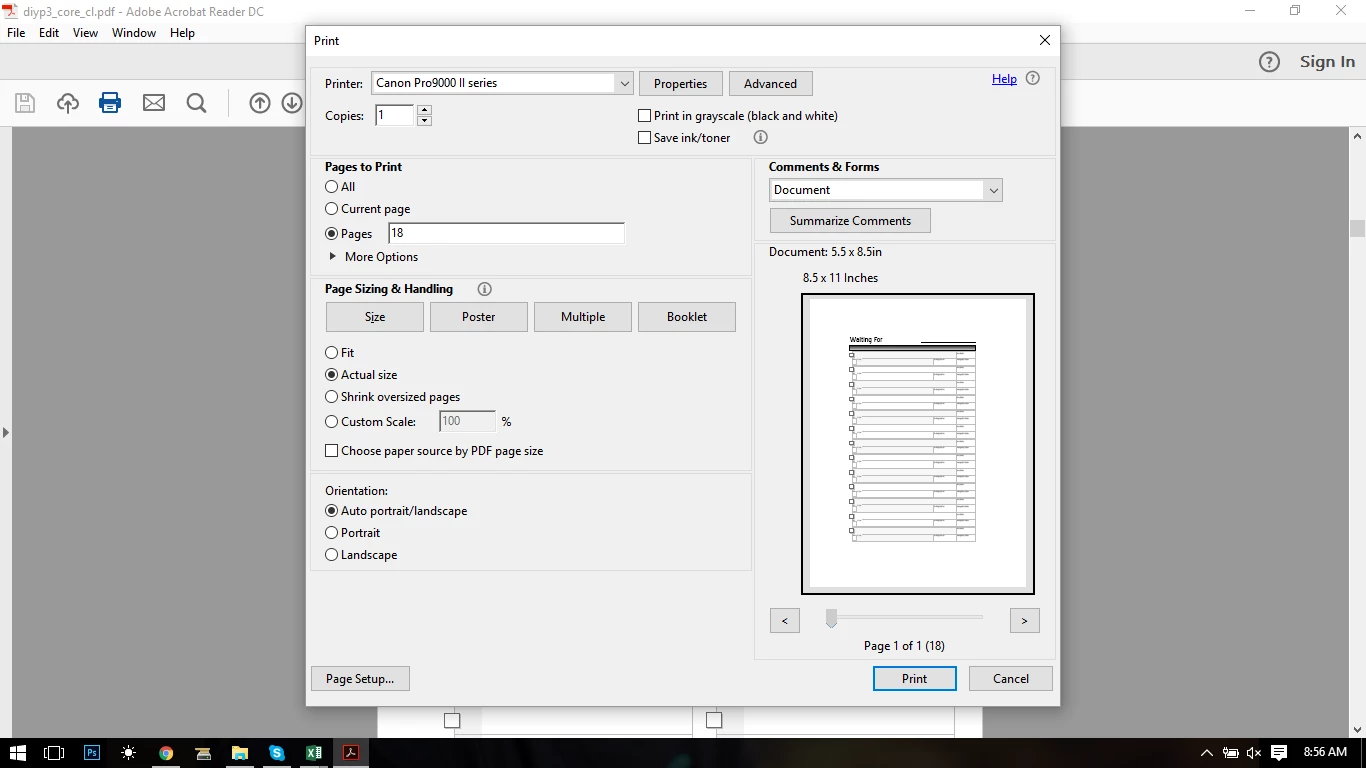
"There were no pages selected to Print"  (but I have tried to "print all"  "print selected page"  a screen shot of the print settings is below.  Also note I have no problems printing from other software applications (word, excel are a few I have tried).
This topic has been closed for replies.

2 replies

Luke Jennings
Inspiring
December 21, 2016

I think Reader is looking for page 18, but there is only one page in your PDF. Try using a + sign in front of the page number, e.g +1

Participating Frequently
December 21, 2016

When I entered "+18"  it said "Please enter valid page range."

FYI- It will not print regardless of which option I select in the "pages to Print" section ie does not work when "all" or "current page" or "page range" is selected. Cheers! Dana

Luke Jennings
Inspiring
December 21, 2016

Try +1, the + sign tells Reader to print the first page in the document, regardless of the page name.

Meenakshi Negi
Community Manager
Community Manager
December 21, 2016

Hi danaz9087059,

Please try the troubleshooting steps provided in this help link:  Troubleshoot PDF printing in Acrobat and Reader

Try once "Print as image" option and check if it works.

Let us know how it goes.

Regards,

Meenakshi