



OneSwitch
New Participant
January 17, 2021
Answered

OCR seems very poor

  • January 17, 2021
  • 6 replies
  • 13763 views

I don't want to seem overly negative, as I really like Adobe products in general... but I've just paid full subscription for Adobe Acrobat Pro, hoping that the OCR would do a good job, and it's terrible. No better for accuracy than OCR scanning I used 20 years ago. Are there no settings to adjust the scanning quality? To adjust the contrast. It's one option and that's it seemingly.


I was hoping to convert this PDF document (1981 PDF Document) to maintain the original 1981 look, but be possible for blind people to use with a screen reader, without having to almost re-type the entire document. I can't see any options to tweak the AI / method used to try to get a better result. Am I barking up the wrong tree with Acrobat?
Correct answer Dov Isaacs

I strongly endorse the response from @gary_sc.


It goes under GIGO, garbage in, garbage out! The original document appears to have been printed on a daisywheel, dot matrix, or low resolution inkjet printer typical of the time period (1981) and then photocopied!


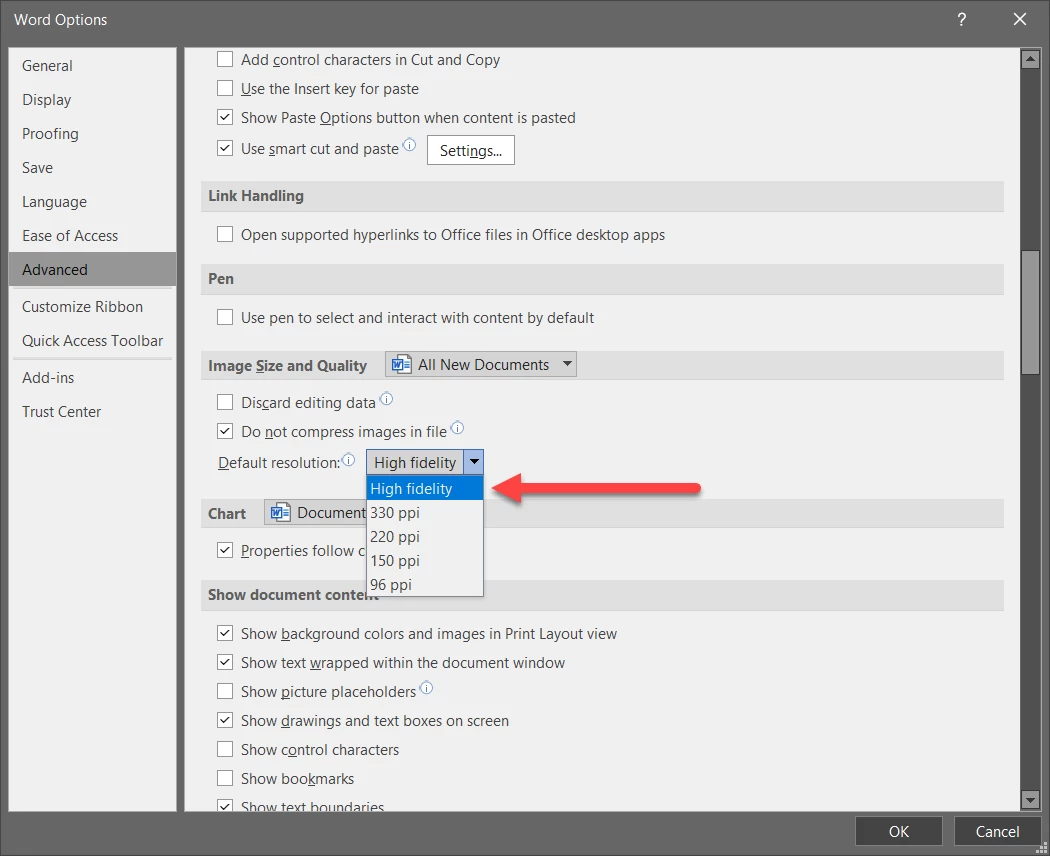
Further analyzing the PDF file provided, to make matters worse, it appears to be a PDF file created by placing images into a Microsoft Word document and using Microsoft's own PDF creation which is notoriously problematic. That is probably the source of the images being 200-225 dpi and in fuzzy-wuzzy JPEG format. Microsoft Word has preferences as to what resolution to store placed images at. Always us the High fidelity resolution setting:


Furthermore, use Acrobat's Save as Adobe PDF PDFMaker facility to create PDF from Word, not Microsoft's! Create special options that result in images not being downsampled and ZIP-compressed within the PDF file. You absolutely don't want JPEG or even JPEG2000 for this purpose.


However, if there is a way for you to get the original scan images and ascertain whether they are significantly higher resolution (and preferably not JPEG), I would suggest creating a PDF file directly from such images and trying OCR in Acrobat from there. Even better, if you have the original paper, I would suggest totally rescanning at 600 dpi into lossless TIFF format and for pages with issues, doing some edits in Photoshop.


Good luck!


6 replies

New Participant
July 1, 2024

finally someone that understands the problem I have, kinda, can't consider the image I'm trying to convert a "document" and wdym "re-type"? it was never typed in the first place?

S_S
Community Manager
Community Manager
January 6, 2025

Hi @IROP,


Hope you are doing well. Sorry for the trouble, and the delayed response.


We made major improvements to the OCR engine in the recent updates. Would you mind trying out the latest version (2024.005.20320) and letting us know if the experience improved?


For example, I tried running OCR on the file attached by the original poster, and the results were far better than what has been described above.


-Souvik

FrequentPDFer
Participating Frequently
January 7, 2025

This is still the same, poor performance . Here is one example of a scanned article abstract OCRd with Acrobat (2024.005.20320, top) and Power PDF Advanced (5.1.0.0.0.24208):


The present article is the fifth contribution of the series of works planned
to be published on the fossil marine fauna collected in recent years from the
Moniwa Formation dj stributed along the Natori River in the southern border of
Sendai City, Miyagi Prefecture, Northeast Honshu, J apan. This article includes
the descriptions and figures of the balanomorph foss.ils from the Moniwa Formation.
The species comprises well preserved shells and opercular valves.
The specimens were collected from a single locality at the basal part of the
Moniwa Formation cropping out in th e cliff facing the Natori River, south of the
bridge crossing the Natori River, and about 250 meters south of the type locality of
the formation. The balanomorph specimens occurred in association with abundant
individuals of the brachiopod, Coptothyri:s (Hatai, Masuda and Noda, 1973),
some shark teeth (Hatai, Masuda and Noda, 1974A) and a fossil problematica
(Hat ai, Masuda and Noda, 1974B), besid s abundant remains of pelecypods of
which one was already published (Hatai, Masuda and Noda, 1974C), ga tropod as
well as bryozoans.


The present article is the fifth contribution of the series of works planned
to be published on the fossil marine fauna collected in recent years from the
Moniwa Formation distributed along the Natori River in the southern border of
Sendai City, Miyagi Prefecture, Northeast Honshu, Japan. This article includes
the descriptions and figures of the balanomorph fossils from the Moniwa Formation.
The species comprises well preserved shells and opercular valves.
The specimens were collected from a single locality at the basal part of the
Moniwa Formation cropping out in the cliff facing the Natori River, south of the
bridge crossing the Natori River, and about 250 meters south of the type locality of
the formation. The balanomorph specimens occurred in association with abundant
individuals of the brachiopod, Coptothyris (Hatai, Masuda and Noda, 1973),
some shark teeth (Hatai, Masuda and Noda, 1974A) and a fossil problematica
(Hatai, Masuda and Noda, 1974B), besides abundant remains of pelecypods of
which one was already published (Hatai, Masuda and Noda, 1974C), gastropods as
well as bryozoans.


While Power PDF produces 100% correct OCR, Acrobat "made" 9 mistakes. For the price of Acrobat, this is simply unacceptable.

Inspiring
February 17, 2024

I realise this thread is a few years old.


In comparison to Adobe, this is an amazing piece of OCR software. It puts Adobe OCR, to shame. 
I wanted to use Google OCR, but it is only an API service, which seems a bit bananas 🍌 

I will show you what it did to the following image:


> ERROR Error: NG0203: takeUntilDestroyed () can only be used main.ts:6

within an injection context such as a constructor, a factory function, a

field initializer, or a function used with `runInInjectionContext` . Find

more at https://angular.io/errors/NG0203

at assertInInjection Context (core.mjs:10367:15)

at takeUntilDestroyed (rxjs-interop.mjs:23:33)

at

7:27)

TakeUntilDestroyComponent.ngOnInit (takeUntilDestroy.component.ts:2

at callHookInternal (core.mjs:4024:14)

at callHook (core.mjs:4051:13)

at callHooks (core.mjs:4006:17)

at executeInitAnd CheckHooks (core.mjs:3956:9)

at refreshView (core.mjs:13513:21)

at detectChangesInView (core.mjs:13663:9)

at detectChangesInEmbedded Views (core.mjs:13606:13)


When I tried this with Adobe, it couldn't extract any text at all and when Adobe OCR does extract text, it adds it to multiple text boxes, littered all over the place, whereas the Scanshot Document Scanner app just creates a single string of text, with paragraph breaks in the correct places. 

New Participant
March 10, 2023

Aparentemente Gary y Dov Isaacs se han quedado en el tiempo al menos unas 2 decadas. Desconozco si serán profesionales o no, pero si van a dar una opinion correspondería que al menos se informen de las tecnologías de nuestro tiempo. Les doy a Gary y Dov un breve repaso gratis: semántica latente, deep learning, redes neuronales recurrentes, modelos preentrenados, transformers, aprendizaje autosupervisado, enormes modelos de lenguaje, modelos generativos preentrenados basados en transformers... bienvenidos a nuestro tiempo!

Efectivamente el método de reconocimiento de texto que utiliza adobe es anticuado y no está aplicando los enormes modelo de lenguaje que se utilizan hoy en día y por lo tanto no puede predecir absolutamente nada.

gary_sc
Community Expert
March 10, 2023

Hi, @institucion288134099in1. Thank you! To put me in the same sentence as Dov, I find a great honor. I have tremendous respect for him.


Actually, I very much agree with you. I've been wondering myself WHEN (not if), AI will be trained on OCR, I think it will be a tremendous feature and is absolutely needed.


Fortunately or unfortuantely, Adobe does not create the OCR engine that they use. They license it from the creator. I'm very sorry, but as I sit here, I cannot remember who it is—I did used to know but I was told that years ago and it has slipped my mind. I say fortunatetly because that means that this third party can, and maybe already has, started on that. But I have no idea and will probably hear about this technology at the same time that you do. Remember, I do not work for Adobe (Dov does).


If ChatGPT can create whole, logical sentences out of whole thin electrons, I could not imagine how working with "mostly correct" text from the first pass of OCR could not be dramatically improved. The one catch to all of this is that all AI generated "stuff" needs an internet link for the main brain to do it's thing. I can only imagine how companies and other institutions would not want their documents to be available to the net. 


But, besides that one issue, I really hope we see this soon!

gary_sc
Community Expert
March 10, 2023

Oh, I just had one other thought to add to this: If you've ever worked with Garmmarly, you know the frustration of being more correct than that AI. 


I recentyly wrote an article on different kinds of wood (my hobby), and Grammarly could not get past that there is a difference between hard woods and hardwoods. The former is that there are woods that are hard, and the latter are deciduous trees. Throughout the entire time I was writing that article, I constantly had to correct and re-correct the error that Grammarly was making. An AI-OCR could fall into the same hole. (Yes, the same with soft woods and softwoods.)

New Participant
April 25, 2021

It is beyond my understanding why Acrobat DC has not getting better at OCR throughout so many years. I'm doing about everything with Acrobat DC except OCR. Try Kofax Power PDF Advanced Power PDF, the attached file is the result of its OCR. Too bad having two use two programs to produce a PDF...

gary_sc
Community Expert
April 25, 2021

Hi V5E7A,


I just looked at your document and to be very honest, it doesn't look like you read any of the preceding comments from Dov Isaacs or myself, nor did you read the linked reference to the blog I wrote for Adobe. 


The quality of the scan you show in your attached PDF looks like a low quality photocopy of typewritten content with a lot of the parts of the characters missing (loops of letters not closed, ascenders and descenders missing regions, etc.). This is a nightmare for any OCR application. Plus, you also have a lot of bleed-through from the other side of the page, a specific issue I raised in my blog to prevent against. But since the photocopying is blurry, there's not much you can do with scanning at a higher resolution, the document is already starting from a bad place.


If you can find software that can do a better job than this, by all means, use it. But you cannot expect to take a worn, well used pallet to a cabinet maker and have them make fine furniture from it.

New Participant
April 26, 2021

You didn't attach any file to this message.


Didn't you comment on the file earlier?

Dov Isaacs
Dov IsaacsCorrect answer
Brainiac
January 18, 2021

I strongly endorse the response from @gary_sc.


It goes under GIGO, garbage in, garbage out! The original document appears to have been printed on a daisywheel, dot matrix, or low resolution inkjet printer typical of the time period (1981) and then photocopied!


Further analyzing the PDF file provided, to make matters worse, it appears to be a PDF file created by placing images into a Microsoft Word document and using Microsoft's own PDF creation which is notoriously problematic. That is probably the source of the images being 200-225 dpi and in fuzzy-wuzzy JPEG format. Microsoft Word has preferences as to what resolution to store placed images at. Always us the High fidelity resolution setting:


Furthermore, use Acrobat's Save as Adobe PDF PDFMaker facility to create PDF from Word, not Microsoft's! Create special options that result in images not being downsampled and ZIP-compressed within the PDF file. You absolutely don't want JPEG or even JPEG2000 for this purpose.


However, if there is a way for you to get the original scan images and ascertain whether they are significantly higher resolution (and preferably not JPEG), I would suggest creating a PDF file directly from such images and trying OCR in Acrobat from there. Even better, if you have the original paper, I would suggest totally rescanning at 600 dpi into lossless TIFF format and for pages with issues, doing some edits in Photoshop.


Good luck!


- Dov Isaacs, former Adobe Principal Scientist (April 30, 1990 - May 30, 2021)
OneSwitch
OneSwitchAuthor
New Participant
January 18, 2021

Thank you both for your replies. It's correct that this is a photocopy. The Blue File project was a means of sharing information across the UK with teachers and parents around IT in educational use.The booklet would have definitely been a photocopy of some nature.


I suppose I over estimate the power of computers. If I can read it easily (well - if I use a magnifier as my eye-sight is a bit shot), I'd expect a computer in 2021 to do a far better job than it did.


I'll do a 1 or 2 page experiment with better settings as close to what is recommended here, and see if that makes much difference. Thanks again.

Dov Isaacs
Brainiac
January 18, 2021

@OneSwitch 


Actually, I don't think that you are overestimating the power of computers, but rather underestimating the power of the human brain to compensate for anomolies in what we see and to make decisions based upon our experiences over time.


Plenty of work is being done in terms of applying artificial intelligence to recognition and interpretation of text. Ultimately, OCR should improve significantly, but in the meantime ...


- Dov Isaacs, former Adobe Principal Scientist (April 30, 1990 - May 30, 2021)
gary_sc
Community Expert
January 17, 2021

HI OneSwitch,


Thank you for supplying the document that you were working on, it was very helpful.


I did download it and I did run it through my copy of Acrobat Pro DC, and like you, did get dreadful results. 


To be honest, I found the results no worse than I was expecting when I saw the quality of the copy that you were working on. Now please read all of this becuase first I'm going to disagree with you and then mostly agree with you.


First off the quality of the original scan was fairly dreadful. I've seen worse, much worse, but this was not good to begin with. Achieving good OCR is like taking great photos: the more you do in camera and the less you do in Photoshop, the better the image is going to be. It is absolutely no different when scanning: the more you do at the time of scanning the better the OCR results will be. On a scale of 1-10, I'd call this a 6+ and the results are about the same.


The scan appears to have been done about 200-225 ppi (300 ppi is considered minimum and 600 ppi is ideal). However, there is a fusyness to the quality of the scan that makes me think this was a photocopy before it was scanned, that's a big trench. The size of the font is OK but for some reason, it's been my experience that Acrobat's OCR has problems with Courier. Don't know why but it just seems that that's an issue for it.


Another issue with the scan is the bleeding from the back (or ghosting of text on the backside). That can screw up an OCR process as well.


So, in a nutshell, what I'm seeing with the results are about on par with the quality of the original scan for this PDF.


Now, on the other hand, why isn't it any better. What I have to think about is the current software trend using AI to better think out what could/should be taking place. I do not know if you follow Photoshop at all but they are investing a lot of time and money in using AI to do some enhanced enhancements. It's in the early stage right now but does show a lot of promise. 


I do know that Adobe does not make it's own OCR engine, they rent it from another company (at this moment I can't remember which one, sorry). But I do wonder if ANY company is starting to utilize AI to increase the quality of OCR. If not I'd be astounded, but it all depends upon someone high up to say "Hey, we should look into this." But until that time, we have what we have.


A number of years ago I did a blog for Adobe on how to get a cleaner scan and wrote the following. It might give you some ideas to work with to get a better quality end result. 


One thing I can suggest is that you take the end result of what you're getting with this and export it into a Word document and do the text corrrection in Word. Word has a variety of features that are significantly better than what Acrobat has for correcting an OCR document. the one big advantage you have with this document is that the formatting is very straightforward and will not be affected by the exporting to Word by any degree. FWIW, several years ago I found a family history that my mom wrote MANY years ago, scanned it, OCRed it, and then brought it into Word for correction. On my previous scale of 1-10, I'd have given that scan about a 3 because the original had pencil scribbles, the patten on the typewriter was causing slipping so some text was at an angle, there were lots of pencil corrections, it was a mess. But it got done.


Anyhow, here's the blog, I hope you get something from it.

http://photosbycoyne.com/Gary's_Help/Scanning/clean-scanning.html

New Participant
November 29, 2021

Hi
I am not sure what kind of OCR technology Google uses but it gives editable (Word document) results where Adobe gives a bunch of glyphs and symbols only.  Not a single word, not ONE word recognized by the OCR engine.  I used the same file and the result is impressive on Google and Zero on Adobe. 
I understand that Bad info In doesn't help but Non-sense Out means nothing; it is wasteful.
Adobe promotes tools for this job that are giving the same result what I was getting more than 10 years ago.

Try Google instead .