New Participant
April 18, 2023
Answered

Open documents in separate windows.

  • April 18, 2023
  • 15 replies
  • 14592 views

My Acrobat Pro must've just updated, and I am no longer able to choose to open documents in seperate windows.  This option appears to have disappeared from the preferences.  Does anyone know how this can be switched back on?  I cannot stand having to view docs in tabs within the same window.  the version is 2023.001.20143 for MAC.

Correct answer Tariq Ahmad

With Cascade, you'll need to select it each time as opposed to the documents opening in separate windows as before? Thanks.


Hi all, 

This is to update you that the feature is available in Acrobat now. If it is disabled, please check this preference.

The preferences settings control how the application behaves whenever you use it; they are not associated with any particular PDF document.

1. To access the Preferences dialog, choose the hamburger menu(Windows) > Preferences or Acrobat / Adobe Acrobat > Preferences (macOS).
2. In the Preference's dialog box's left pane, select General, then uncheck the "Open documents as new tabs in the same window(requires relaunch)"

3. Click Ok

4. Relaunch Acrobat
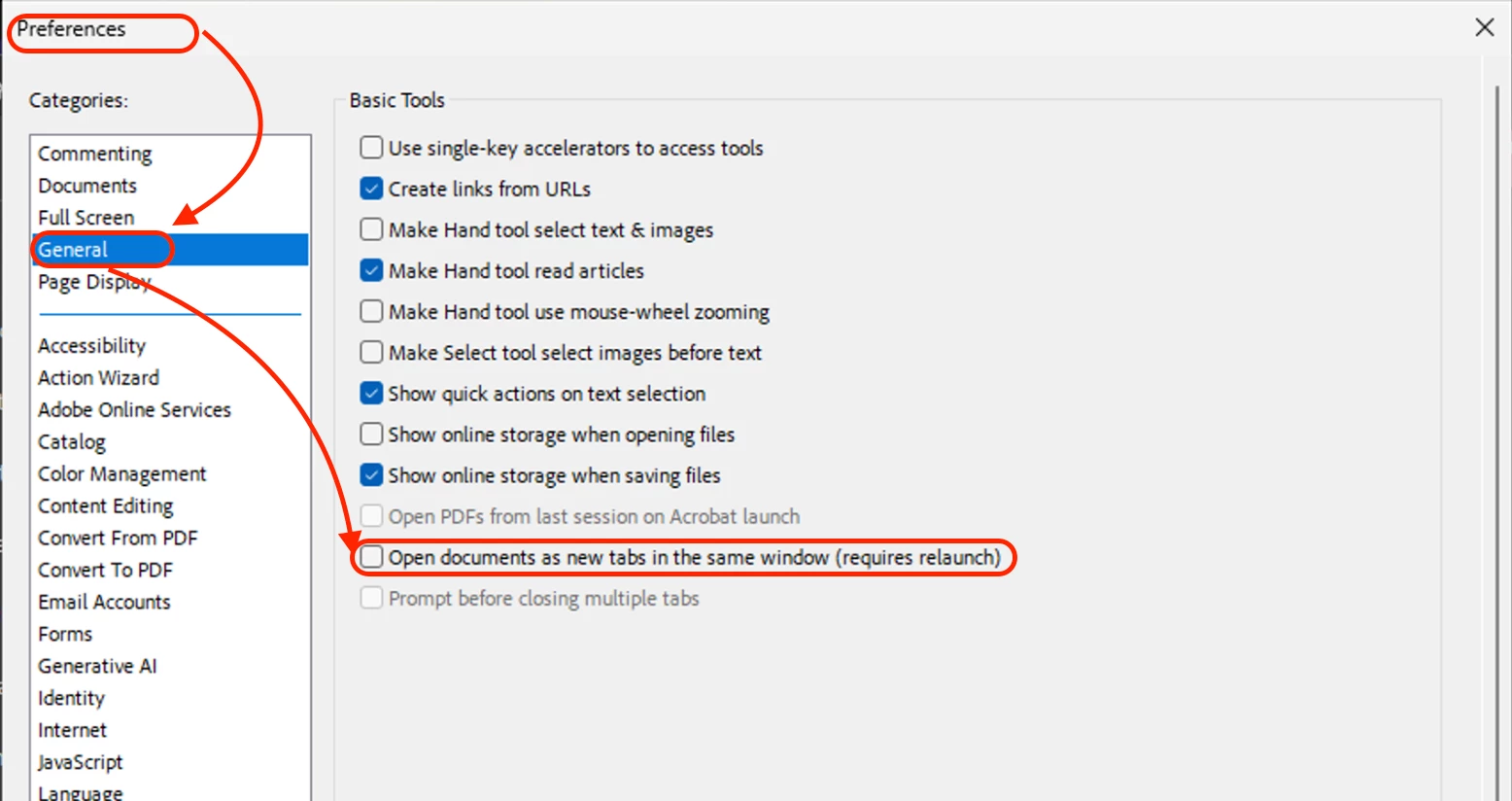


To know more about opening documents: https://helpx.adobe.com/acrobat/using/opening-pdfs.html 


Let us know if that helps.


~Tariq

15 replies

Blue Sky 59599194
New Participant
December 10, 2023

I am supporting the request from @d3s1gnjet 

<<

Adobe Acrobat 2023 ("New Acrobat") needs the option to open each document in a new window.

This should be possible without disabling New Acrobat.

>>

Opening documents in tabs, depending on your workflow is extremely cumbersome.

Bernd Alheit
Braniac
June 26, 2023

You can disable the new UI.

Participating Frequently
June 26, 2023

The problem (for me) is that, except for a couple of things, I LIKE the new UI. This thread is about one of the things I don't care for. The other thing is the different sequence of steps to SAVE a document. I'm slowly getting used to that one :-). I do hope they add back the open PDFs in separate windows very soon.

New Participant
June 26, 2023

Has this been fixed yet?  It has been the biggest reason I keep reverting back to old Adobe.  Its annoying to drag and drop to a new window when most of my days are spent working between multiple documents at a time.


Participating Frequently
June 26, 2023

I have not gotten any notification that they've fixed this yet, although they said they would update us once a fix is available. Don't you just love it when software designers remove a feature upon which you have relied (sometimes for years)?

New Participant
June 16, 2023

I need a fix for this as well. It's very cumbersome to have the PDFs tabs in the same window. Please fix this quickly! 

New Participant
June 16, 2023

So on a whim, I clicked and dragged one of the tabs to the desktop and that created two separate PDFs...! See if this works for you.


Participating Frequently
June 16, 2023
Thanks. I know about this one. I just want them to create a default or a setting to open pdfs in separate windows.


[cid:image001.jpg@01D9A064.194F6E30]
Deborah Warcken
Administrative Assistant
Monterey Peninsula Regional Park District
(831) 372-3196 x111
www.mprpd.org<>
Meenakshi Negi
Community Manager
Community Manager
April 18, 2023

Hi Aaron29456127wk5g,


Thank you for reaching out and reporting this.


The team is aware of this issue and working on the fix.

We will update you once the fill is available.

We appreciate your patience.


Thanks,

Meenakshi

New Participant
April 18, 2023

Following, thank you.

