


Participant
August 28, 2023
Answered

Page Scrolling

  • August 28, 2023
  • 10 replies
  • 80355 views

Greetings,

I apologize if this seems too rudimentary. When I read documents, I prefer to scroll, as opposed to having a new page pop up. I recall in earlier versions of Acrobat and Reader, that scrolling was available in toolbars and the header of the UI (just dated myself there).


Now, the only available option is on the bottom right edge of the UI, and that is fit screen/ scroll. That requires selecting the option and then resizing the page. I looked in the in the customization routine for the toolbar the floats near the top left. However, there didn't seem to be a group to add navigation options. 

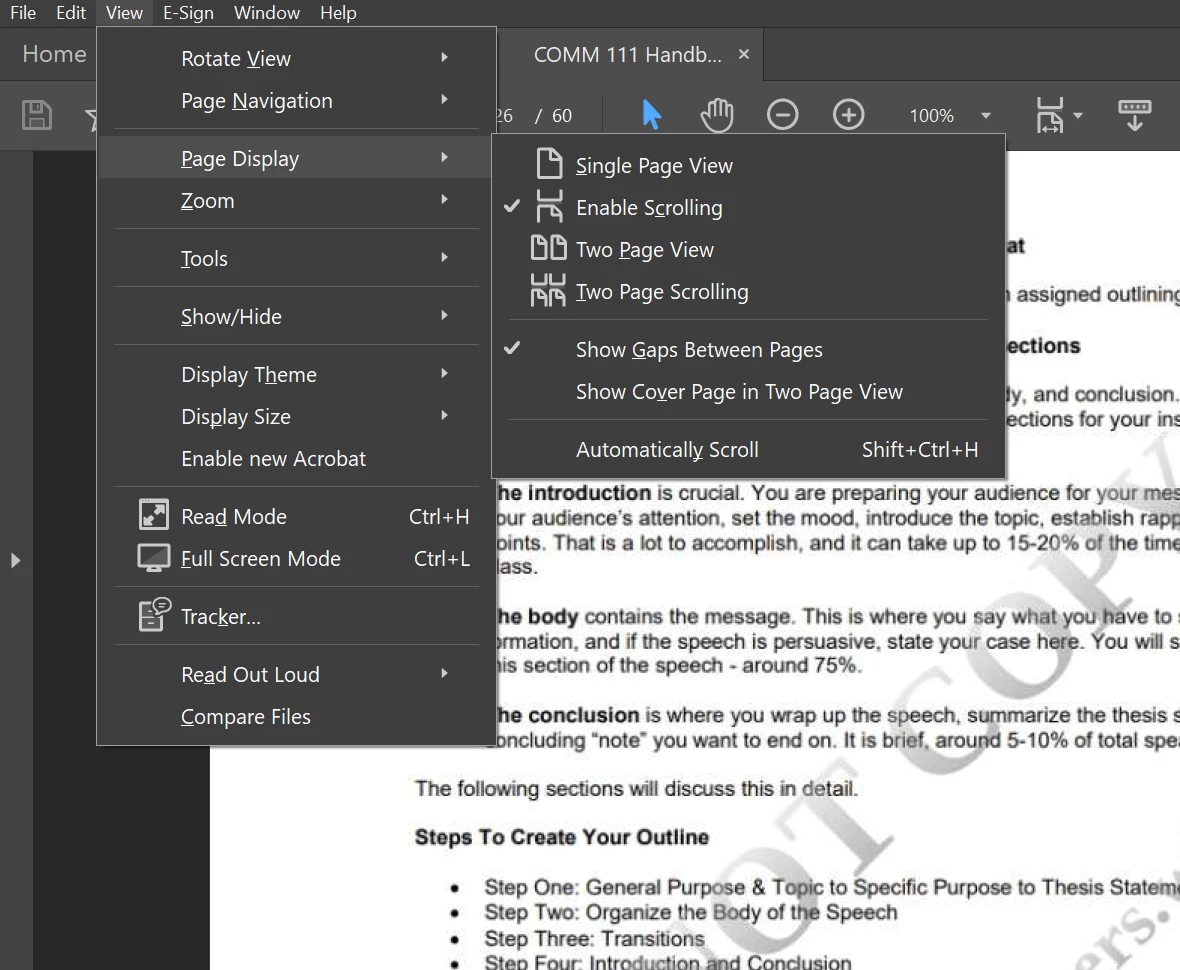
The only way, I have found, to get continuous scrolling is to go to the view menu and select scrolling.


I like Acrobat for its capability as a PDF system. It's rather amazing. But it's really busy and I wonder if I am missing what I'm looking for because I can't see the forest for the trees. To repeat, I must admit my ignorance of the program.


So my question is (you new one would come eventually...eh, where would I find the scrolling tool so that I can add it to one of the toolbars? Or at least, find it without having to use the View menu.


Any help with my obviously elementary question would be most appreciated. I am using the Acrobat Pro subscription service. I tried to find the version, but I was taken to a website that only said Acrobat Pro subscription.


Thanks,

Graham
Correct answer defaultwo7f2a7r26oo

Just in case you haven't found the answer you were initially hoping for, or if anyone else comes across this looking for help, this is the easiest way I have found to do continuous scrolling.

View-Page Display-Enable Scrolling.

You will most likely have to do this on each document, and then make sure you save it! Hope this helps!


10 replies

Participant
August 30, 2024

Solution: There is an option to "Restore last view settings when reopening documents", which resolves this issue. If you want to have continuous scrolling across page breaks then do the following: View > Page Display > check Enable Scrolling. Once you've enabled scrolling then do the following: Acrobat > Preferences > click on Documents under Categories, and then check the "Reestore last view settings when reopening documents" box 

I

Participant
May 8, 2025

This helps, although it is nto a complete solution...

Participant
July 31, 2024

I don't know wihch made decision that the continous scrolling should not be the default; which removed the View tab in the latest version of Adobe Acrobat Reader; which hide the option of continous scrolling deep in the preference menu; which decided to remove Apply button and the setting can be only applied when the whole software is restarted.  Adobe, adobe UX designers, you can for making this software shitter. I am uninstalling this. 


[Abuse removed by moderator]

Participant
July 31, 2024

Sorry  Adobe UX designers, you guys are not the ones to blame upon further resaerch. 


whoever made the UX designers and developpers implement these decisions, regardless you are a marketing/sales/researchers/director of some sort...whatever. You should know that the world is a better place without you!


[Abuse removed by moderator]


Participant
July 19, 2024

I rarely write comments on forums but this really was exceptional.
figured out how to change the default setting thanks to the comments below. this was unbelievably confusing, I passed through "Accessibility" like 5 times ticking and didn't find it myself. why is it so hard to change what should have been the default setting in the first place?
Just make it a tick box and call it "allow smooth scrolling". I know app design is a hard process but it really seems rudimentary to me...

Participant
August 6, 2024

I found many features and functions, not just the scrolling, becoming more and more complicated and confusing and hard to work with.  Sorry being so negative.

Participant
February 26, 2024

Oh thank you!!

Participant
July 10, 2024

Why oh why does it have to be this way??!!! AAArgh! Thanks all for suggestions.

Tiger_words
Inspiring
February 22, 2024

Of course you prefer to scroll.  That's what normal people do and that's what virtually every other platform does - like internet pages, etc.  But the geniuses at Adobe turn the mouse roller into a page down key.  Why?  No logical reason [abuse remove].  So they constantly "improve" things...

Participant
April 25, 2024

Bingo. 

defaultwo7f2a7r26ooCorrect answer
Participant
February 13, 2024

Just in case you haven't found the answer you were initially hoping for, or if anyone else comes across this looking for help, this is the easiest way I have found to do continuous scrolling.

View-Page Display-Enable Scrolling.

You will most likely have to do this on each document, and then make sure you save it! Hope this helps!


Participant
May 21, 2025

Hi there, 


I can't seem to find these settings! Do you know what I could do? 

Meenakshi Negi
Community Manager
Community Manager
May 29, 2025

Hi molly_8865,


Thank you for reaching out.


If you are looking for the view settings, please use the steps suggested below:

- In Acrobat, go to Menu > View > Page display.

- Select the required options from the list.


You can also take a look at the preferences settings for page display. 

- In Acrobat, go to Menu > Preferences > Page display.

- Set the required page layout for the PDF under the Default layout and zoom. 


Feel free to let us know if you have any questions.


Thanks,

Meenakshi


Participant
November 6, 2023

I'm with you. I much prefer continuous scrolling to the sudden jump to a new page. It's like a repeated smack in the eyes when I have to read a long document. No one's eyes snap up that fast (scientific fact), so it's disruptive to the flow of the reading. Seems like that would be the standard way to read and the snapping should be the option you can choose if you want a change.

Tiger_words
Inspiring
July 19, 2024

Yes, and of course if you want to glance back at the preceding sentence on the previous page it creates a ridiculous jump. It's incredible that people actually come up with this stuff.

Participating Frequently
September 20, 2023


Would you be happy to change the app's default setting for all files? If so here's a solution for Acrobat 2023.


Click Menu > Preferences > Accessibility > check Always use Page Layout Style and select Single Page Continuous.

Or if anyone prefers to scroll one page at a time then here you'd select Single Page.


If you see a dialog called Prepare document for screen reader just cancel it.


(Screenshot from PC)

Participant
April 28, 2024

Thank you for saving me, I was about to uninstall adobe for the scrolling problem 


gary_sc
Community Expert
Community Expert
August 28, 2023
Participant
August 28, 2023

Hi Gary,


I reverted to the old Acrobat. Set page as single page continuous and opened a few files. Each file opened scrolling.


Thanks,

Graham

gary_sc
Community Expert
Community Expert
August 28, 2023
Amal.
Community Manager
Community Manager
August 28, 2023

Hi @Graham31920244p10m 


Hope you are doing well and thanks for reaching out.


Are you looking for the hand tool to pan through the document? If yes, Please check out the screenshot below and see if that works:


For more information about the new Acrobat please go through the help page https://helpx.adobe.com/acrobat/using/new-acrobat-experience.html


Let us know if you are referring to something else.


Regards

Amal

Participant
August 28, 2023

Thanks Amal,

Actually I'm looking for the option for smooth scrolling of pages, as opposed to flipping to the next page. I would like that to be default. If that's not possible, I would at least like to have the option handy.


Thanks


Thanks