


Copy link to clipboard
Copied
I have received a document, which I have filled out and signed and saved. I am now unable to do any further work (ie: Organize Pages) on this document as it provides a window advising:
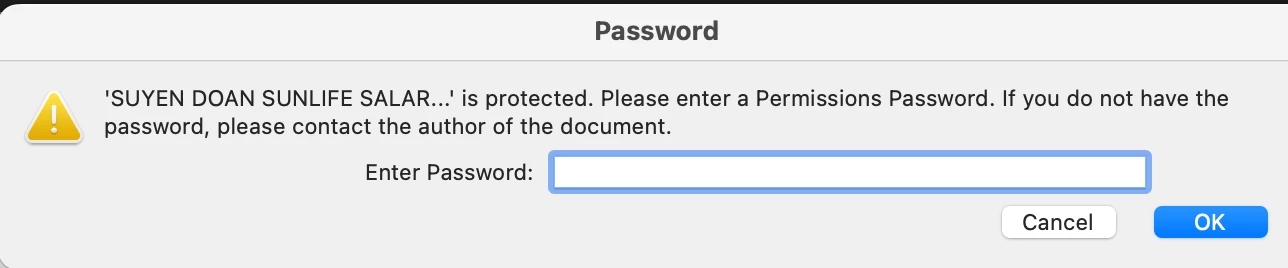
I have not password protected this document. I fear that my medical practitioner, whom I have sent this document to, will not be able to access it either. I have contacted the company that provided the form to me and they have advised their company does not password protect their form documents. I have a subscription to Adobe. I would like to have the access I pay for in order to have full use of this application. I hope I have provided all the information you require and you will be able to provide me with positive assistance.
Thank you.
Copy link to clipboard
Copied
How did you sign the document?
Copy link to clipboard
Copied
Copy link to clipboard
Copied
I signed the document using the "FILL AND SIGN" option in Adobe.
By @Suyen_Doan1162
Ok, this makes it event wierder. From your description I'm assuming that you used the "Sign Youself" tool? If so, then the signature you applied is an image. Unlike a digital signature, this tool does not change the security on the PDF. It certainly does not apply a password. In this case the password is not related to the signature at all. Something else happened to your PDF. I would suggest requesting a new copy and saving it in a location where you know it is clean.
Copy link to clipboard
Copied
You can't modify a (digitally) signed file. You must first clear the signature, then modify it, and sign it again.
Copy link to clipboard
Copied
Thank you for reaching out.
Could you please let us know how the document was received for signature? Did you receive it via Acrobat Sign?
If yes, then it is not possible to make any changes to the signed document. Once the document is signed, it is encrypted, and you cannot make any changes to it. However, you should be able to view the file.
Please confirm if the password window appears when you try to open the PDF or when you try to make changes, such as organizing pages.
Feel free to let us know if you have any questions.
Thanks,
Meenakshi
Copy link to clipboard
Copied
Copy link to clipboard
Copied
There are a few different ways to sign a PDF document. This is why it is important that you tell us explicitly the steps you followed. Simply stating that you signed something has little meaning.
That said, none of the signing techniques in Acrobat result in a password protected PDF. It sounds very much like you recieved an Adobe Sign request. An Adobe Sign Document is an electronic form, but it is not a PDF. After completing and submitting the Adobe Sign form, you would have recieved a PDF of the filled form that is protected.
Adobe Sign forms cannot be re-filled. You have to recived a new request.
Get ready! An upgraded Adobe Community experience is coming in January.
Learn more