


krystelh53602876
New Participant
January 4, 2017
Answered

PDF changed original fonts and hyperlinks don't work

  • January 4, 2017
  • 12 replies
  • 18576 views

I am using MacBook Pro and have Microsoft Word 2016 and Adobe Acrobat 2015 version installed.

Objective: to convert microsoft word file to pdf document with all internal links (table of contents, cross reference links, etc) working.

What I've done:

First try: converted the document to pdf using 'Save As' option straight from Ms. Word, chose 'best for online viewing' to retain all the links. What happened was, the links were all working but all original fonts are gone and replaced with some sort of generic font throughout the document

Second try: tried to create pdf using Adobe Acrobat, it automatically converts the word document into pdf but later found out that all the links were not working at all.

I need to know how to convert a word document into pdf without losing the hyperlinks/internal links and original font. Not sure why Ms. Word just decided to change all of my fonts....

Help...
Correct answer defaulth2ym0ddqd09q

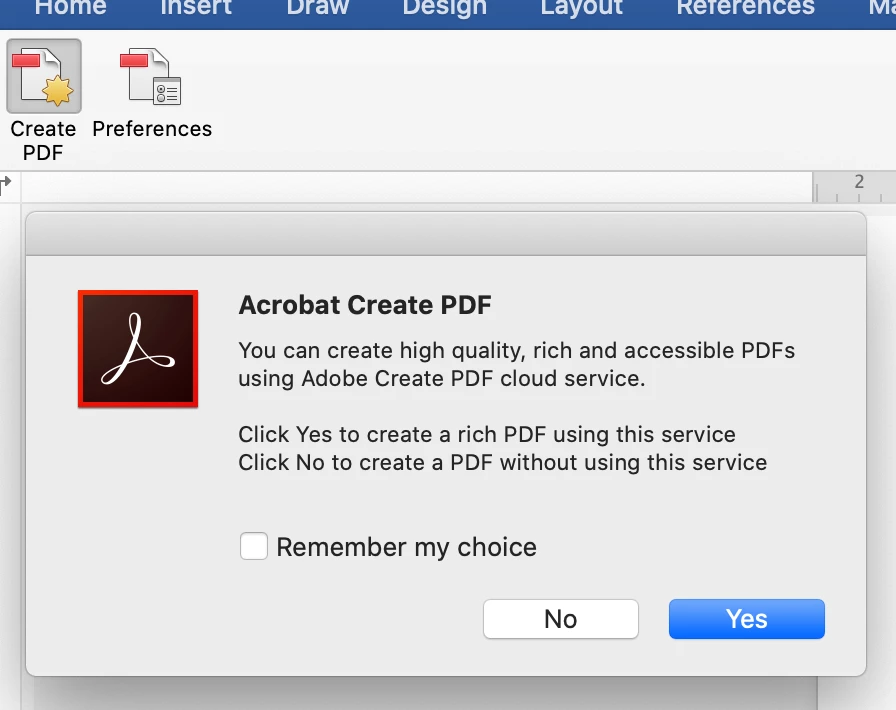
It is 2021 and this is still an issue. It has driven me mad. The solution I have found rom testing every way to create a PDF appears to be something to do with the 'Adobe Create PDF cloud service'. The only way to both create a PDF with embedded fonts *and* retain hyperlinks is to disable the 'use Adobe Create cloud service'.


From the Acrobat tab in Word's ribbon click 'create PDF' and then click 'No' to create a PDF without using this service if prompted. If you are not prompted maybe you already agreed to go into the Acrobat 'preferences' option in the Word ribbon and tun on then export without cloud service and then turn off the preference prompt tickbox so you don't get asked each time (if that makes sense).

Not sure what the 'Create Cloud service' does that is a benefit, but it seems to mess this up and maybe something to do with what fonts are installed locally or installed via Adobe fonts.


12 replies

New Participant
June 14, 2023

Embed the font in word, then go to save as a PDF. Choose "More Options" under where you select the file type>"Options" button>PDF options> check the "PDF/A compliant" box. 

robertg8210098
Participating Frequently
December 13, 2022

ATTENTION MAC USERS:  I HAVE THE SOLUTION !!


After years of frustration and anger towards Microsoft - I have finally found a work-around that is perfect.


Open your Word document in Pages (Mac)

Export to PDF.

That's it.  All formatting, fonts and links are in tact.

If you really want to vote with your feet - start using Pages instead of MS Word. It's not a bad program!

New Participant
April 4, 2022

I had the same issue and found a quick way to make the document preserve hyperlinks and downloaded fonts simply anc quickly. I clicked the print icon. 

Then clicked on the PDF dropdown at the bottom of the pop up print screen and selected Save as PDF

This then saved the document preserving both hyperlinks and downloaded fonts. 

New Participant
June 15, 2022

This does not seem to work for hyperlinks when I tested it (any hyperlinked words that are not a full URL are no longer linked).


How has this still not been resolved?

robertg8210098
Participating Frequently
December 13, 2022

SOLUTION:  Open your Word document in Pages and then export to PDF.  All fonts, formatting and links remain in tact.  Perfect !!

New Participant
January 25, 2022

I have tried the "correct answer" below, but it still didn't work for me on my Mac with Word v 16.57.

Maybe because I did click "use online service" and seems like there is no way to turn it off after that.


But a colleague of mine find another workaround. Check the fonts you have installed. These are probably .OTF.

  • Use and online converted to .TTF; delete .otf versions and install same fonts, but in .TTF again.
  • restart Word
  • Save As.. PDF and it works!!! (it's ok to use the cloud service to convert now, as it doesn't matter)


Hope it helps before Adobe fixes it in 2055 🙂


New Participant
February 6, 2022

This problem has been a constant problem for years now, and none of these fixes address it consistently. Yes, Microsoft Word for Mac is always a second-rate product (and no, Mac-to-Windows docx files are not WYSIWYG compatible, depsite Microsoft claiming this for at least as many years). But now it's even more absurd – take your library of OTF fonts, convert them one-by-one to TTF, and then try those versions instead? Come on. Just more crap programming from developers at MS and at Adobe. You can pay hundreds of dollars for these apps (thousands over the years) and they still can't handle a basic conversion between file formats that retains even embedded fonts (at a 5x file size penalty) and hyperlinks, TOCs, and so on? Absolutely ridiculous.

robertg8210098
Participating Frequently
December 13, 2022

Open your Word document in Pages and then export to PDF.  All fonts, formatting and links remain in tact.  Perfect.

defaulth2ym0ddqd09qCorrect answer
New Participant
February 11, 2021

It is 2021 and this is still an issue. It has driven me mad. The solution I have found rom testing every way to create a PDF appears to be something to do with the 'Adobe Create PDF cloud service'. The only way to both create a PDF with embedded fonts *and* retain hyperlinks is to disable the 'use Adobe Create cloud service'.


From the Acrobat tab in Word's ribbon click 'create PDF' and then click 'No' to create a PDF without using this service if prompted. If you are not prompted maybe you already agreed to go into the Acrobat 'preferences' option in the Word ribbon and tun on then export without cloud service and then turn off the preference prompt tickbox so you don't get asked each time (if that makes sense).

Not sure what the 'Create Cloud service' does that is a benefit, but it seems to mess this up and maybe something to do with what fonts are installed locally or installed via Adobe fonts.


New Participant
July 25, 2021

OMG. Thanks for this tip. After hours of yelling at my Mac I was finally able to pdf a word 365 document and preserve both the hyperlinks and the fonts. Thank you thank you thank you. 


jjfremont
New Participant
July 25, 2021

Really?!!! I tried followong the instructions but still could not get it to work. What did you do to finally make it work?!!!

jjfremont
New Participant
August 7, 2020

It is August 6, 2020.


I am working on a project for a client that requires I use a specific font (Mrs. Eaves font deck -- which is listed in Adobe Fonts) <<and>> I have created a linkable TOC. I am working with Word for Mac (V16.39) on a Macbook Pro. I am able to either retain the font <<or>> the linkable TOC <<but>> not both. I've tried utilizing create PDF and print to PDF and export to PDF options, though I get the same results -- font <<or>> TOC links are retained <<but>> not both.


I've tried working with Adobe but they keep directing me to help pages for Word for PC issues. I just found this thread today. Has anyone figured out how to make this work? I know my client is losing faith in me. I really don't need my reputation ruined because of this. Please help! I need a workable solution!

New Participant
September 8, 2018

It's already 2018 and still Adobe doesn't have an answer for this? How do we resolve this for mac users? I usually do tv program decks for a tv network and we attach hyperlinks for the tv trailers on our pdfs that we send to our sales clients. Hope we can do something about this. Hope Adobe and Microsoft can look into this problem. It's been years and I still see this problem on mac users. Please... =)

New Participant
September 4, 2018

This appears to still be an issue a year later... you have to either pick having fonts download OR hyperlinks - they don't work together. When will this be fixed or are there any workarounds?

Dov Isaacs
Brainiac
September 4, 2018

Not without significant changes in the architecture of Microsoft Office for Mac…

          - Dov

- Dov Isaacs, former Adobe Principal Scientist (April 30, 1990 - May 30, 2021)
wastelandcompanion
New Participant
March 5, 2020

I'm assuming they still have not made those changes. Has it improved at all in Office 365?

New Participant
May 10, 2017

For the hyperlink issue, if you have Adobe Acrobat Pro DC you can use that app as a work-around for the broken hyperlink export from Word.

  1. Select File > Create > PDF from File.
  2. Then select the word doc.
  3. The pdf created will have clickable hyperlinks.
Known Participant
May 10, 2017

I have Acrobat Pro DC, but the problem with using that approach or the Word plugin is that our installed fonts are replaced by substituted ones.  That, as it turns out is a bug, which supposedly is getting looked at.  But we've had some other issues with that approach, such as Noteref fields being treated like new footnotes (which screws up the footnote symbol sequencing).

The best solution for us would be if Adobe added the ability to keep bookmarks and hyperlinks in the Mac version of Distiller -- just as the PC version does -- but since that's a feature request, we need other Mac users to show an interest.

Known Participant
April 27, 2017

I had the same problem on my Mac (using Word for Mac 2016).  I was using only Mac-installed fonts, and anything besides Arial was replaced by something else.  Since I wanted to keep hyperlinks, we couldn't use the File > Print (or the Save As Adobe Acrobat) option.

It took me a long time and some persistence, but I finally got help on the issue from a very helpful Adobe support person, @Ankur Sharma.  He was able to reproduce the problem and lodged it as a bug (ADC-4212190).

While we were looking at other options, I found out that the Save As Adobe Acrobat option uses Distiller, which on the PC version can preserve hyperlinks, bookmarks, etc., but not on the Mac.  So we also put in a feature request (ADC-4210906) to add this functionality to the Mac version too.  Obviously, the more people they hear from who express an interest, the more likely it is Adobe will act on it, so please, Mac users, let Adobe know we want this.

New Participant
August 31, 2021

Is there any movement on this functionality on Macs? I am trying to convert files from Word for Mac v. 16.52 with a Microsoft Office 365 license to Adobe Acrobat Pro DC. The brand fonts that I need to preserve are Apertura and Futura PT (Both available in my Adobe Creative Suite.) After countless hours, I still haven't found a solution. Any ideas out there?


New Participant
August 31, 2021

See the response dated Feb 11 20211 from defaulth2, and the string below that post. That method worked for me and i am now able to pdf word doc on macbook with fonts and hyperlinks preserved.