Known Participant
October 21, 2022
Answered

PDF – editable number selection

  • October 21, 2022
  • 2 replies
  • 4418 views

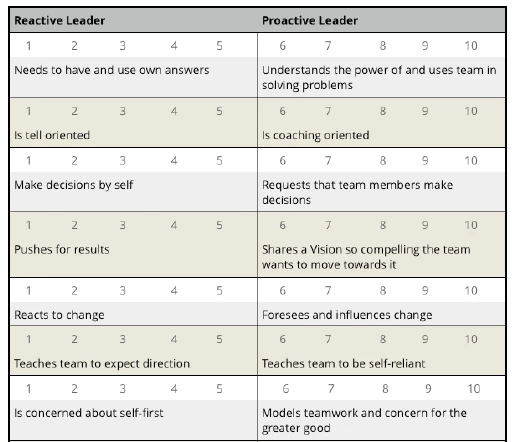
I have a client self-assessment form that has 8 questions and under each question is a row of numbers  (1 – 10).

The client answers the question by selecting how they feel by clicking one of the numbers.

How do I make the numbers seen and editable so when the client selects say number (4) it goes bold.


This topic has been closed for replies.
Correct answer Nesa Nurani

Hi Nesa, so grateful for your help.

Almost there, not sure how to implement your last step, where or how to add script.

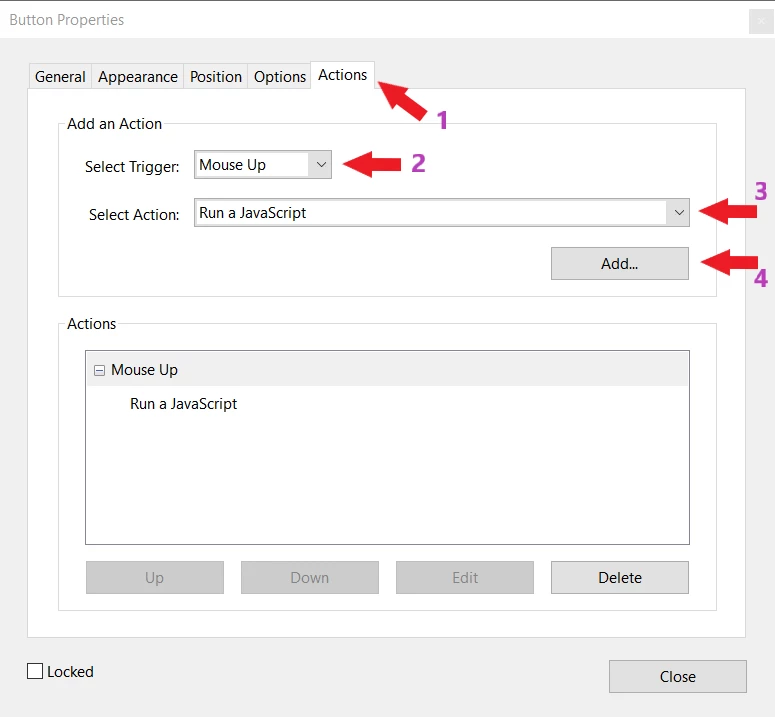
I have attached screen shots of the steps I followed and need help on the last one. 


You are creating 'Radio Button' field and not a button as I suggested, it will still work the same but if you or users who will be using the form have  highlights turned on they may not see the number under the Radio Button. I suggested 'Button' field because it doesn't have highlights, But if you still want to use 'Radio Button' script is same in both cases.

In field 'Properties' click on 'Actions' tab ⇾ Select Trigger: 'Mouse UP' and Select Action: 'Run a JavaScript', click on 'add' and paste script inside, look at photo bellow.


 

2 replies

try67
Community Expert
Community Expert
October 21, 2022

I strongly recommend you don't use buttons for this. The main reason is that a button doesn't have a value, so if you wanted to export the values the users selected later on (for example, if you wanted to create an Excel spreadsheet so you could analyze them further), you won't be able to do so. You will have to write a script specifically for this task.

Instead, just use any of the built-in form field types that already exist in PDF files for getting user input, such as a drop-down field, a text field, or a group of radio-buttons or check-boxes.

Known Participant
October 21, 2022

Thank you for your response. I am very new with Adobe. I understand your end intent. I did try to use a check-box but then the number is not visible to select. 

I need the client to see a number to select, would be ideal if the number selected was marked with an  'X' . Any suggestions for the numbers to be visible to select?

ls_rbls
Community Expert
Community Expert
October 22, 2022

The best way to do this is with a combination of both suggestions from Nesa Nurani and Try67.


You need to add texfields. But each textfied pre-filles with the desired number value.


And the checkboxes can't be placed on top of the static text content of your form.


You can place them underneath or next to the field ( to the right or left), for example.


You are complicating this task too much snd unnecessarily.

Nesa Nurani
Community Expert
Community Expert
October 21, 2022

I would suggest that you put every number in a separate text field.

Unless you use rich text format with spans method, you would need to change your font type with textFont property to change to a bold font. Another approach would be to use text fields (or a button) and set color to gray and then change to black on click (or some other color).

Known Participant
October 21, 2022

Thank you for your help. Interestingly there is another software PDF Filler  that allows ytou to make each number editable with a slight gray out on the number until you select it. It was very easy to use. 

Unfortunately when you save your final work it had an issue with the page set out (OCR?) but I slaso encountered the same with ADOBE OCR as well.