


PDF Form - Text shifts in text fields with certain fonts. - Adobe Acrobat Pro
Hello,
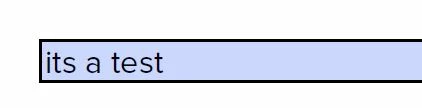
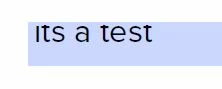
Maybe you can help me, I am at my wits' end. I have created a PDF form with some text fields, dropdown lists, and checkboxes. Now, the content of the PDF template has changed slightly, so I adapted the template in Word, saved it as a PDF, and then I wanted to simply copy my 23 text fields, dropdown lists, and checkboxes from the old to the new one. Suddenly, I noticed that the text in the fields had shifted upwards, cutting off the top of the text in the fields. I use the Proxima Nova font, other fonts work fine and the text is displayed in the correct position. However, Proxima Nova is not the only font where the text shifts too far up. Strangely enough, it worked for weeks and even in my old version of the PDF form, the text in the fields is still displayed properly, even if I now add new fields. How can that be?? But I can't format the fields either, can I?
I have also installed Adobe Acrobat Pro on another client to rule out that it is a problem with my installation or computer. But there, too, the text in the fields is cut off.
Please Help me 🙂
 AdChoices