


Exit
  • Global community
    • Language:
      • Deutsch
      • English
      • Español
      • Français
      • Português
  • 日本語コミュニティ
  • 한국 커뮤니티
0

PDF preflight "font name is not unique"

Community Beginner ,
Nov 21, 2022 Nov 21, 2022

Hi there!
I've been using google fonts not only for digital but also print usecases. I've never had any issues with it, when exporting a PDF/X-3 out i.e. of illustrator for print.
Now I have a print product which does have some visual problems with the fonts. I have not converted the fonts into vector paths as I thought, they are going to be embedded anyways.
Unfortunately now I've realised, that the PDF does contain embedded fonts BUT the "wrong" typefaces - or it is missing some. The preflight is giving an alert named: "font name is not unique".
I went through all older PDF-files that I've created the past years with google fonts in it and they ALL have this alert showing up when I do the preflight. There were never any problems with the final print product, so this is the first time it seemed to really making trouble. I am in shock as I didn't know that this can happen... I didn't know there were some fonts that are not able to be embedded properly - and that it is google fonts, that seem to have this issue. Does anyone know this problem (I couldn't really find any problems reported)? Does anyone know how to "rename" the fonts properly? Is there any preflight-fix for this?
Thanks for replies!
TOPICS
Create PDFs , Print and prepress
3.1K
Translate
Report
Community guidelines
Be kind and respectful, give credit to the original source of content, and search for duplicates before posting. Learn more
community guidelines
1 ACCEPTED SOLUTION
Community Expert ,
Nov 21, 2022 Nov 21, 2022

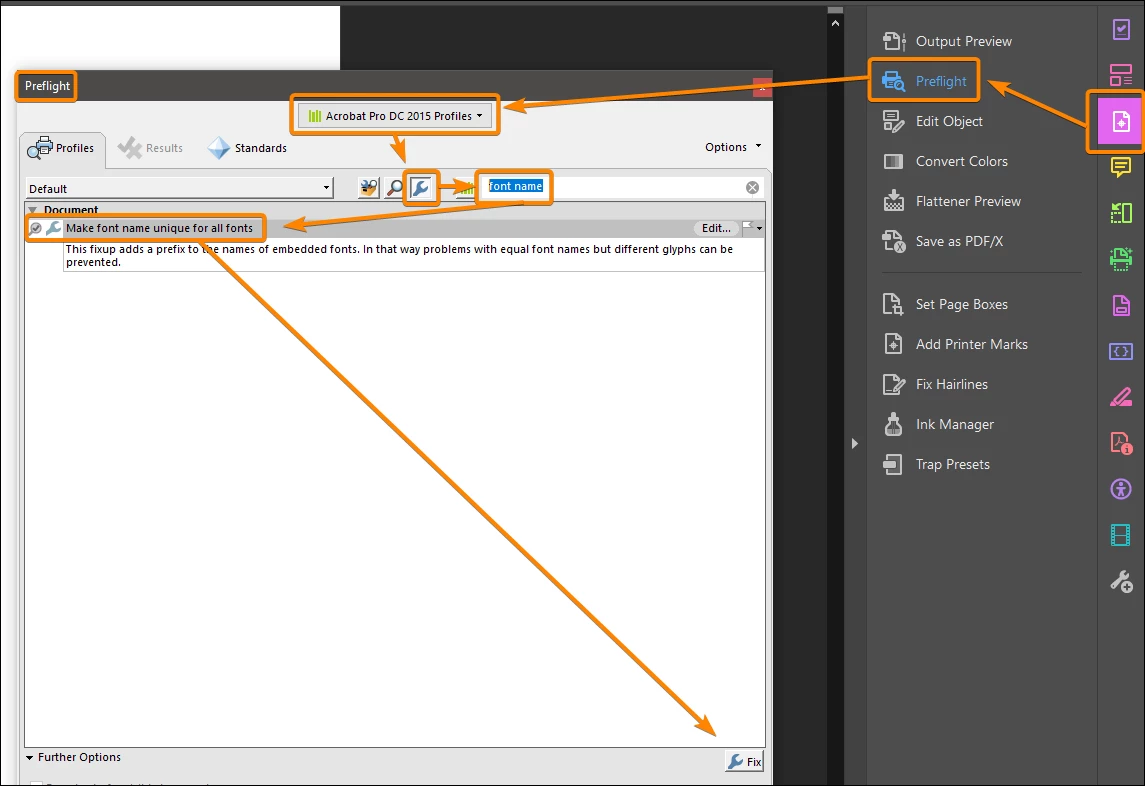
This is not a critical issue but you can easily fix it using the Preflight:


Capture_2211211443.png


Acrobate du PDF, InDesigner et Photoshopographe

View solution in original post

Translate
Report
Community guidelines
Be kind and respectful, give credit to the original source of content, and search for duplicates before posting. Learn more
community guidelines
Community Expert ,
Nov 21, 2022 Nov 21, 2022

This is not a critical issue but you can easily fix it using the Preflight:


Capture_2211211443.png


Acrobate du PDF, InDesigner et Photoshopographe
Translate
Report
Community guidelines
Be kind and respectful, give credit to the original source of content, and search for duplicates before posting. Learn more
community guidelines
Community Beginner ,
Nov 21, 2022 Nov 21, 2022

Yeah!!! I see!!! That was exactly the fix I was searching for! Thanks!

Unfortunately I still have the very strange issue that the wrong font-type is listed as embedded: i.e. I've used "Montserrat Regular" in my file, but in the PDF there is only "Monserrat Thin" listed (which I haven't used at all in the document).
Example (in german Acrobat):
Screenshot 2022-11-21 153032.jpgScreenshot 2022-11-21 153106.jpg

So if I use the fix you've just mentioned, this will just sort out the problem with this funny naming-alarm - but I can't really say, if the right font ist embedded. Any ideas for that?

Translate
Report
Community guidelines
Be kind and respectful, give credit to the original source of content, and search for duplicates before posting. Learn more
community guidelines
Community Beginner ,
Nov 21, 2022 Nov 21, 2022

I've just realized: Could that be because the font is a "various (VAR) font"? So the font is always named after the "first" one of the possible ones that are listed in the preset-styles? That might be an explanation. I then will never be sure that the PDF has the right "info" about the typeface for the printer in it, as it has simply any name. 😞

Translate
Report
Community guidelines
Be kind and respectful, give credit to the original source of content, and search for duplicates before posting. Learn more
community guidelines
Community Beginner ,
Nov 06, 2025 Nov 06, 2025

Hi, having this issue in 2025, I don't see the "make font name unique for all fonts" option in preflight. I'm on the wrench tab and don't see it. Anyone know where it is in 2025 Adobe Acrobat Preflight? 

Vic37378482f6t2_0-1762475258774.png

My guess is that the location changed or it's no longer available. Here's another screensnipping of what shows up when I search for menu items containing "font."

Vic37378482f6t2_1-1762475345645.png

Thank you in advance, been struggling with this.

Translate
Report
Community guidelines
Be kind and respectful, give credit to the original source of content, and search for duplicates before posting. Learn more
community guidelines
Community Expert ,
Nov 07, 2025 Nov 07, 2025

"make font name unique for all fonts" is not in ‘Essential’.

See my screenshot above (excerpt):


Capture_2511071530.png


Acrobate du PDF, InDesigner et Photoshopographe
Translate
Report
Community guidelines
Be kind and respectful, give credit to the original source of content, and search for duplicates before posting. Learn more
community guidelines
Community Beginner ,
Nov 13, 2025 Nov 13, 2025

Thank you, I really appreciate the response.

I have 2 questions:

  1.  Would NOT doing this step impact the screen reader experience?
  2. Is there any way to address this recurring "font name is not unique" upstream in your experience? Is there some setting in Word or elsewhere I can change so I don't have to do this each time I export something?

Thank you.


P.S., for anyone else looking for answers to this problem, here is the full screenshot of how it looks in Adobe Acrobat Preflight as of 2025.

Vic37378482f6t2_0-1762998285174.png


Translate
Report
Community guidelines
Be kind and respectful, give credit to the original source of content, and search for duplicates before posting. Learn more
community guidelines
Community Expert ,
Nov 14, 2025 Nov 14, 2025
LATEST

1. I don't think so, but we would need to check.
2. I can't say anything without knowing which fonts are used in the Word document and which conversion settings are used.


Acrobate du PDF, InDesigner et Photoshopographe
Translate
Report
Community guidelines
Be kind and respectful, give credit to the original source of content, and search for duplicates before posting. Learn more
community guidelines
Community Expert ,
Nov 21, 2022 Nov 21, 2022

If Acrobat and InDesign referred to fonts the same way that would be ideal, but I don't think that's very important.


Acrobate du PDF, InDesigner et Photoshopographe
Translate
Report
Community guidelines
Be kind and respectful, give credit to the original source of content, and search for duplicates before posting. Learn more
community guidelines