


StRoMeCzEcH
New Participant
February 10, 2021
Answered

PDF print paper size

  • February 10, 2021
  • 3 replies
  • 10055 views

Hello, Acrobat stopped respecting PDF paper size after last update (2021.001.20135).

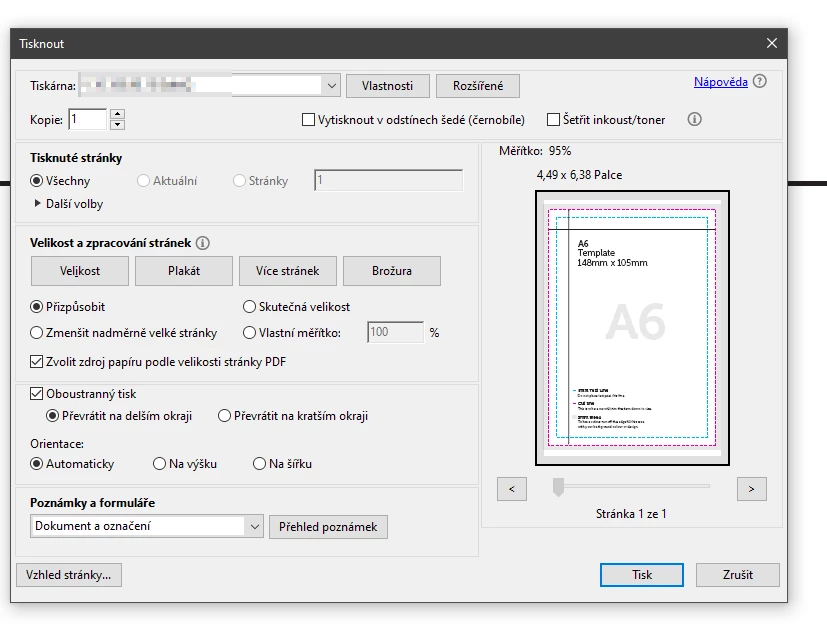
When i try to print A6 paper with older version with "choose paper source by PDF size" ticked, paper size is showed as 4,49"x6,38" (A6) and is printed directly on A6 paper on second paper feeder.

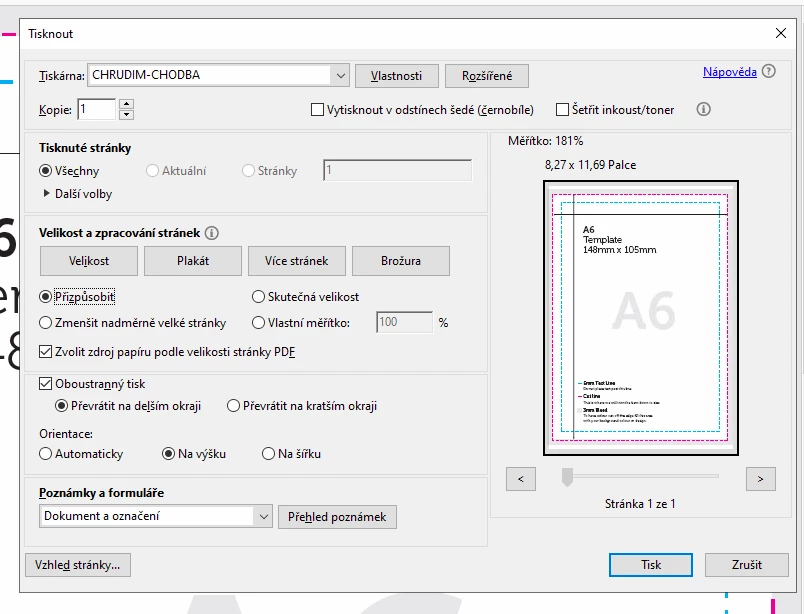
On new version - same settings - but paper size is showed as 8,27"x11,69" and document is falsely printed on A4 paper from first printer feeder (even with cutted off edges of text). 

How to get Acrobat back to respecting PDF paper size?
This topic has been closed for replies.
Correct answer Meenakshi Negi

Hi All,


Thank you for your patience and sorry for the inconvenience caused.


We have released an update for Acrobat and Reader DC(version 21.001.20138) that contains the fix. 

Please try updating the application to the latest version. In the application, go to Help > Check for updates.


For more information about the latest version, please refer to this link: https://www.adobe.com/devnet-docs/acrobatetk/tools/ReleaseNotesDC/continuous/dccontinuousfeb2021qfe.html#dccontinuousfebtwentytwentyoneqfe  


Let us know how it goes.


Thanks,

Meenakshi

3 replies

Meenakshi Negi
Community Manager
Meenakshi NegiCommunity ManagerCorrect answer
Community Manager
February 15, 2021

Hi All,


Thank you for your patience and sorry for the inconvenience caused.


We have released an update for Acrobat and Reader DC(version 21.001.20138) that contains the fix. 

Please try updating the application to the latest version. In the application, go to Help > Check for updates.


For more information about the latest version, please refer to this link: https://www.adobe.com/devnet-docs/acrobatetk/tools/ReleaseNotesDC/continuous/dccontinuousfeb2021qfe.html#dccontinuousfebtwentytwentyoneqfe  


Let us know how it goes.


Thanks,

Meenakshi

New Participant
February 15, 2021

I'm also an NSA that prints thousands of pages per month and became impacted by this issue a few days ago.  Installing the timely update to adobe now!  Please work. lol

New Participant
February 15, 2021

The update worked!  However I did have to change the paper tray order from MP,T1,T2 to T1,T2,MP.  Otherwise, I was getting a No Paper in MP Tray error. I never used the  MP Tray before. Also, had to reboot the printer because of that error. Had docs to print and they came out fine.  I'm sure many other NSAs are having  this problem and hope they find the fix here.

Community Manager
February 12, 2021

Hi all, 


Firstly, this is a workaround, so you can continue your work. This is a known issue to us and we are working on this on a high priority.
Secondly, I would like to ask, if possible, can you tell me with protected mode off, on an older version(if you have access to an older version), is the legal size sheet getting printed as expected? 
Or I would like to ask what all things you felt change or broke after the recent release, in terms of printing.


~Tariq

Participating Frequently
February 12, 2021

Tariq,


Unlike a couple of other posters, the workaround has not worked for me to print legal-size documents.  Those documents are printing only in letter size.  Some of my clients have already expressed that they need the legal size documents printed in legal size.  Unfortunately, I have lost some business as a result of documents only printing in letter size.


See the answers I gave to your questions on my 02/11/2021 post.  I hope it is helping you and your team develop a permanent fix.


Thanks.

Participating Frequently
February 13, 2021

Tariq and all others....FYI.....


I found a post on the Notary Cafe website which suggested that the Brother driver be uninstalled and reinstalled.  So I did this and then found out the scaling was back down to 75% from 96% on legal-size documents.  So I redid Tariq's workaround mentioned above and now I am able to print legal-size documents on legal size paper.  I was not able to do so before in uninstalled and reinstalled the Brother driver.


As Tariq knows though, I/we are operating on a "workaround" so I hope the Adobe folks let us know when they should have a permanent fix.

Community Manager
February 10, 2021

Hello, 


Sorry for the inconvenience caused. Thank you for reaching out. 

Please try the same workflow, with turning off the 'Protected Mode' and then try printing the same.

Steps to turn off the 'Protected Mode' :

  1. Launch Acrobat
  2. Click on Edit (from Menu Bar) > Preferences
  3. Click on 'Security (Enhanced)'
  4. Uncheck 'Enable Protected Mode at startup (Preview)' > Click Yes (on popup)
  5. Click on OK > Close & Re-Launch application (reader)


If the above suggest doesn't work for some reason, please provide some more detail(s) regarding the issue you're facing:

  • Acrobat/Reader's version on which the issue is observed (DC/Classic)
  • OS version (MAC/WIN and version as well)
  • Printer details on which the same is observed at your end (driver as well)
  • Is the same observed for a specific file? or is happening. for a set of file(s)
  • Is the same happening for any other file as well, say MS Word file?
  • Is the same happening when the PDF is printed from any other application? or only Acrobat?


~Tariq


jessarii
New Participant
February 11, 2021

Why do we have to turn off protected mode to print by PDF size?? When printing legal documents, I want the information to be protected but I need the paper size to be correct. It shouldn't be like this, can you explain?

Participating Frequently
February 12, 2021

Good point jessicah9845964


I hope Adobe's Tariq can answer both of our questions.


Tariq, if you do not have an answer yet, can you at least let us know you are troubleshooting matter?