


Known Participant
February 10, 2023
Answered

PDF Script

  • February 10, 2023
  • 2 replies
  • 3165 views

Is there a way, when one item is selected on a drop down, all outputs for set fields have one value and when the other item is selected on a drop down, all outputs for set fields have a different value?

The two attachements are the current forms I use. The third attachment labeled dropdown, has the one modification I want to add in the top right hand corner. I want to have one PDF where in the top left hand corner what ever value is selected, determines the below outvalues used in the formuals.
This topic has been closed for replies.
Correct answer Nesa Nurani

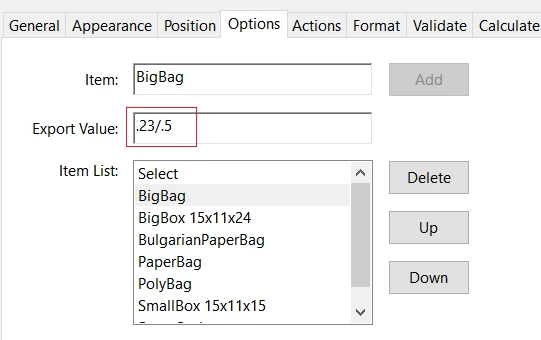
You can setup export value like this:

Then you can use this script:

var measure = this.getField("TallyUoM").valueAsString;
var s = this.getField("UnitTypeTallyPg1.0").valueAsString.split("/");
var a = 0;
var e = 0;
if(measure == "kgs")a = Number(s[0]);
else if(measure == "lbs")a = Number(s[1]);
var b = Number(this.getField("#ofUnitsTallyPg1.0").valueAsString);
var c = Number(this.getField("TotalNetTallyPg1.0").valueAsString);
var d = Number(this.getField("NotesTallyPg1.0").valueAsString);
if(a&&b&&c&&d)
event.value = a*b+c+d;
else
event.value = "";
if(this.getField("PalletTallyPg1.0").valueAsString != ""){
 if(measure == "kgs")e=.23;
 else if(measure == "lbs")e=.5;}
if (a&&b&&c&&d) {
	event.value = (a*b+c+d)+e;
} else {
	event.value = "";
}

Here is your file with new script:

https://drive.google.com/file/d/17xobpnSo9-KCxBqhpkZN32-G2EiLSf2I/view?usp=share_link 

Also, you need to fix calculation order, or you will have delay in your calculations, I fixed order for the first row in the file above.

2 replies

Nesa Nurani
Nesa NuraniCorrect answer
Inspiring
February 10, 2023

You can setup export value like this:

Then you can use this script:

var measure = this.getField("TallyUoM").valueAsString;
var s = this.getField("UnitTypeTallyPg1.0").valueAsString.split("/");
var a = 0;
var e = 0;
if(measure == "kgs")a = Number(s[0]);
else if(measure == "lbs")a = Number(s[1]);
var b = Number(this.getField("#ofUnitsTallyPg1.0").valueAsString);
var c = Number(this.getField("TotalNetTallyPg1.0").valueAsString);
var d = Number(this.getField("NotesTallyPg1.0").valueAsString);
if(a&&b&&c&&d)
event.value = a*b+c+d;
else
event.value = "";
if(this.getField("PalletTallyPg1.0").valueAsString != ""){
 if(measure == "kgs")e=.23;
 else if(measure == "lbs")e=.5;}
if (a&&b&&c&&d) {
	event.value = (a*b+c+d)+e;
} else {
	event.value = "";
}

Here is your file with new script:

https://drive.google.com/file/d/17xobpnSo9-KCxBqhpkZN32-G2EiLSf2I/view?usp=share_link 

Also, you need to fix calculation order, or you will have delay in your calculations, I fixed order for the first row in the file above.

Known Participant
February 10, 2023

THANK YOU! I have signed up for an online course on JavaScript to hopefully eliminate the need to come here. Again thank you so much!

try67
Braniac
February 10, 2023

Yes, but it's not clear what element in the file you want to change based on this selection. Do you have a weight for each item that should change based on the selected value? If so, where does it come into play?

Known Participant
February 10, 2023

Right now I have to have the two separte documents for when my team is working on an order in pounds or in kgs. When ever each field, net per unit, pallet, pallet tare, is filled, it exports the value to the gross. I want one that when they select lbs in the top left, the export values for the below field, is the pounds value. When they select kgs, the export values is kgs.

The export value for the "PalletTally", "UnitTypeTally", and "GrossWeightTally" script would all need to have two different values. The lb value, and the kg value.