


New Participant
May 31, 2018
Answered

PDF won't open after email submission

  • May 31, 2018
  • 2 replies
  • 3928 views

I've created a form with an email "submit form" button, but the receiver is getting an error message on the pdf when it's received. It won't open. We've tried it with multiple people and they are all getting the same error message. Any idea why it might be doing this?
This topic has been closed for replies.
Correct answer try67

How do I set up the file so that it's sending a filled out pdf instead of an fdf? I don't want the receiver to have import data into a new pdf every time they get a form. Is there a way to eliminate that step?


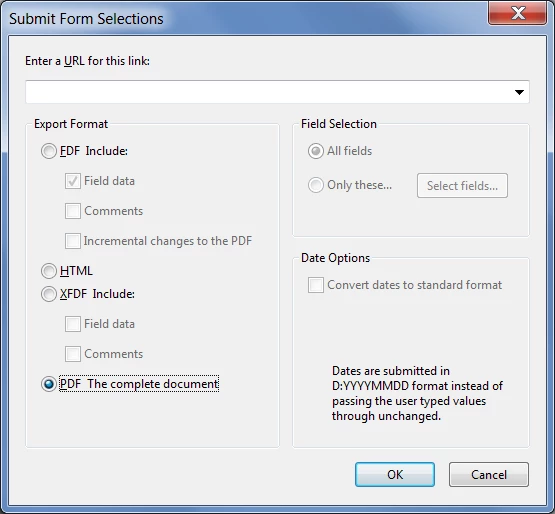
Go to the settings of your submit button, edit the "Submit a form" action and change the Export Format from "FDF" to "PDF":

2 replies

New Participant
June 5, 2018

I have the same issue. I already had a form that submits by email. It's working in Reader DC and Internet Explorer 11 but not in Chrome  version 66. I don't get any error message, the button just does nothing. I think something in a recent build of Chrome broke it.

Meenakshi Negi
Community Manager
Community Manager
June 6, 2018

Hi Kpr,

This is a duplicate post.

I have replied to your query here Submit button fails to open email dialog in Chrome

Please refer the above thread for further discussion.

Regards,

Meenakshi

New Participant
May 31, 2018

This is the error message: "The file you are attempting to open contains comments or form data that are supposed to be placed on . This document cannot be found. It may have been moved, or deleted. Would like to browse to attempt to locate this document."

try67
Community Expert
May 31, 2018

What you were sent is an FDF file, which is just the form data. You need to open a blank copy of the PDF and then import that file into it.

try67
try67Correct answer
Community Expert
May 31, 2018

How do I set up the file so that it's sending a filled out pdf instead of an fdf? I don't want the receiver to have import data into a new pdf every time they get a form. Is there a way to eliminate that step?


Go to the settings of your submit button, edit the "Submit a form" action and change the Export Format from "FDF" to "PDF":