February 15, 2022
Question

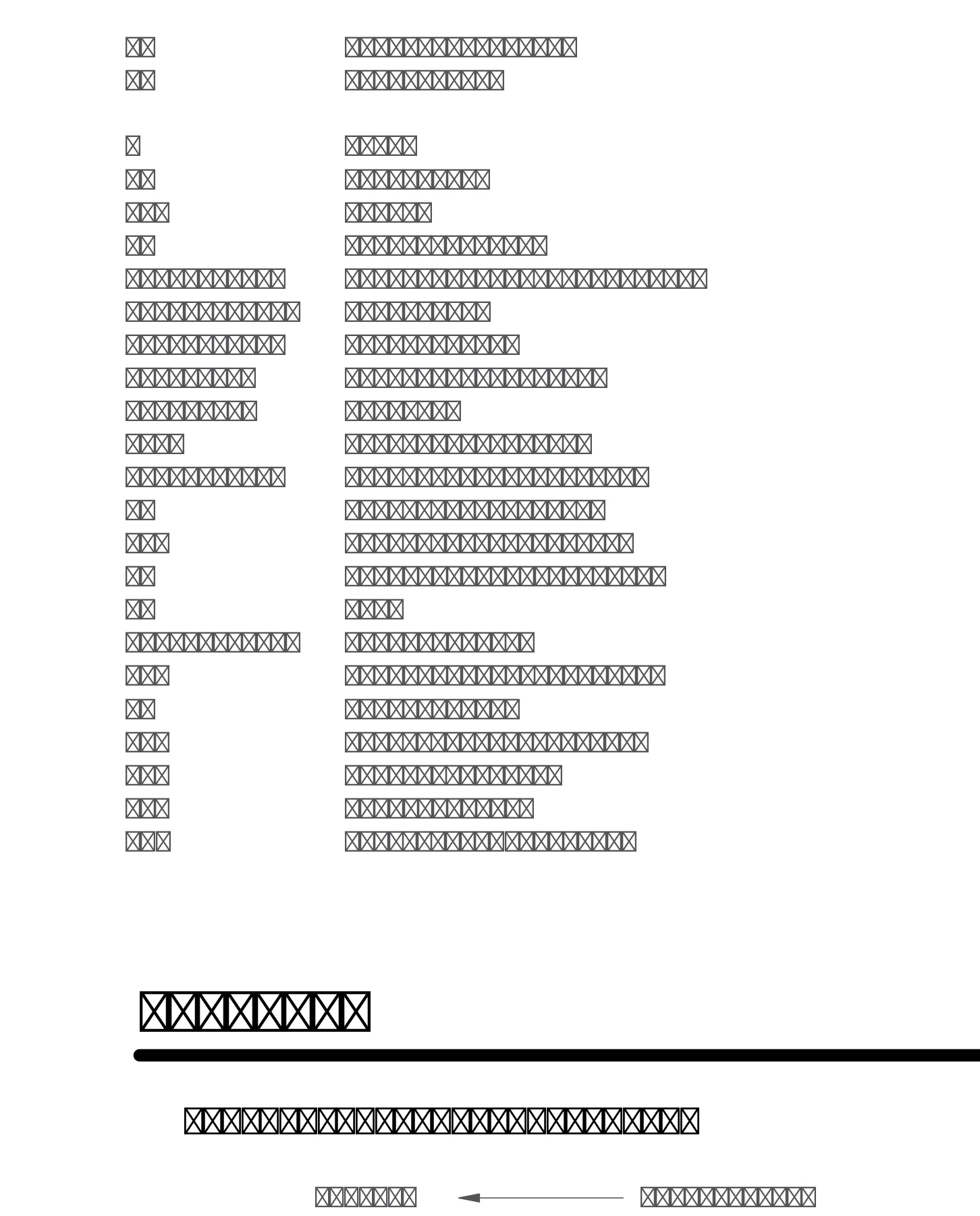
PDFs Opened into Illustrator get Boxes... WHY?

  • February 15, 2022
  • 2 replies
  • 477 views

PDFs opened into Illustrator get's Boxes... WHY?

This has been an issue for years and I'm sure I'm not the first person to ask this question.

Why does this happen to fonts on some PDF's opened in illustrator?

Tried to preflight with no change. The only resolution I have found is to outline the font, which is just dumb.


Looks like I can't even re-map fonts anymore.


Latest CC apps on MacOS Catalina. Nothing exotic.


This topic has been closed for replies.

2 replies

Bevi Chagnon - PubCom.com
Legend
February 15, 2022
quote

PDFs opened into Illustrator get's Boxes... WHY?

This has been an issue for years and I'm sure I'm not the first person to ask this question.

By @8808520


Not a bug, it's a user error.

When the PDF is exported from its source file, the user must select the option to embed all fonts into the PDF.


A workaround:

  • Open the PDF in Acrobat first.
  • Select File / Properties and check under the Fonts tab for the list of fonts the file is calling for.
  • Install those fonts on your computer system.
  • Then try bringing the PDF back into iIllustrator.
  • Or, while still in Acrobat Pro, use the Embed Fonts utility in Acrobat's Preflight utility, and then open the PDF in Illustrator.

@Document Geek's solution also works.


|    Bevi Chagnon   |  Designer, Trainer, & Technologist for Accessible Documents ||    PubCom |    Classes & Books for Accessible InDesign, PDFs & MS Office |
Document Geek
Community Expert
Community Expert
February 15, 2022

PDFs aren't designed to be opeend in Illustrator, ubless they were originally created in Illustrator. 

Try placing the PDF in Illustrator, and outling the fonts there:

https://www.youtube.com/watch?v=pUQ1YxEkRqI&list=PL9IOEbreNfprgMNm3IX8dPuj2emTzFt1S

February 15, 2022

This isnt what I'm even asking to fix.