
rainbowfrontlawn
Participating Frequently
January 14, 2018
Answered

Permissions Password on Adobe Acrobat Pro - I never set one??

  • January 14, 2018
  • 9 replies
  • 54389 views

I downloaded a PDF from my bank. I can open the PDF just fine. But if I try to edit the PDF - add or remove a page, for example - it demands a Permissions Password. I've tried every password I have to no avail.

I have Adobe Acrobat X Pro and have never encountered this issue before. The bank swears they did not set a password on their end. Some documents from their site are "secured" with this Permission Password, and others are not.

I uninstalled and reinstalled Acrobat, and it never presented me with any options for any kind of password.

Any ideas?
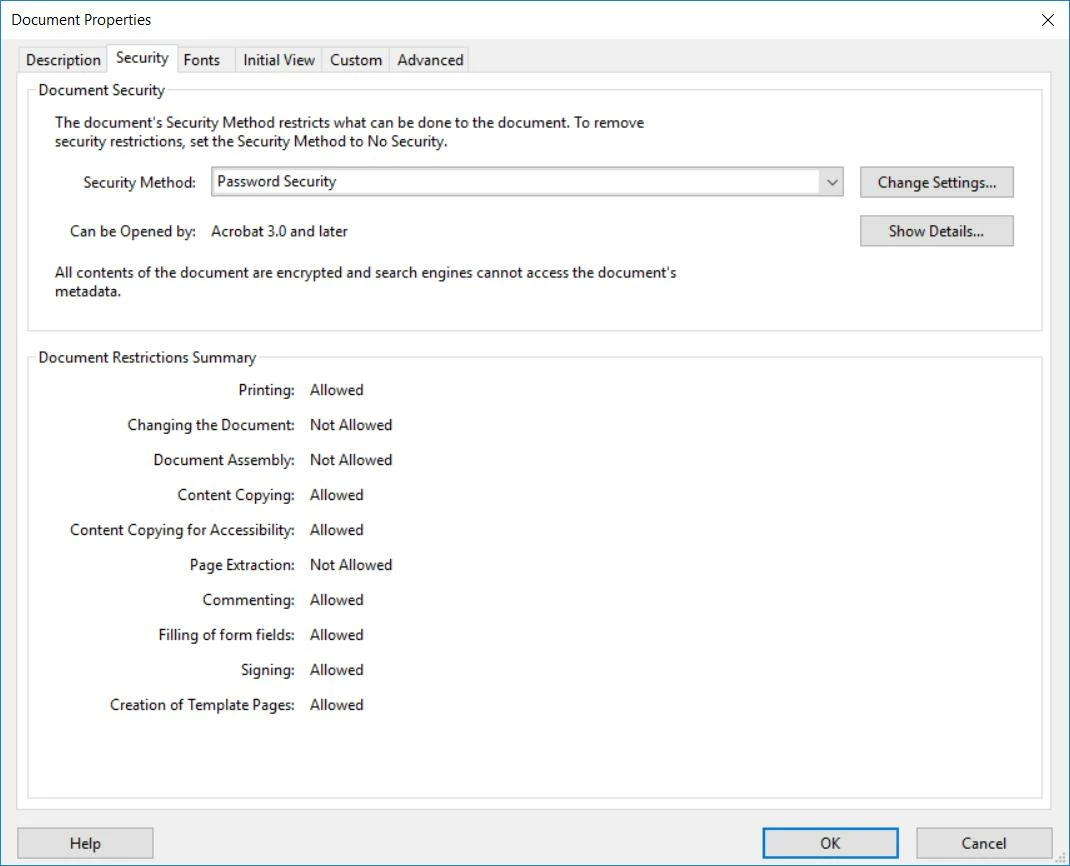
Correct answer try67

Ah, you mean this one:


Yes. If you're seeing the same thing in Reader then the file has been password protected before it arrived to you.

There's nothing you can do about it if you don't know the password.

9 replies

Participant
January 13, 2024

I have the same problem with my Chase Bank Statements.  One thing I found that works in Adobe Acrobat XI Pro is to open the file in Acrobat and before making any alterations do a Save As TIFF.  This will create a TIFF image of each page.  Combine all the TIFF images creating a new Acrobat pdf file that can be modified.  

Good Luck.

Participant
June 15, 2023

Yes, open the pdf in chrome. Then click print and "Save to pdf". The new pdf will be editable.

Participant
November 16, 2021

Nooooo Not only did I not set up any password. The original document has been edited by me several times over several years. I have been told that because I signed it that an invisible unknown password was created. Does that answer make sense to anyone? I opened up my Acrobat and every single document is password protected by a password I have no idea what it is how to remove it or even change it. Lucky I had the very first version long before I began editing and turned it into a pDF in an email otherwise I would be totally screwed. Maybe if we all compalin they will fix this insanity. 

Meenakshi Negi
Community Manager
Community Manager
November 16, 2021

Hello,


Thank you for reaching out and sorry about the trouble.


As you have mentioned above, the PDF is protected with a password on its own. 

Could you please share the screenshot of the password window that appears when you try to open the PDF?

Did you check if the issue occurred with this particular PDF or with other PDFs too?

Share the Acrobat and OS version currently in use. It would be helpful if you can share any sample PDF with us so we can check it on our end. It will help us to investigate this issue further.


Let us know if you have any questions or need any help.


Thanks,

Meenakshi


JR Boulay
Community Expert
Community Expert
December 24, 2020

-----

Acrobate du PDF, InDesigner et Photoshopographe
Participant
September 14, 2020

Here is a solution I found

1. Print

2. Select Printer : Microsoft Print to PDF

3. Print (Save as)


Participant
December 23, 2020

Unfortunately, with the newest update to the Mac System, Big Sur 11.1, and Acrobat Pro DC, this work-around no longer works for me.  Adobe disenables that function in the print dialog of the computer.   This is very real and problematic issue.  I had files I could open just fine and modify, and save as with the changes.  They weren't marked as "secure".  Now they are marked as "secure", and I can't print sometimes, and can't save at all.  Noone else has had access to my files.  The only thing that changed was that they are were imported through iCloud from my old laptop, and now they are on the new Mac.  All my Adobe docs now say "secured" when they did not before, and I never set a password in the first place or subsequently, but I can't make any changes, even to the ones that are 4 years old.  


Anyone at Adobe able to help me out here?   You have improved your security so much, you have disenabled functionality for the end user.   This is very frustrating, beyond words. 

Participant
January 28, 2020

I had the same thing happening to me and my manager had no clue there was a thing, she probably wasn't the one to set the password there in the first place. So I totally understand not everyone knows the password to edit your document.

One way around it which works for me to remove the password is: to export the pdf to Microsoft word and save. Then in the Word doc settings is to save to Adobe PDF and remember to save the new pdf that should have the password removed. A bit of work but that gets the job done so it's worth it for me. The document is for my personal use and ease of access so I thought why not make my life a bit easier without typing the password EVERY single time to view it. 

Just wanted to share how I managed to remove the password to view the doc.

Participant
January 8, 2019

I just came across this problem today.  I work for an attorney and a client emailed me a bunch of bank statements that I need to combine, process and prepare for production to the other attorney.  Wow! This is a really stupid thing - Permission password? Phooey!  I can't merge into one pdf, can't insert, can't rotate.  Nothing!  So, I tried to print so that I could manually scan (I figured it would be easier) and it only let me print the first page.  Pretty irritating!  So, finally, I decided to Save As to JPEG.  It created individual jpg pages.  Then, I selected all of the jpg files I wanted and printed to pdf.  It created one file with which I can now work.  The file is huge - the pages with the copies of deposit slips and checks made large files, but I could reduce the size a little bit.  But, oh well, it was a solution and took a lot less time than printing and scanning.  Part of my processing is adding document numbers in a footer.  I do not appreciate this permission password bit, especially since there is nobody on the planet, it seems, that knows the password, but I guess I can anticipate more of this craziness. 

-Hay

Dov Isaacs
Legend
January 8, 2019

The problem isn't Adobe, Acrobat, or even the PDF file format. If the creator of the PDF file chooses to protect the file, then your issue is really with the person or organization that created and/or protected that PDF file.

There are exceptionally good reasons why someone would choose to protect such files including prevention of changes, forgery, etc. Unfortunately, I can relate true stories of credit card statements in unprotected PDF form that were modified by unscrupulous clerks to cover up fraud. So …

          - Dov

- Dov Isaacs, former Adobe Principal Scientist (April 30, 1990 - May 30, 2021)
Participant
January 8, 2019

Dov, sir,

I would like to make it known that the reason for my original comment was to help other poor souls who come across the same problem.  I had an issue and went looking on the internet to see if anyone was able to remove or get access to the permission password for their documents.  I have found that many people have not found good solutions, some none, except for one person who has a Mac, instead of a PC.  I found a solution that, although not optimal, works.

I mean no disrespect, but your comment makes me think that you didn't really read my comments very well.  You see, I never said there was a problem with Adobe, Acrobat or PDF file format.  It sounds like your trying to rightfully shift blame, when I put no "blame" on Adobe, etc. at all.  Obviously, it is the creator of the file, ie. the bank, financial institution, etc.  I totally get that and I actually got that the first time around from someone else's comment that was made a year ago, even before I read your initial comment on the matter.  Actually, I understood that prior to even searching the internet for a solution as I have a decent understanding of how Acrobat works.   But, obviously, there is next to zero chance that I, or any other regular banking customer, is going to be able to make actual contact with the person who secured the document to get the permission password.  One would think that maybe they could let the customer pick the password or have it be some form of a social security number or something, just maybe.  However, I have no issues with Adobe in this matter.  I like Adobe.  Well, I actually love Adobe Acrobat.  I wish I had time to take classes to learn how to efficiently and expertly use Adobe's different products.  Alas, I haven't the time for that, maybe when I retire.  But, nonetheless, the situation is really bothersome when one is not able to do what one has always done, which happens to be part of one's job.   It is part of my job to compile and organize clients' documents and put document numbers on them and sometimes redact information prior to giving them to opposing counsel and the Court.  The Court prefers digital pdf far more than scanned pdf and they demand that certain information be redacted or covered up prior to filing with the Court.  Adobe Acrobat is AWESOME for this.  I used to hand Bates stamp document numbers on each page.  Let me tell you...The options in the the header/footer window in Acrobat Professional are AWESOME!  Redacting  social security numbers and birth dates and account numbers in Acrobat is a breeze.  Having to hand stamp and hand redact just costs the client more money, which I would prefer not to do, and more time than I would like to spend. 

Regarding the fraud bit, yep, I believe it, there are lots of unscrupulous, dishonest people.  But, whereas it may concern financial statements, one can always send out a subpoena to the financial institution and double-check the documents produced by the other side.  In most cases, subpoenas, especially to financial institutions, work like a charm. 

And, obviously, there are good reasons to protect certain documents from editing.  I'll be honest - I'm rolling my eyes just a bit, but only just a bit.  However, I am taking note of what companies do that so that I can not be one of their customers.  The dealing with the whole Permission Password thing has been beyond a bother and cost my client more of my time than it really should have.  If there was confidence that my client could have figured it out herself rather than my spending time on it, we would have gone that route. There are many people that are still not that technologically savvy.  Alas, I surmise that you have been long desiring that I digress.  However, I will take the liberty to make a small reiteration - I made the initial comment on this website to empathize with others that have the same or similar problem and to offer a nearly painless solution, since it appeared that there were few with actual solutions and even you did not offer a solution, but instead just got on a soapbox of why the protection was such a great and valid thing.  Come on, really, the customer can't do with his/her own bank statements as they wish?  Do we really want to keep the whole thing and bulk up our files with the repetitive pages that have little to no account specific information whatsoever?  Do we not have the privilege of taking the first two amount- and transaction-specific pages of a mailed statement and throw the other 2-5 pages in the garbage if we want?  Gotta love rhetorical questions!  I wonder if there is anywhere on the statement that says that it is a federal or state offense for the customer to separate individual pages of their own banking or credit card statement.  I'll be honest, your reply was rather like an unrelated retort to my comment.  But, hey, maybe it's your job to respond to every comment that gets posted on this website.  A simple thumbs-up for finding a solution would have sufficed.  I will not blame Adobe for making it possible for documents to be secured or protected by password.  But, I will say that many goings on and restrictions in this country and world are overkill, ie. HIPAA and not profiling at the airport, but patting down little old grannies and going through their luggage (randomly selected - it does happen), etc.  But, one could think that if the bad guys were actually truly prosecuted and penalized and not let get away with stuff on technicalities, then, maybe, it would be easier to breathe freely.  Oops.  That comment might start another soapbox from somebody else.  But, just so y'all know, I was using an extreme remark to make a point and promise that should someone jump on that soapbox, which is largely unrelated to the permission password issue, I will not reply, as I am sure you have heard enough of my ranting.

Participant
September 5, 2018

Hey, I was having trouble with this, but I figured a way around the security/Permission Password (at least in my case), though it may only work for Mac. 

I opened my bank statement with (Apple) Preview, then made a small edit to the pdf (highlighted some text).  Preview then gives this notification:

Then, I can save the new pdf, just undo the original edit, and click Save again.  Now, I have an identical pdf that I can open with Acrobat and edit to my heart's desire!

Dov Isaacs
Legend
September 5, 2018

Although you may think that this is a “feature” it is a major problem with applications such as Apple's Preview program which is clearly not adhering to the PDF specification. It should not allow you to edit and save the PDF file if it is so-protected. Allowing such changes opens the door for fraud.

Note that I am not accusing you of such intent, but I have seen edits of PDF financial statements used to commit serious financial fraud!

This is exactly why issuers of bank statements and other financial statements should digitally-sign these PDF files such that “edits” can be readily detected.

          - Dov

- Dov Isaacs, former Adobe Principal Scientist (April 30, 1990 - May 30, 2021)
try67
Community Expert
Community Expert
January 14, 2018

The bank did do it. Maybe they are not aware that they did, but they did.

This doesn't happen by itself.

On Jan 14, 2018 7:45 PM, "rainbowfrontlawn" <forums_noreply@adobe.com>

rainbowfrontlawn
Participating Frequently
January 14, 2018

That's what I kept telling them! Two different calls, and they keep insisting it's Adobe's fault.
(I couldn't find a number to call at Adobe.)

try67
Community Expert
Community Expert
January 14, 2018

It can be tested very easily: Download the file and then open it using only Adobe Reader. If it still shows up as secured that means that's how it came, as Reader is technically not capable of applying a security policy.

Also, what exactly does it say under File - Properties - Security?