


Participant
March 11, 2022
Answered

Persistent Error Code 0xC0000001 for AcroCEF.exe for Adobe Acrobat Reader DC

  • March 11, 2022
  • 14 replies
  • 30198 views

I work IT, and I've noticed recently that there have been multiple computers with the same error message for AcroCEF.exe.
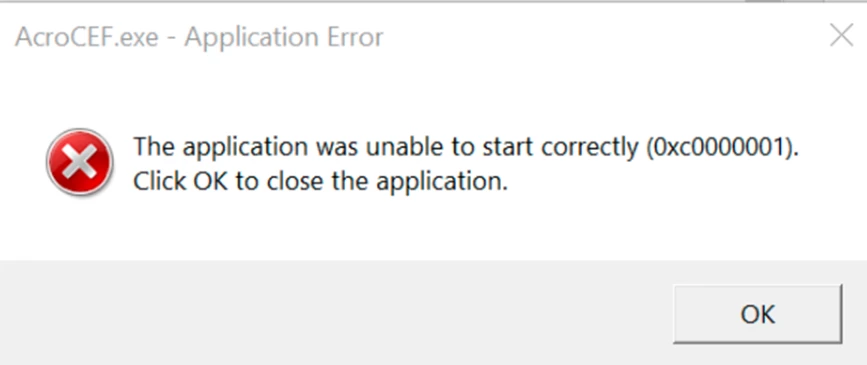
This error started to appear on March 9th, 2022. 

My team and I have tried to uninstall and reinstall Adobe Acrobat Reader DC multiple times , but it the error comes back for some computers after the system is restarted. Has anyone found the cause and solution to this problem?

This topic has been closed for replies.
Correct answer AMu

With the latest release of Acrobat on 12th April, 2022, this issue has been addressed.


If your product is not already updated, you can manually do so from within the product.  Click on the menu Help-> Check for updates.

14 replies

BT141
Participant
March 15, 2022

I work in IT and we have seen several machines behaving the same way.  We uninstall and reinstall and Acrobat works maybe one time after the reinstall, but the second time, it shows the same error.  We would like to know how to fix this issue.

Participant
March 15, 2022

I have unistalled it and installed the Adobe XI for now, til this issue fixes it. Make sure you put windows XP as your OS

Participant
April 4, 2022

Thank You Not_Sara


This has what has worked for our organization.  Once I installed this none of the errors the user had reported came back.  Hoping that this helps others out as well.

Adobe Employee
March 15, 2022

Hi,
Sorry for the issue that you are facing with Adobe Reader.

Can you please help me with the below details so that I can help you further in this?
I would request you to kindly share the Crash dumps as well when Reader Crashes/Hangs for you.
Here is how you can collect the crash dump :
When Reader Crashes you need to perform the following steps:
For Getting the Crash Logs:
a.     When Acrobat Reader Crashes, Open Windows Task Manager
b.     -> Go To Processes, There you can see a process AcroRd32.exe
c.     Right Click on this process and click "Create Dump File"
d.     Dump file will be created in the Temp folder of user (as specified on the dialog you get after creating dump files).
e.     Save this DMP file on any Cloud Storage and Share the link for that with us on mail.
We will try to analyze your issue on priority.
Thanks

Meenakshi Negi
Community Manager
Community Manager
March 15, 2022

Hi Lawrence,


Thank you for reaching out, and sorry about the trouble.


Could you please share the Reader DC and OS version used by the users?

Did you make any recent changes, after which you have started receiving this error?

It would be helpful if you could share the logs with us.


Thanks,

Meenakshi


Participant
March 17, 2022

Update: The Adobe Acrobat Reader DC version for the problematic machines is 22.001.20085. All computers have windows version 21H2. I am using a stop gap measure of using an older version of Adobe Acrobat Reader DC. However, I would like to have a more permanent solution if possible. 

Participant
March 14, 2022

IT engineer here, I just had a user with the same issue. Restarting, uninstalling, and reinstalling didnt help. Haven't been able to find any other solutions. I am getting him an Adobe Acrobat Pro license and hoping the problem goes away with that program.