


Pop-up forcing a comment when adding markings or drawing in shared PDF
Hi,
Im using the adobe share files with comments enabled to have a file that several users can access and highlight / draw in on different tablets. But despite removing the checkers for pop-up behaviour and reinstalling / cleaning Adobe i cant get rid of it, every time a line is added or something is highlighted a damn comment pop-up shows up prompting the need for a comment.
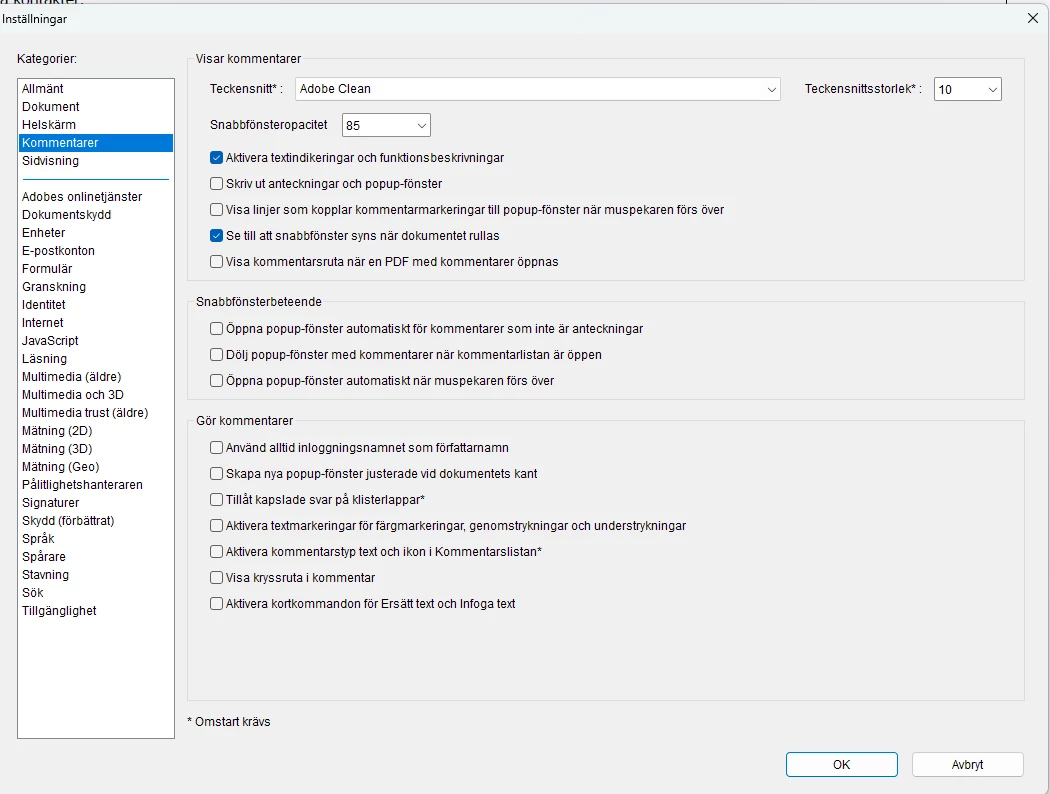
This is making the program lag and adobe eventually crashing every 3rd second until restarted on all devices, mobile or tablet. I did find a workaround to the problem, when drawing and marking i switch the color of the line before closing the tool down to avoid being given a comment pop-up but its annoying and not a permanent solution to the problem.
Solved: Re: Disable Highlight Pop Up Note Problem - Adobe Community - 10120568
Solved: Comments Pane in Acrobat will not disable - Adobe Community - 14556942
I did all of the steps in the above forum links, nothing works. Using the latest avaiable adobe acrobat PDF reader variant on app store V 25.2.
Sincere regards, Pontus
 AdChoices