


Inspiring
September 15, 2023
Question

Populate text field from button group AND another text field

  • September 15, 2023
  • 1 reply
  • 2313 views

Yet another road block for me!  I need to have my form auto populate a text field.  The issue I am having is that it needs to be populated from a variety of buttons, check boxes and other text fields.  I know how to do that if it just buttons and check boxes, but not how to add in the text fields.  I'm also hoping to add in some permanent words if something is typed into the text fields.  For example:

1. "Shortage" is chosen from the Group1 buttons

2. 9/2023 is inserted in the "Bill period" text field

3. $100.00 is inserted in the "Short amt" text field

4. "Late payment fee" is chosen from the Group2 buttons

I want the result text to say (not the colors, but colors are the tie-ins): "Shortage for 9/2023 bill period in the amount of $100.00 due to late payment fees."


Below is my form:
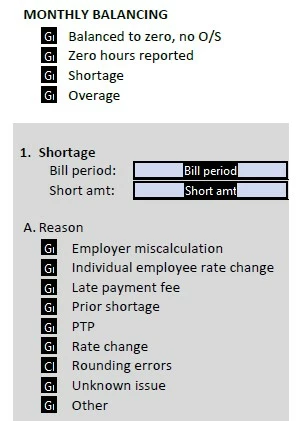
 

Below is my current script for the completed text box:

event.value = "";

var v1 = this.getField("Group1").valueAsString;

if(v1 == "Choice1"){

event.value += "BILL PERIOD balanced to zero, no O/S. ";

}

if(v1 == "Choice2"){

event.value += "Zero hours reported for BILL PERIOD. ";

}

if(v1 == "Choice3"){

event.value += "Shortage for ";

}

if(v1 == "Choice4"){

event.value += "Overage for ";

}


Beyond this, I am a little stumped as to how to include the text fields.  I also don't want the person completing the form to have to type "bill period in the amount of" after the date.  I just want them to enter the date and the rest will be inserted automatically because a date has been entered in the field.  Thanks all for your help!

This topic has been closed for replies.

1 reply

try67
Community Expert
September 15, 2023

event.value += "Shortage for " + this.getField("Bill period").value + " bill period in the amount of $" + this.getField("Short amt").value + " due to late payment fees.";

Inspiring
September 15, 2023

Getting closer, but I don't want the words to show up in the text box UNLESS something is typed in the "Bill period" and "Short amt" fields.  The below is also problematic as it no longer shows the result of Group1, the "Bill period", the "Short amt", but does show the reason chosen from Group2:

event.value = "";
var v1 = this.getField("Group1").valueAsString;
if(v1 == "Choice1"){
event.value += "BILL PERIOD balanced to zero, no O/S. ";
}
if(v1 == "Choice2"){
event.value += "Zero hours reported for BILL PERIOD. ";
}
if(v1 == "Choice3"){
event.value += "Shortage for ";
}
if(v1 == "Choice4"){
event.value += "Overage for ";
}
event.value += this.getField("Bill period").value + " bill period in the amount of $" + this.getField("Short amt").value;
event.value = "";
var v2 = this.getField("Group2").valueAsString;
if(v2 == "Choice1"){
event.value += "due to employer miscalculation. ";}
if(v2 == "Choice2"){
event.value += "due to individual employee rate change. ";}
if(v2 == "Choice3"){
event.value += "due to late payment fees. ";}

Nesa Nurani
Community Expert
September 16, 2023

Not quite. Specifically I want the resulting text field to be empty unless something is either toggled or entered into the other text fields, I simplified the code below:

event.value = "";
var v1 = this.getField("Group1").valueAsString;

if(v1 == "Choice3"){
event.value += "Shortage for ";
}

event.value += this.getField("Bill period").value + " bill period in the amount of $" + this.getField("Short amt").value;

var v2 = this.getField("Group2").valueAsString;

if(v2 == "Choice3"){
event.value += "due to late payment fees. ";}


If "Shortage" is selected from Group1, then "A shortage for" is populated.

IF a date is entered into "Bill period", then "DATE bill period in the amount of $" is populated.

IF an amount is entered into "Short amt", then "AMOUNT" is populated.

If "Late payment fee" is selected from Group2, then "due to late payment fees" is populated.


So, I want the populated text box to be empty UNLESS something is toggled or entered in the other text boxes.


Use this, field should be empty until both text fields have value and both radio buttons are selected "Choice3":

var v1 = this.getField("Group1").valueAsString;
var v2 = this.getField("Group2").valueAsString;
var v3 = this.getField("Bill period").valueAsString;
var v4 = this.getField("Short amt").valueAsString;

event.value = (v1 === "Choice3" && v2 === "Choice3" && v3 !== "" && v4 !== "") ? 
"Shortage for " +v3+ " bill period in the amount of $" +v4+ " due to late payment fees." : "";