


Exit
  • Global community
    • Language:
      • Deutsch
      • English
      • Español
      • Français
      • Português
  • 日本語コミュニティ
  • 한국 커뮤니티
0

Populating a text field from responses in Dropdown field

Explorer ,
Sep 28, 2020 Sep 28, 2020

I am reasonably new to PDF forms and want to develop my skills during the COVID lockdown.  

I am trying to auto-populate a text field based in the dropdown box selection.  i.e if "Dropdown1" selection is "Paul" then "Text1" would auto-populate with "Melbourne" if "Dropdown1" selection is "Terry" then "Text1" would auto-populate with "Adelaide" and so on.

I am sure this is probably quite easy, but at the moment is beyond my skill level.

Thanks in advance

Paul
TOPICS
Create PDFs , How to , PDF forms
1.0K
Translate
Report
Community guidelines
Be kind and respectful, give credit to the original source of content, and search for duplicates before posting. Learn more
community guidelines
1 ACCEPTED SOLUTION
Community Expert ,
Sep 29, 2020 Sep 29, 2020

It is quite easy to do this with a combination of the Acrobat built-in features for the comboboxes and a little bit of JavaScript scripting.


However, if your dropdown menu has over 10 listed items it becomes quite an annoyance to do this manually, in which case, you'll need to fully employ a more elaborated script.


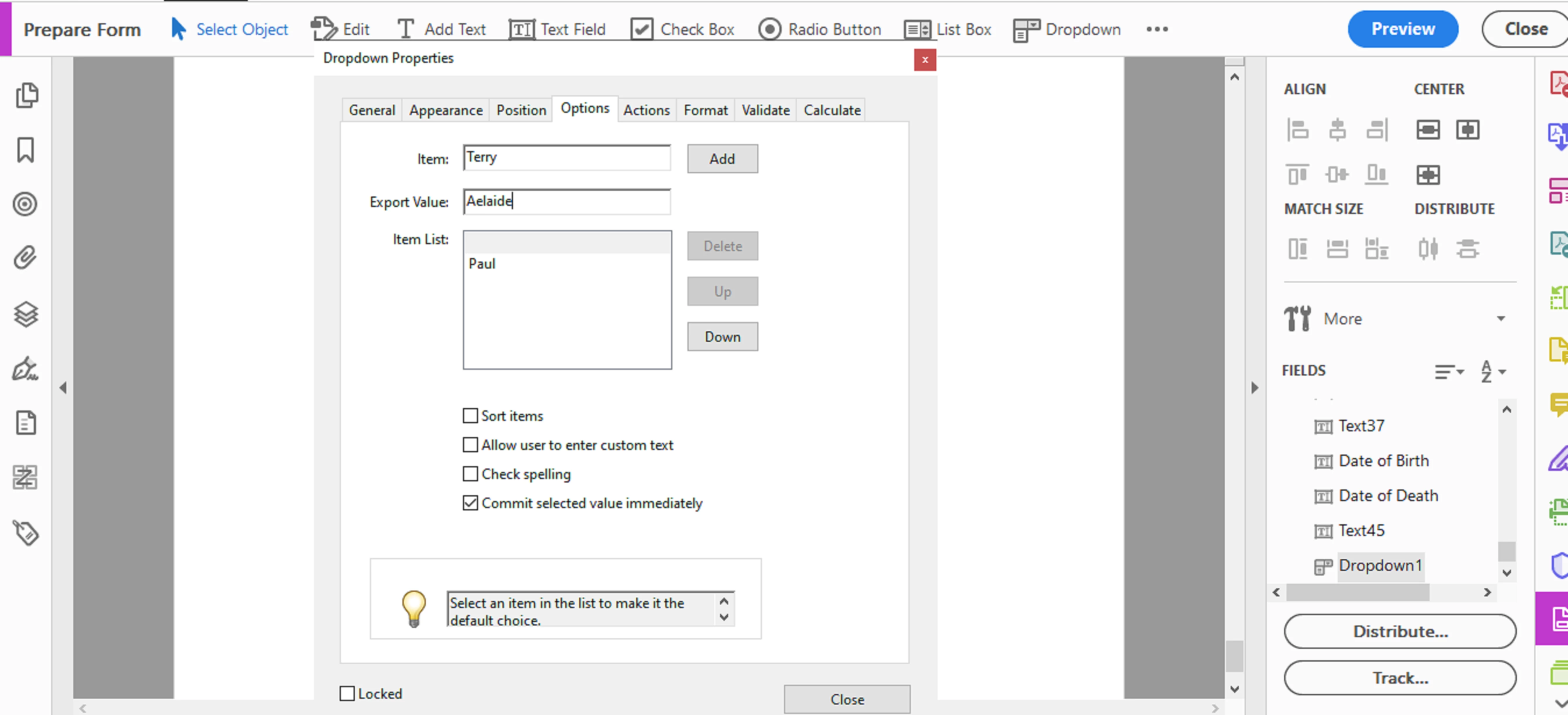
But the easiest way for me would be to manually enter the list item "Paul" and assign its export value "Melbourne" . Do the same for each entry that you add.


See slide:


combobox-exportvalues.png


Then you can add a custom calculation script in "text1" field like :


event.value = this.getField("Dropdown1").value;


View solution in original post

Translate
Report
Community guidelines
Be kind and respectful, give credit to the original source of content, and search for duplicates before posting. Learn more
community guidelines
Community Expert ,
Sep 28, 2020 Sep 28, 2020

You can use this code as custom calculation script of text1 field:

var drop = this.getField("Dropdown1").valueAsString;
if(drop == "Paul"){event.value = "Melbourne";}
else if(drop == "Terry"){event.value = "Adelaide";}
else event.value = "";

Translate
Report
Community guidelines
Be kind and respectful, give credit to the original source of content, and search for duplicates before posting. Learn more
community guidelines
Explorer ,
Oct 01, 2020 Oct 01, 2020

Thank you NesaNurani, I will be having a close look at using this in my current and future forms.  Thanks again for your help.  

Translate
Report
Community guidelines
Be kind and respectful, give credit to the original source of content, and search for duplicates before posting. Learn more
community guidelines
Community Expert ,
Sep 29, 2020 Sep 29, 2020

It is quite easy to do this with a combination of the Acrobat built-in features for the comboboxes and a little bit of JavaScript scripting.


However, if your dropdown menu has over 10 listed items it becomes quite an annoyance to do this manually, in which case, you'll need to fully employ a more elaborated script.


But the easiest way for me would be to manually enter the list item "Paul" and assign its export value "Melbourne" . Do the same for each entry that you add.


See slide:


combobox-exportvalues.png


Then you can add a custom calculation script in "text1" field like :


event.value = this.getField("Dropdown1").value;


Translate
Report
Community guidelines
Be kind and respectful, give credit to the original source of content, and search for duplicates before posting. Learn more
community guidelines
Explorer ,
Oct 01, 2020 Oct 01, 2020
LATEST

Thank you ls-rbls.  Your idea works a treat and has shown me how much more I need to learn.  Thank you again 

Translate
Report
Community guidelines
Be kind and respectful, give credit to the original source of content, and search for duplicates before posting. Learn more
community guidelines