Inspiring
November 27, 2023
Answered

Populating values when a checkbox selected and data is in a field

  • November 27, 2023
  • 3 replies
  • 8529 views

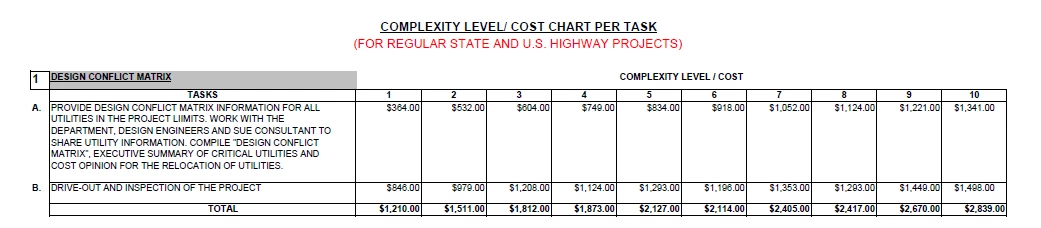
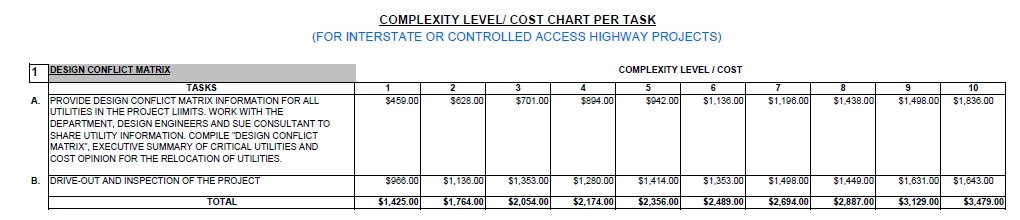
I'm making a form for my organization and I want to assign a dollar amount to a field. The dollar amount is based off of the complexity (value ranges between 1 and 10) and if the access control is yes or a no (Access control yes is an interstate project and no access control is a highway project). Can someone give me an example of a custom script for this?

This topic has been closed for replies.
Correct answer Thom Parker

I created a "CalcOverride" checkbox and entered your code in "Text1" to see if it would work but it still auto populates if "CalcOverride" is checked or not. Any suggestions?


That's because of how the calculation script is written.  

First, always return the calculated value for a field in the "event.value property".


So replace this line:

   this.getField("Text1").value = total1;

with this one:

   event.value = total1;


Next, since the script aslo sets a value in a different field, the entire calculation has to be qualified in order to allow user entry into the "Text2" field. 

So put the whole calculation into an "if" statement


event.rc = this.getField("CalcOverride").value != "Off";
if(event.rc)

{

.....  calculation script ...

}


There are a few other things that could be improved with this script. For example, the data could be moved to a document level script so it's global to the entire document. And the loop for finding the matching data could be simplified by useing the Array.find() method. 



3 replies

Nesa Nurani
Community Expert
November 28, 2023

You can use this script as 'Custom calculation script', you can put it in "Text1" field.

Just finish list with all the prices.

var cpx = Number(this.getField("Complexity").valueAsString);
var chk = this.getField("Check Box").valueAsString;
var total1 = 0;
var total2 = 0;
var prices = [
{complexity: 1, check: "Yes", price1: 459, price2: 966 },
{complexity: 1, check: "No",  price1: 364, price2: 846 },
{complexity: 2, check: "Yes", price1: 628, price2: 1136 },
{complexity: 2, check: "No",  price1: 532, price2: 979 }
//Fill in list with rest of the complexity and prices.
];

for(var i in prices){
if(cpx == prices[i].complexity && chk == prices[i].check){
total1 = prices[i].price1;
total2 = prices[i].price2;}}

this.getField("Text1").value = total1;
this.getField("Text2").value = total2;
Badhawg66Author
Inspiring
November 28, 2023

I filled in the rest of the values but I get a Syntax error saying I'm missing a ] after the element list on line 11. Did I do something wrong?


var cpx = Number(this.getField("Complexity").valueAsString);
var chk = this.getField("Check Box").valueAsString;
var total1 = 0;
var total2 = 0;
var prices = [
{complexity: 1, check: "Yes", price1: 459, price2: 966 },
{complexity: 1, check: "No", price1: 364, price2: 846 },
{complexity: 2, check: "Yes", price1: 628, price2: 1136 },
{complexity: 2, check: "No", price1: 532, price2: 979 }
{complexity: 3, check: "Yes", price1: 701, price2: 1353 },
{complexity: 3, check: "No", price1: 604, price2: 1208 },
{complexity: 4, check: "Yes", price1: 894, price2: 1280 },
{complexity: 4, check: "No", price1: 749, price2: 1124 }
{complexity: 5, check: "Yes", price1: 942, price2: 1414 },
{complexity: 5, check: "No", price1: 834, price2: 1293 },
{complexity: 6, check: "Yes", price1: 1136, price2: 1353 },
{complexity: 6, check: "No", price1: 918, price2: 1196 }
{complexity: 7, check: "Yes", price1: 1196, price2: 1498 },
{complexity: 7, check: "No", price1: 1052, price2: 1353 },
{complexity: 8, check: "Yes", price1: 1438, price2: 1449 },
{complexity: 8, check: "No", price1: 1124, price2: 1293 }
{complexity: 9, check: "Yes", price1: 1498, price2: 1631 },
{complexity: 9, check: "No", price1: 1221, price2: 1449 },
{complexity: 10, check: "Yes", price1: 1836, price2: 1643},
{complexity: 10, check: "No", price1: 1341, price2: 1498 }
];

for(var i in prices){
if(cpx == prices[i].complexity && chk == prices[i].check){
total1 = prices[i].price1;
total2 = prices[i].price2;}}

this.getField("Text1").value = total1;
this.getField("Text2").value = total2;

Badhawg66Author
Inspiring
March 13, 2024

That's because of how the calculation script is written.  

First, always return the calculated value for a field in the "event.value property".


So replace this line:

   this.getField("Text1").value = total1;

with this one:

   event.value = total1;


Next, since the script aslo sets a value in a different field, the entire calculation has to be qualified in order to allow user entry into the "Text2" field. 

So put the whole calculation into an "if" statement


event.rc = this.getField("CalcOverride").value != "Off";
if(event.rc)

{

.....  calculation script ...

}


There are a few other things that could be improved with this script. For example, the data could be moved to a document level script so it's global to the entire document. And the loop for finding the matching data could be simplified by useing the Array.find() method. 



I'm able to manually enter values now but Text23 doesn't add Text1-22 correctly

Thom Parker
Community Expert
November 27, 2023

The best way to achieve this is to use a custom calculation script on the field that is assigned the Dollar amount value. 

If there is any complexity to the calculation, then you'll need to use "if" statements. 

Here are some relevant articles :

https://www.pdfscripting.com/public/How-to-Write-a-Basic-PDF-Calculation-Script.cfm?sd=40

https://www.pdfscripting.com/public/How-to-write-an-If-statement.cfm?sd=40


Thom Parker - Software Developer at PDFScriptingUse the Acrobat JavaScript Reference early and often
Amal.
Community Manager
Community Manager
November 27, 2023

Hi @Badhawg66 

Hope you are doing well and thanks for reaching out.

The workflow you are trying to achieve is might be possible using JavaScript. For more information, please check the help pages listed below:
https://acrobatusers.com/tutorials/javascript_console/
https://helpx.adobe.com/acrobat/using/applying-actions-scripts-pdfs.html

Hope it will help

Regards
Amal

Badhawg66Author
Inspiring
November 28, 2023

Could you help me delete my attachments? I tried attaching on to my post yesterday but it said I couldn't attach files. I can't edit my post yet.