Known Participant
June 17, 2020
Answered

'Prepare Form' tool can't add any fields (Acrobat Pro DC)

  • June 17, 2020
  • 3 replies
  • 5795 views

After opening the Prepare Form tool, when I click to add a field (checkbox, text field, etc.) to my document, it doesn't place anything down.  I also am not able to edit any field names. None of them are locked or on read only. Please help!!!


See attached screen recording.

This topic has been closed for replies.
Correct answer Bevi Chagnon - PubCom.com

I think you have either a corrupted PDF file, or one that was not made to the PDF specification by Quartz (Apple's built-in PDF knock-off).


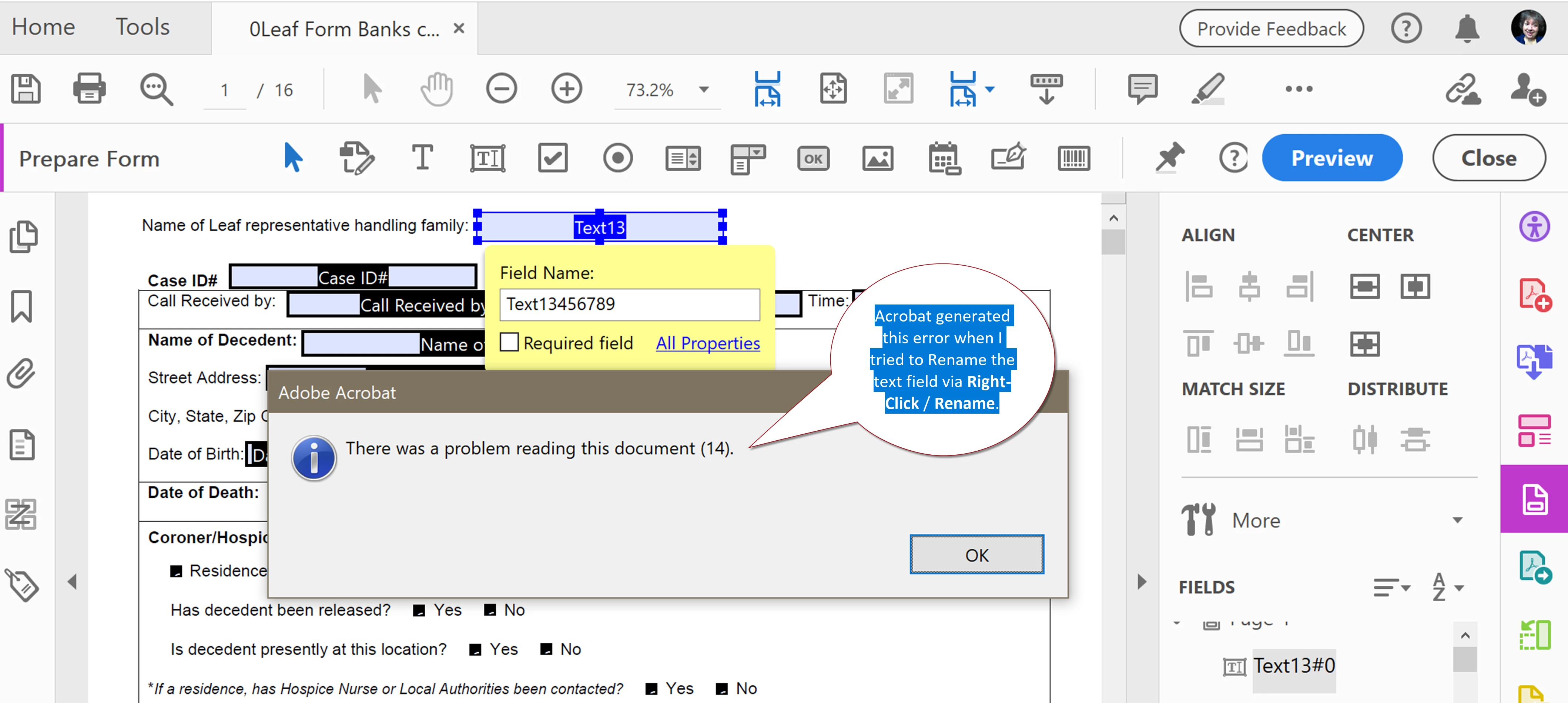
I couldn't change any form fields or add new ones, as you described. But using the right-click/Rename utility, got this error message which means Acrobat's form utility hit some glitch in your file.
 

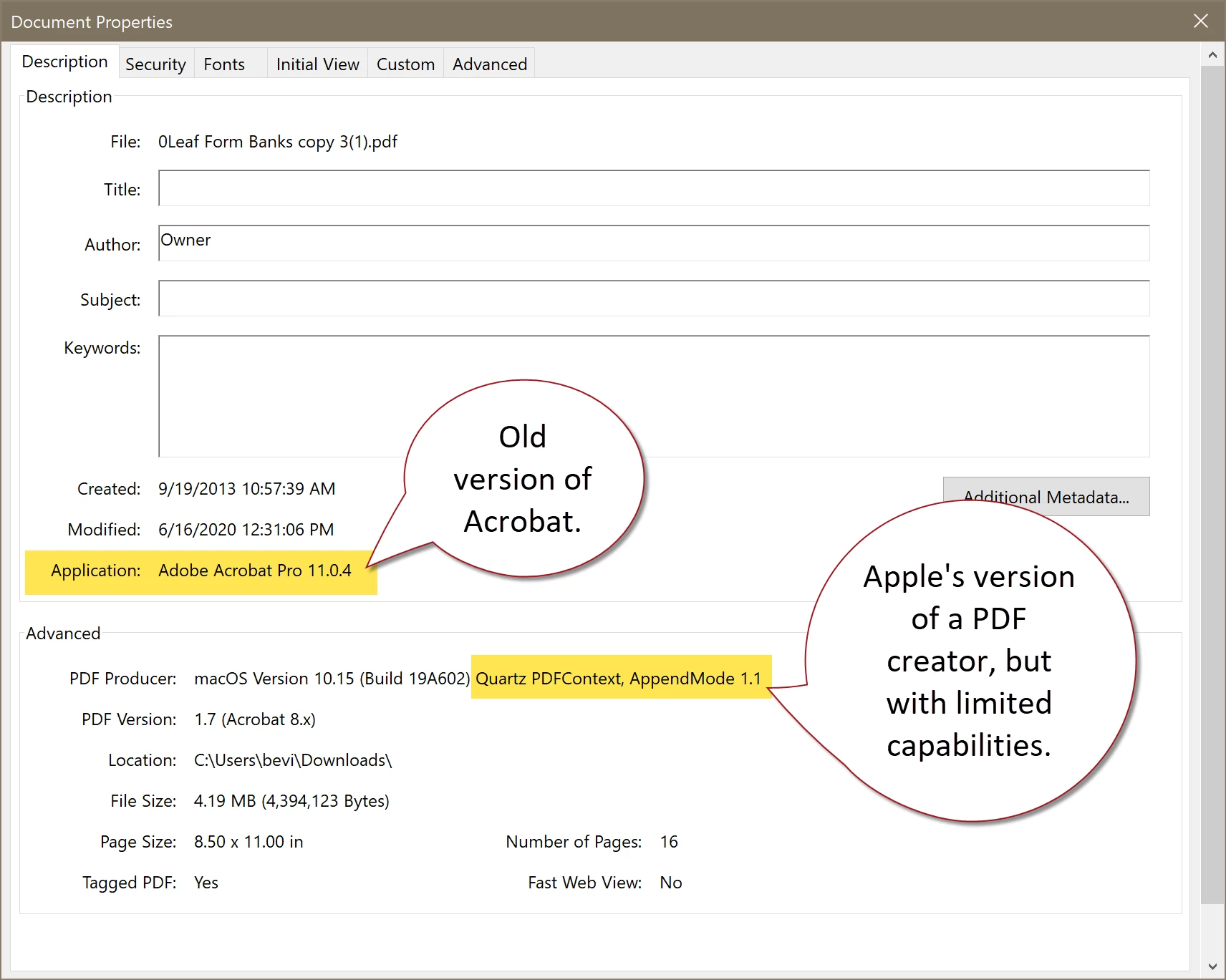
Looking at your FIle / Properties, it shows that an out-of-date version of Acrobat Pro was used (XI), and that the "PDF Producer" (the utility that actually converts the source file into the PDF) is Apple's Quartz, the free PDF producer that comes with Apple OS. We've had PDF-compatibility problems with Quartz-built files in the past, and I wouldn't be surprised if it's at the root of your problem.
 

Can you re-export the PDF using an Adobe product? Then you can copy/paste the fields from the old file into the new, rather than having to recreate everything from scratch.


 

3 replies

Bevi Chagnon - PubCom.com
Brainiac
June 17, 2020

I think you have either a corrupted PDF file, or one that was not made to the PDF specification by Quartz (Apple's built-in PDF knock-off).


I couldn't change any form fields or add new ones, as you described. But using the right-click/Rename utility, got this error message which means Acrobat's form utility hit some glitch in your file.


Looking at your FIle / Properties, it shows that an out-of-date version of Acrobat Pro was used (XI), and that the "PDF Producer" (the utility that actually converts the source file into the PDF) is Apple's Quartz, the free PDF producer that comes with Apple OS. We've had PDF-compatibility problems with Quartz-built files in the past, and I wouldn't be surprised if it's at the root of your problem.


Can you re-export the PDF using an Adobe product? Then you can copy/paste the fields from the old file into the new, rather than having to recreate everything from scratch.

 

|    Bevi Chagnon   |  Designer, Trainer, & Technologist for Accessible Documents ||    PubCom |    Classes & Books for Accessible InDesign, PDFs & MS Office |
Known Participant
June 17, 2020

Incredible. Thank you. I started copying and pasting over into an older version of our forms that I found, and that does seem to work.  Thank you so much!

Bevi Chagnon - PubCom.com
Brainiac
June 17, 2020

Hi Pierce,

Could the PDF be secured or locked?

Check under File / Properties / Security.


|    Bevi Chagnon   |  Designer, Trainer, & Technologist for Accessible Documents ||    PubCom |    Classes & Books for Accessible InDesign, PDFs & MS Office |
Known Participant
June 17, 2020

"No Security" and everything is "Allowed"

Amal.
Community Manager
Community Manager
June 17, 2020

Hi Pierce@Leaf


We are sorry for the trouble. As described you are unable to add any fields to the document using prepare form tool.


Is this a behavior with a particular PDF file or with all the PDFs? Please try to create a new PDF form and check if its working or not. If its a file specific issue please share the file with us for testing. Upload the file to the document cloud https://documentcloud.adobe.com/link/home/  generate the link and share it with us.


What is the version of the Adobe Acrobat DC you are using? To check the version go to Help > About Adobe Acrobat DC and make sure you have the latest version 20.009.20067 installed. Go to Help > Check for Updates.


If it still does'nt work, please try to create a new test user profile with full admin rights or enable the root account in Mac and try using the application there and check.


Let us know how it goes


Regards

Amal


Known Participant
June 17, 2020

This is just happening on this one file. I am able to add fields in other PDFs.  I am running the updated version.

Here is the file: https://documentcloud.adobe.com/link/review?uri=urn:aaid:scds:US:a4630bd9-77ec-41a7-8281-2d0d32e01ee8