


New Participant
December 30, 2023
Question

Preserve the ordering when pasting from PDF with vertical selection using Ctrl + Alt + Mouse drag

  • December 30, 2023
  • 2 replies
  • 1409 views

I have a table with a list of Product codes in a table like this.
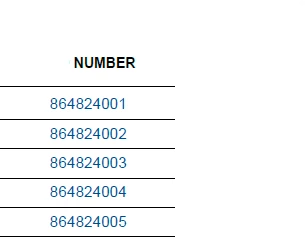
I want to copy these codes into excel, excluding other columns. So I use Ctrl + Alt + Mouse drag to create select box, so that I can select vertically. But then after pasting, it doesn't follow the pdf table order but instead: 

864824002
864824003
864824004
864824005
864824001

Is there any way I can keep the original ordering, since I need to copy other columns with associated attributes as well. I already tried to make the select box larger but it didn't work.

This topic has been closed for replies.

2 replies

JR Boulay
Community Expert
January 8, 2024

Select the text using the Selection tool.

Right-clic on the selected text.

Choose "Copy With Formatting".

Then you can paste as a table.


Acrobate du PDF, InDesigner et Photoshopographe
Jf97Author
New Participant
January 8, 2024

Hi, my goal is to select and copy "one single column only", then paste as text to fill into an excel form (the form is already formatted).  That's why I used Ctrl + Alt+ Mouse Drag.
Copy with format and paste as text produces additional spacing so I cannot paste directy into my form. Also, this requires me to do additional steps (choose tool, right click, choose copy with formatting,...).

I just want to resolve the unwanted behavior of incorrect ordering only to reduce the steps saving more time, since I only extract partial info from small tables in many files (around 1000 files to work with).

Here is the result of copy with formatting.


Amal.
Community Manager
Community Manager
January 1, 2024

Hi @Jf97 


Hope you are doing well and thanks for reaching out.


Please go through the correct answer marked in the similar discussion https://community.adobe.com/t5/acrobat-discussions/how-to-copy-paste-a-table-from-pdf-to-excel-using-acrobatx/m-p/3189835#M7343 and see if that works for you.


~Amal

Jf97Author
New Participant
January 8, 2024


Hi, unfortunately none of the anwsers in that post solve my problem. I saw most of them referring to copy/extract "all the table", not select and pasting from 1 specific column in my case.