New Participant
October 23, 2017
Answered

Print Current View

  • October 23, 2017
  • 3 replies
  • 10220 views

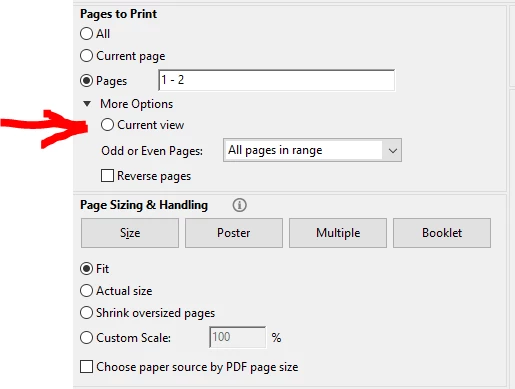
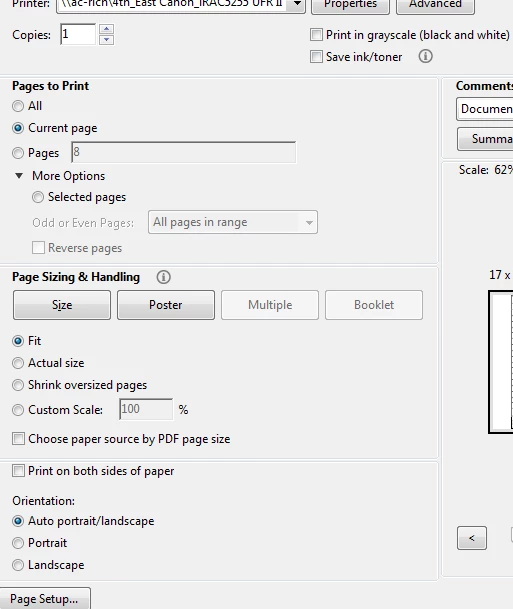
The option to Print Current View does not appear in Adobe Acrobat Pro 2017.  Is there a way to print the current view other than to take a screen snip and copy it into Word?  It's a lot of extra steps, and the image quality suffers.
Correct answer Abambo

Well, with my version it is there:

What exact version of Acrobat do you have?

3 replies

September 25, 2018

Thank you dennisg!   Your response should be marked as the answer as this solved the problem.   I see the span of time between the post already marked "answer" and your response is almost a year, but hopefully engineer will log in and update the answer.

Inspiring
February 6, 2019

yeah, just another UI glitch/bug.,..

New Participant
August 8, 2024

Hey I think I found the answer. You cannot select "Current VIew" if your current view includes a page break, ie. part of one page and the next page. It must be of only part of a single page.

New Participant
October 26, 2017

The Current View option is back in my Adobe Acrobat print dialog.  It was gone a few days ago as evidenced by my original screen snip posted 10/23/2017.  When originally happened, I exited and restarted Acrobat, but the problem persisted.  I have not rebooted my computer since, but have exited and restarted Acrobat many times in the past few days.  I'm running Acrobat Pro 2017.011.30066.

dennisg49261762
New Participant
September 23, 2018

I've just had this problem and found the solution on another page... "You might need to click off the page in the Navigation Panel so that no PDF page is preselected. Then, open the Print dialog box and find current view option."

New Participant
October 3, 2021

03 Oct 2021. I tried that and it didn't work. I had it the other day and I use the current view/print option a lot. I've restarted my computer, I've asked Adobe AI (waste of time), and I've come to the community for help. Here's the weird thing, it worked on one page this morning but now it won't on that same page nor will it on any other pages. I just tired it on another PDF and it was the same issue even though yesterday it worked on that very same PDF. Frustrating. And...this is after a pop up that said Adobe was updating. All I want is to be able to print the "current view". Help please!

Abambo
AbamboCorrect answer
Community Expert
October 23, 2017

Well, with my version it is there:

What exact version of Acrobat do you have?

ABAMBO | Hard- and Software Engineer | Photographer