


soflojo
New Participant
May 10, 2017
Answered

Printing a PDF only opens a Save As Dialogue, Does NOT actually print.

  • May 10, 2017
  • 3 replies
  • 46330 views

I have Acrobat DC, when I open a file and then try to print to my printer. It instead saves the file as a PDF. The printer dialogue box opens up and allows me to select the printer as if I was going to print but then when I press print a save as dialogue box opens up. I am assuming this is a checked setting somewhere, how do I fix this?
Correct answer Dov Isaacs

The problem is most likely due to a particular setting being inadvertently set.


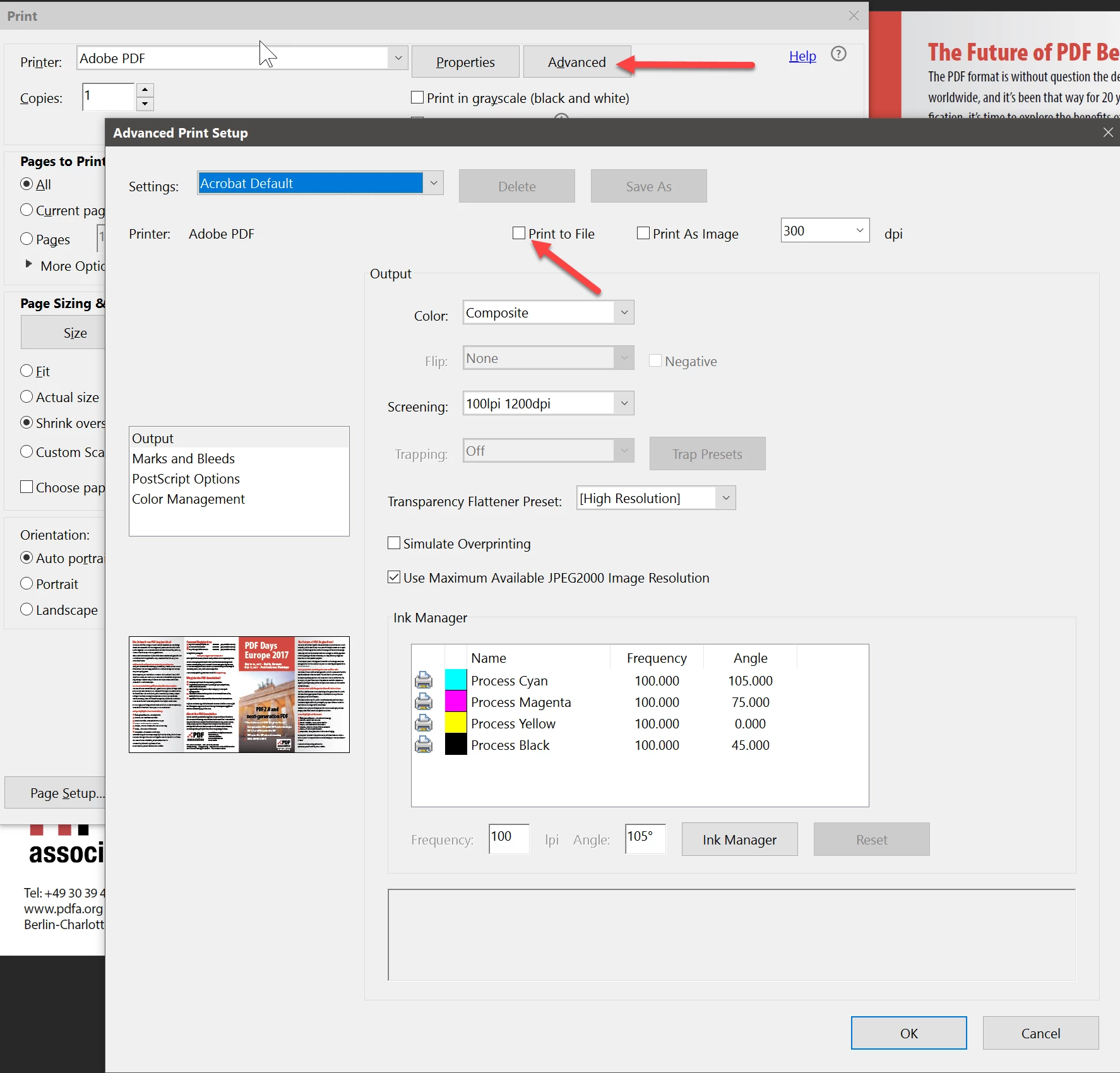
From the Acrobat Print dialog, press Advanced.


Then in the Advanced Print Setup dialog, select the Output pane (left part of dialog).


You will see an option labelled Print to File. Make sure that this option is not checked (checking this option on forces the print driver's output to be diverted to a file causing a Save as dialog to appear).


Press OK and then Print. Your output should now correctly go the printer.


If that does not solve the problem, it could be that the actual printer properties as accessed via Windows has a similar option checked. But if that was the case, all applications would experience the same problem.


Let us know if this solves your problem.


          - Dov

3 replies

New Participant
September 16, 2024

This advice is still helping after all these years.  Thanks Dov Isaacs for the advice and thanks to soflojo for asking the question in the first place.  

New Participant
May 8, 2024

I checked and the print to file box is not checked and still just wants to save the file. tried diffwent laptops and the same think happens on both.

Dov Isaacs
Dov IsaacsCorrect answer
Brainiac
May 14, 2017

The problem is most likely due to a particular setting being inadvertently set.


From the Acrobat Print dialog, press Advanced.


Then in the Advanced Print Setup dialog, select the Output pane (left part of dialog).


You will see an option labelled Print to File. Make sure that this option is not checked (checking this option on forces the print driver's output to be diverted to a file causing a Save as dialog to appear).


Press OK and then Print. Your output should now correctly go the printer.


If that does not solve the problem, it could be that the actual printer properties as accessed via Windows has a similar option checked. But if that was the case, all applications would experience the same problem.


Let us know if this solves your problem.


          - Dov

- Dov Isaacs, former Adobe Principal Scientist (April 30, 1990 - May 30, 2021)
peter ws72539870
New Participant
May 15, 2017

hi, this morning Adobe Acrobat  Pro 9 is refusing to print to either of my printers (CANON PIXMA M922, DELL 1320 laser). it will only bring up the Save as File dialogue (like the previous posters problem). i tried the approach recommended above (go to ADVANCED settings). however, the page that comes up does not have a PRINT TO FILE box to check/uncheck. the only box on this line is PRINT TO IMAGE.

before coming to this website, i tried repair ACROBAT PRO. it did not fix the problem.

your help will be appreciated.

Brainiac
May 15, 2017

Acrobat is not broken, it does not need repair. Turn off the PRINT TO FILE option. The answer was for Acrobat DC, not 9. Poke around for the option.