


StephanieDeguire
Participating Frequently
November 6, 2018
Answered

Problem with OCR deleting some information on document

  • November 6, 2018
  • 2 replies
  • 2149 views

We have problems with the OCR on some documents. I contacted Adobe technical support for help and said that the help I received did not answer my problem at all.

This situation is critical for my company because the OCR removes certain information from the original document and that it is legal documents that can not be altered as well!

The file in error currently works if I transfer it in image or if I pass it in post script and return in PDF but not if I work directly on it.

The proposed solution is to go through the ADOBE PDF driver but it is impossible for us for several reasons.

Is there any way that a programmer evaluates my file?
Correct answer gary_sc

OK, I think I have enough information. (Hopefully)

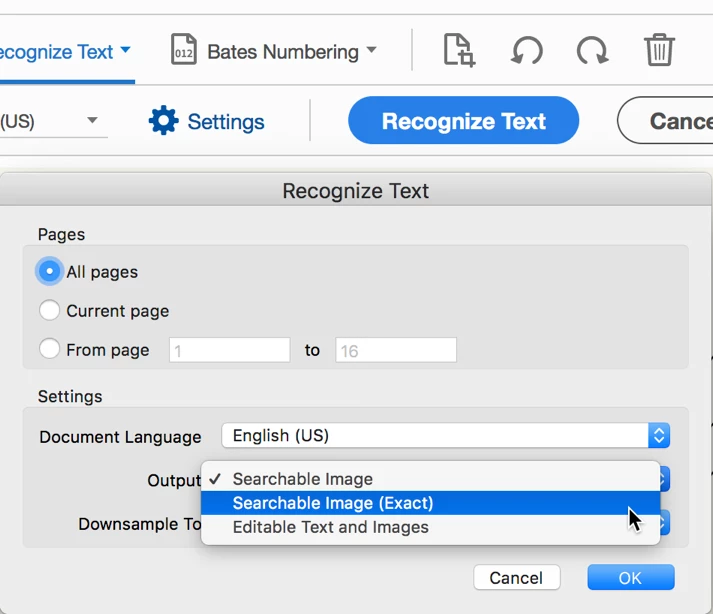
When you are setting up your Acrobat to do the OCR, go into settings (as shown below) and set the Output to Searchable Image (Exact).

IF that doesn't work (or you already have that set), try the other two and see if that makes a difference.

The only reason I'm being a bit nebulous here is that different scanners can do different things to an image that may help/hurt this process.

Let us know...

2 replies

New Participant
February 21, 2025

I've had multiple problems with entire pages of text disappearing when running the OCR Recognize text function on a PDF document.  I recently had a problem again, and in order to restore it to it's original state, I backed out of the PDF itself. Then I right clicked on the PDF file name, chose "Restore to Previous Version" and restored it to the date I originally created/downloaded/saved the PDF.  This restored all of the text that had been erased (thank goodness!).  

I then went back into the PDF, went to Print, then print to "Adobe PDF", which creates another PDF copy of it, which I then saved.  Then that saved version I just made could then be scanned with OCR Text Recognition with no problems and no erasing data.  

S_S
Community Manager
Community Manager
March 12, 2025

Hi @Cristal319841111ozk,


Hope you are doing well. Sorry for the trouble, and the delayed response.


This looks very strange, and shouldn't be happening. Would you mind sharing a few pieces of information for further investigation:

1. The OS and version of your system;

2. A screen recording of the entire event for a better understanding;

3. A sample file where you experience the issue.


Also, please ensure you are on latest version (2025.001.20432) for the best experience.

To do so, go to Menu-> Help-> Check for Updates.


Regards,
Souvik.

gary_sc
Braniac
November 6, 2018

HI Stephanie,

My wife's a retired attorney so yes, I do understand how critical this is.

Some questions to start:

Are these already scanned documents or are you doing the scanning in house?

If you're scanning in house, how are you doing them? (E.g., what kind of scanner, what resolution, are you scanning from within Acrobat or from the scanner's software that came with the scanner, what is your OS, what version of Acrobat, etc., etc.)

What is the nature of the part of the page that is being removed? That is is it hand-written notes, stamps on page, what?

Depending on all of these things, there should be some answers.

Lastly, would it be possible for you to redact the sections on the page that is confidential and share the rest with us so we can see what's taking place?

StephanieDeguire
Participating Frequently
November 6, 2018

This is the courthouse that provides me the document, so I have no control over how it is generated. The current document was produced by Xerox WorkCentre 5855, PDF version 1.5 (Acrobat 6.x).

The page contain hand-writting and text. I need to make OCR on the complet page. Is one of the hand-0writting line that dissapear.

I cannot redact the file since all the contains is confidential. Can i send a link to a specif person?

gary_sc
gary_scCorrect answer
Braniac
November 6, 2018

OK, I think I have enough information. (Hopefully)

When you are setting up your Acrobat to do the OCR, go into settings (as shown below) and set the Output to Searchable Image (Exact).

IF that doesn't work (or you already have that set), try the other two and see if that makes a difference.

The only reason I'm being a bit nebulous here is that different scanners can do different things to an image that may help/hurt this process.

Let us know...