


New Participant
February 13, 2020
Question

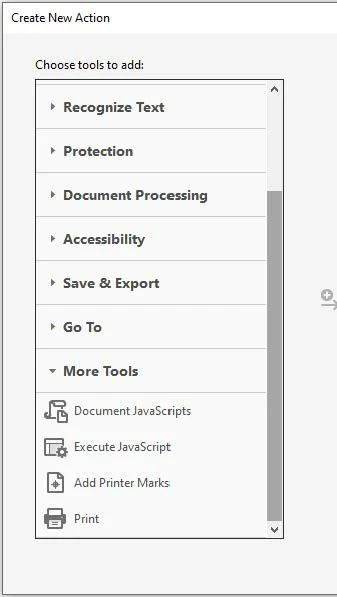
"Action Wizard" > "More Tools" missing the "Split Document" function

  • February 13, 2020
  • 4 replies
  • 4452 views

Hi All,


I have Acrobat Pro 2017 here at work, installed by IT.  I'm trying to create an action wizard to split large documents by size that we need to do daily.  All tutorials indicate that the 'Split Document' function should be in the 'Action Wizard' sub folder 'More Tools' but it not there.  I couldn't find the 'Split Document' function under any of the 'Action Wizard' sub folder.  To be clear, I need this to be an 'Action Wizard', I know how to do it manually everyday but would like to save time.

Thanks in advance!!!
This topic has been closed for replies.

4 replies

New Participant
February 15, 2023

This looks like we need to buy some fancy plug-in.  All of the answers below seem to only open the "Split" page, but doesn't allow us to specify any functions.


JR Boulay
Community Expert
March 31, 2021

"unfortunatly "Create Custom Tool" without any guidence isn't a greate answer"


A picture is worth a thousand words:


Acrobate du PDF, InDesigner et Photoshopographe
Brainiac
March 31, 2021

Perhaps you could post a link to one of these tutorials, so we can see what is wrong with the tutorial, your Acrobat, or something else.

Bernd Alheit
Community Expert
February 13, 2020

Use "Create Custom Tool", not the Action Wizard. Info is available in the help of Adobe Acrobat.

athletic_imagination15A9
New Participant
March 31, 2021

I also have the same issue, unfortunatly "Create Custom Tool" without any guidence isn't a greate answer. 

try67
Community Expert
March 31, 2021

You can open this dialog by executing this JavaScript code:


app.execMenuItem("SplitDocument");