


Participating Frequently
September 12, 2023
Answered

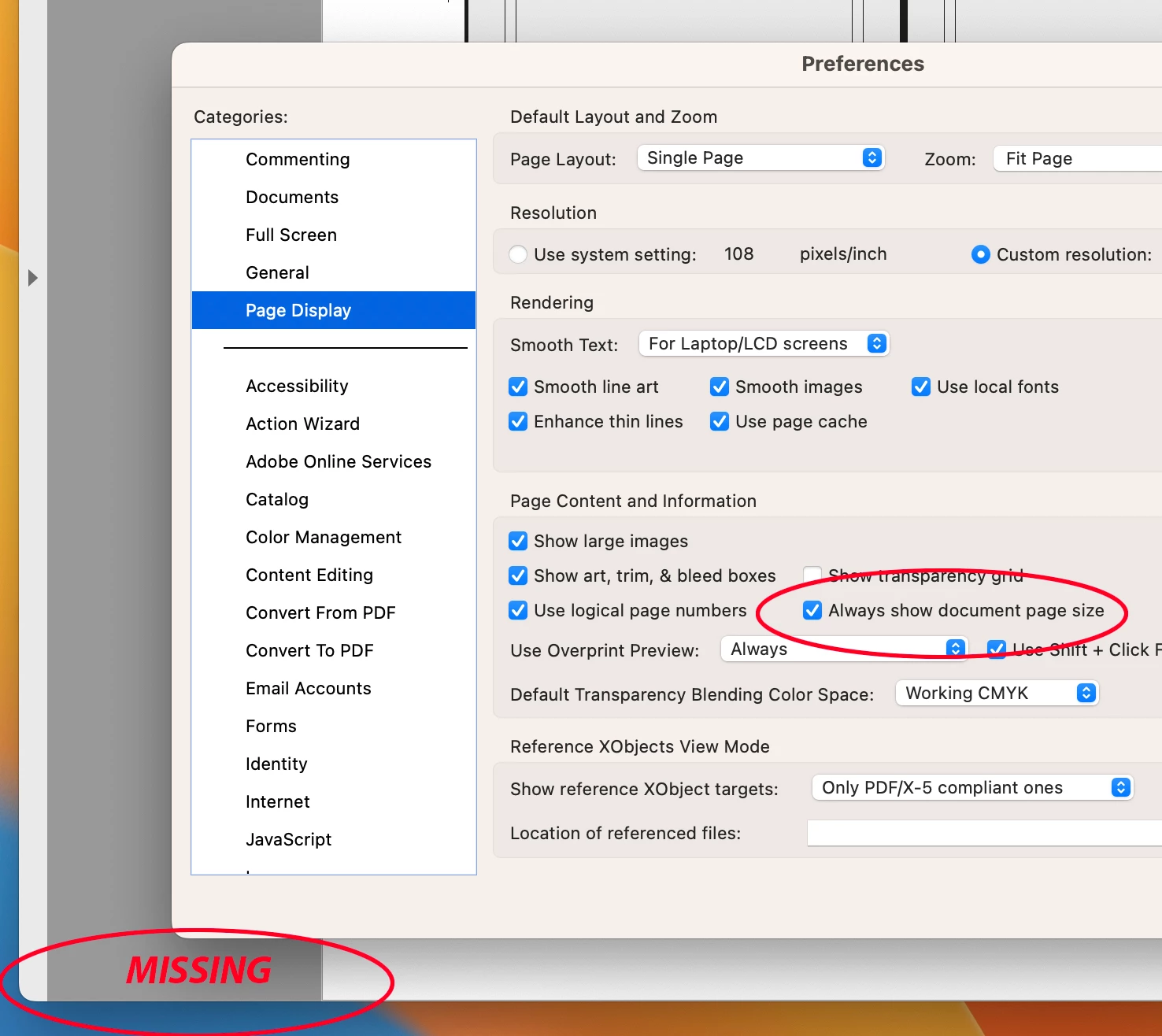
"Always Show Document Pages Size" in "Page Display" preference is suddenly not working !!!

  • September 12, 2023
  • 54 replies
  • 60325 views

I always rely on the Document Page size in the lower left frame bar of any and all PDF windows.  For some reason, today it is gone.  I have restarted Acrobat, rebooted my machine.  I have even deleted the Acrobat preferences and let it create a new preference file.  No matter what, this check box clicked or not clicked, does not yield me what I have relied on for many years.


Thoughts please.


Acrobat DC for Mav. v 2023.006.20320


Correct answer AJaycup

The solution is to go to the menu tab, down to view, then select "Disable New Acrobat". This reverts to Adobe UI before it was made to be garbage and will display the page size all the time. As far as I can tell, all the features are still there as well.

54 replies

Participating Frequently
September 26, 2023

Every day that ticks by that this is not fixed is slowing production time on projects all over the marketplace. Does that dollar sign mean anything to anyone at Adobe? I mean, I do get paid by the hour so "thanks" but I'd rather spend my time working on the next project.

Participant
September 25, 2023

This update is terrible! And why is there still the option to "Always show document page size" if it doesn't work??


Come on Adobe change it back!!!!!


tonks_the_auror
Community Expert
Community Expert
September 24, 2023

Like everyone else here, I need my scroll bars and my page size display.

What I want to know is why this update was installed without my knowledge and consent? I don't have autoupdates enabled on any of my computers. Not having an option to roll back to previous version is just…[insert adjective].

Participating Frequently
September 23, 2023

i posted about this separately before finding this thread- I thought it was a bug in the new update. I had Adobe remote access my Mac to try and fix it.. the person obviously wasn't aware of their own companies update otherwise they could have told me over chat that you have a hover now! I hope they change it back, like everyone else here, its vital to my work process 😫

rickselfok
Participating Frequently
September 22, 2023

The common thing in all this crap is that those who use the page size in the corner are already familiar with having to go into the preferences to turn that option ON. We are intelligent to go into the settings to make NUMEROUS changes that suit our needs. Make it the same as it was. Don't have it there unless WE turn it on. Like many have said…I open maybe 10, 20, 30 pdf's at a time only to look in the bottom left corner for the size. In prepress, one hand is always on the keyboard at all times. Open a batch, look and Command-W. Look at the next,  Command-W. It goes fast. Now, when I go to print proofs, my press sheet sizes may change. Okay. Command-P to go into the print setup. Oh yeah, what was the size? Well, Einstein, the hover doesn't work if another dialogue box is open.

L I S T E N  TO US!

You are not smarter than all of us. FIX IT!

Neil LCC
Participating Frequently
September 22, 2023

Apparently this hover option has been there as one of my co-workers only used that and did not know about the "Always Show Document Page Size" check box. So with this update, now to see the hover you must uncheck always show, which is utterly ridiculous, and we are turning off a setting that no longer works.

Neil LCC
Participating Frequently
September 21, 2023

I see I am not alone when this turned up missing.

Bad update and hover does not work for me either. There is no other place to find page size. 

Participating Frequently
September 22, 2023

As noted elsewhere in these posts, you need to turn the 'Always show document page size' OFF in preferences, then hover works.  Honestly you couldnt make this stuff up...


Shows that the people running things at Adobe have no idea what reprographics, pre-press, print, is and the needs of anyone formatting pages as PDFs actuallty does... the page size is the most basic bit of information, we have all turned this option on as soon as a new install is done... WE NEED TO SEE THE PAGE SIZE!!   We also want the scroll bars back, whoever thought they were unnecessary needs to write out 1,000 times, I must not tamper with processess that my customers rely on.

Participant
September 22, 2023

I don't even see this option on my Acrobat - it's completely missing and does not show size even whe hovering.

VERY frustrating.

rickselfok
Participating Frequently
September 21, 2023

I do believe that Adobe's plans are to wait out all the bitching about their BAD decision, hope it goes away and do nothing.

Way to piss off the whole of prepress, publishing and printing. But you don't need us, right? Let them adapt to our heavy handed ways. Screw THEM is what they think. Let them try to find a better product. You know what - WE ARE LOOKING!

jimw79795516
Participant
September 21, 2023

You're right. It occurred to me that these changes afffect the print community more than those that use it for on screen presentations. Perhaps Adobe is trying to make it more copetative with PowerPoint. On screen the page size doesn't matter as much. For those of us preparing documennts for the press the sheet size, page size and trim are critical.

Participating Frequently
September 21, 2023

Dear Adobe,

You know what is even worse than all this grief the end users have received over this ?  The fact that the "Rulers" interfere with the the top of the PDF.


So on a MAC, "Command 0" or "Zoom to page level" will fit on screen the entire PDF if the rulers are not turned on.  If and when you turn on the rulers, it cuts off the top of the PDF, despite even if you re-select "Zoom to page level".


Nice Update all around, NOT !  Why don't you undo all the crap in the last release, and re-release it in the future without all these bugs including the Pitstop issue !!!

leed93541571
Inspiring
September 21, 2023

Beat me to it. Also it cuts off the sides if a landscape PDF. Very frustrating.

Participating Frequently
September 21, 2023

Just found the same issue, this is the most STUPID and POINTLESS update ever, please put the page dimensions back so it reflects preferences.... urgently

Participant
September 20, 2023

I used time machine to go back to the Adobe Acrobat.app that was there on Sept 16th. Then I turned off auto updates. So far it seems to be working but not much testing yet. Anyone else tried this? Any problems?

Participant
September 20, 2023

I did the same thing yesterday. Has been working fine since then.