


Participating Frequently
September 13, 2022
Answered

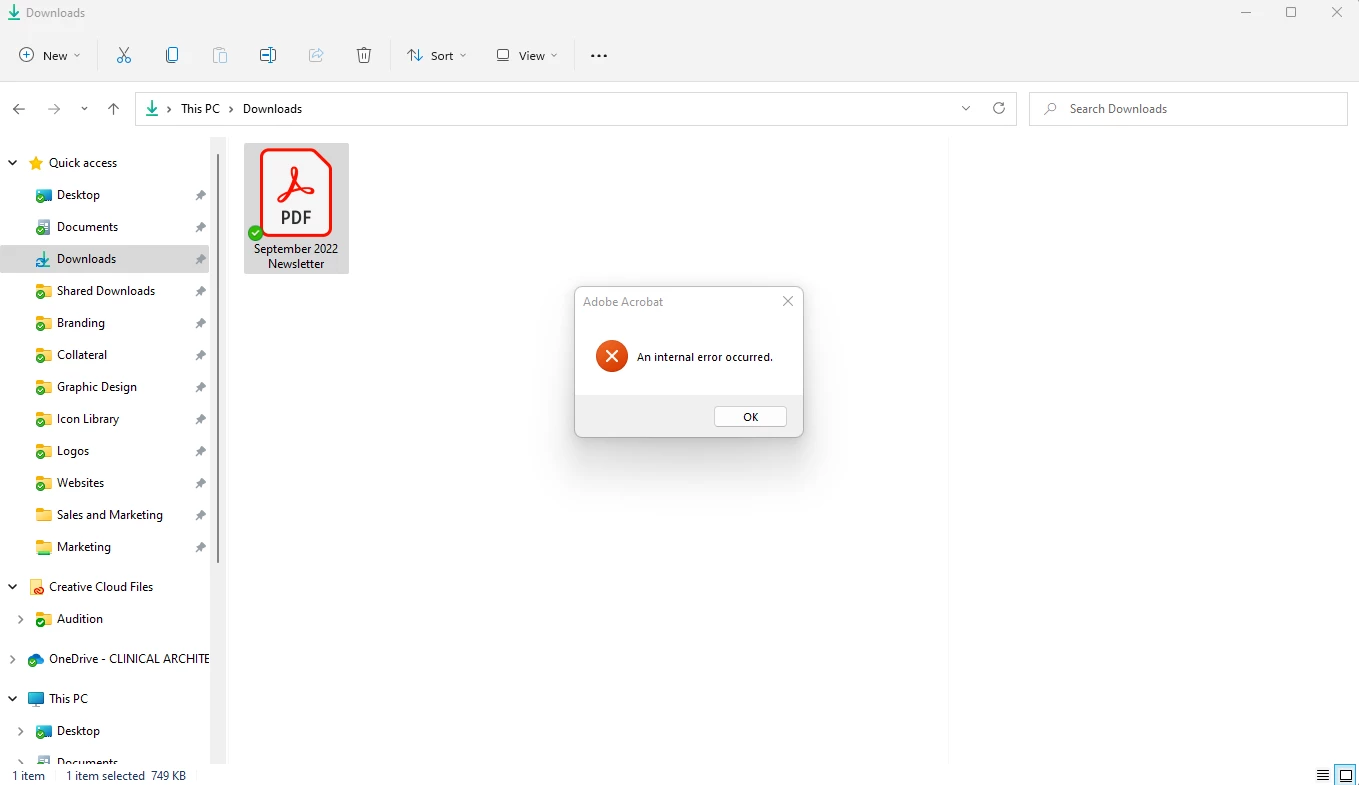
"An Internal Error Occured" when clicking on a PDF and Windows Explorer preview pane is showing.

  • September 13, 2022
  • 22 replies
  • 207643 views

Hi there,

Running Windows 11, up-to-date system and up-to-date Creative Cloud and Adobe Acrobat DC. I have my preview pane visible when going through my files, and sometime in the last 2 weeks PDFs no longer show up in the preview pane. Instead, windows explorer freezes for a few seconds and then shows an Adobe Acrobat "An Internal Error Occured" pop-up. I tried clearing out my temporary files, and tried creating a "2022" folder in C:\Users\(user)\AppData\Local\Adobe\Acrobat\ which was suggested in this thread. Neither worked. All other file types (.jpg, .doc, etc.) show up in the preview pane just fine. Any suggestions?
 

Correct answer Juan Cruz33608956vecu

Me paso lo mismo, entre en la ruto que colocaron y le saque los permisos heredados y borre los los desconocidos y hasta ahora funciona


22 replies

Participating Frequently
October 21, 2022

This worked for me too!

 YOU ROCK! THANK YOU!

Participating Frequently
October 19, 2022

I FOUND A SOLUTION.


I had to go C:\Users\[me]\AppData\Local and right click the Adobe folder, click properties and go to security tab. I had a bunch of left-over "Account Unknown" listed besides my three main ones (System, [me], Admin). I deleted all the account unknowns.

That fixed it for me.

Participant
October 19, 2022

thanks!!! you are the best!!!

mattb256
Participating Frequently
October 19, 2022

I am also having this issue. Ran an additional update for windows. Removed / re-installed acrobat. Still having this error.


Participating Frequently
October 18, 2022

same issue for me I cant do ANYTHING with pdfs without freezes, crashes, INTERNAL ERROR. I cant even attach more than 1 pdf to an outlook email without it freezing and crashing my email. I have uninstalled, reinstalled, contacted adobe, contacted IT department...spent all day trying to fix. please help!!!!!!!!!!!!!!!!!!!!!!!!!!!!!!!!!!!!!!!!!!!!!!!!!!!!!!!

Participant
October 17, 2022

Hi,

Same problem for me on window 10

RedFeathers
Inspiring
October 17, 2022

I'm on Windows 10 and getting this too. I thought it could be a windows display setting that was disabled, but I can't find anything that would seem to be related to this error.

Has anyone else had this issue resolved with an update yet?

I see that an Adobe team member mentioned working on a fix for this issue on the 15th of Sept, but that's just over a month ago so I've left a comment on that thread for feedback.

I'm hesitant to try installing the 32-bit version as I've had issues with other software in 32-bit.


Participant
October 16, 2022

Same issue constantly! I have no idea where to send Adobe support my crash dumpfile as they don't even list the location on the help file! 

Participating Frequently
October 14, 2022

Having similar issues in Windows 11

- This is NOT the "1 Correct answer"

Participating Frequently
October 18, 2022

Agreed, I thought it was fixed but it's still happening. 😞

Participating Frequently
October 7, 2022

Either an Adobe update fixed it or a Windows update did. Now I can view PDFs in the preview pane again without any issues. 

Participating Frequently
October 13, 2022

Hi, I'm having this same issue. Can you post your window version and the acrobat version you are running?

Participating Frequently
October 13, 2022

Well, unfortunately it's back to showing an Adobe Acrobat "An Internal Error Occured" pop-up. Which is so frustrating. I checked both Creative Cloud and Windows for updates and I'm up-to-date. No one from Adobe Support has chimed in, so I guess I just have to wait until another update fixes it 😞 Keep trying!

Zy0n
Participant
October 7, 2022

same problem

Participating Frequently
October 7, 2022

Try updating your Adobe creative cloud and apps, and trying a Windows update. It's working fine for me now!

Zy0n
Participant
October 10, 2022

To me it bugged out after i did the last acrobat update instead. Atm there is no update to be done....