

tomx578
Participant
September 12, 2017
Answered

"print" a comment / markup into a pdf

  • September 12, 2017
  • 1 reply
  • 2787 views

is it possible to "print" a comment / markup into a pdf so that no one can change it?

This topic has been closed for replies.
Correct answer Dave__M

I tried everything in preflight, but I cant find the option so that the markups are really "baked" into the pdf. I can always remove them. do you know where I can find the option?


Visit your Optimize PDF tool set, and click on the Preflight button.  Look in the PDF fixups list, and you should see Flatten annotations and form fields listed.  Double click there, or click on the Analyze and fix button at the bottom.  That should initialize the process.
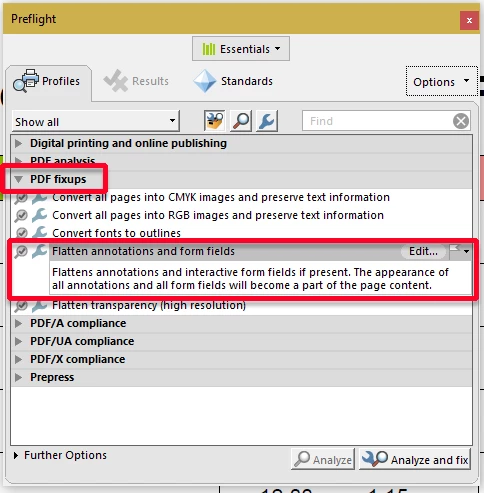
I hope this is helpful.

My best,

Dave

1 reply

Adorobat
Community Manager
Community Manager
September 12, 2017

Hi Tomx,

Per the description mentioned above, you want to print pdf with comments, is that correct?

If yes, you can do that by selecting Document & Markups option under Comments & Forms. Below are the links which explain more on this:

Print comments | Adobe Acrobat, Reader

https://acrobatusers.com/tutorials/how-to-print-a-pdf-with-comments

Let us know if you have any question on this.

Shivam

Dov Isaacs
Legend
September 12, 2017

Actually, the OP is asking whether a comment can be "baked" into the underlying PDF file.

There is a function in Acrobat Pro Preflight that allows one to flatten annotations into the underlying PDF content. Use that and you should have what you are looking for.

          - Dov

- Dov Isaacs, former Adobe Principal Scientist (April 30, 1990 - May 30, 2021)
tomx578
tomx578Author
Participant
September 13, 2017

I tried everything in preflight, but I cant find the option so that the markups are really "baked" into the pdf. I can always remove them. do you know where I can find the option?