


New Participant
September 17, 2021
Question

Radio button display issue

  • September 17, 2021
  • 2 replies
  • 2233 views

I converted a form to make it fillable, and the radio buttons work as they should mostly, but there is a display quirk that I haven't been able to figure out. When selecting the first option in any of my radio button groups, the button disappears. The other buttons in the group select and show as such, but not the first one.


Once I hop out of the group, the button displays as it should. I was thinking maybe it was too close to the next button in the group and moved it away, but that didn't help. I have a hidden button that is selected by default so that the group displays without a visible selection when the form loads.


The attached screenshot shows one of the groups while I am in it, and how it looks after I click out of the group.
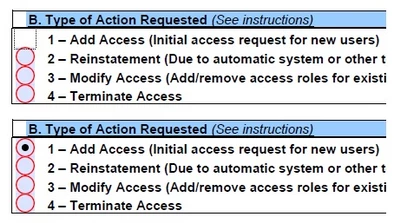


Any ideas?


Craig

This topic has been closed for replies.

2 replies

New Participant
April 22, 2024

The attach file pdf generated contains a filed radio button named ATT_CHK_DIC13C whith two option (0,1);  second option is selected (value 1) but Acrobat Reader do not display, other reader do.
System updated, Acrobat reader updated.
What's wrong on pdf?
Thanks

ls_rbls
Community Expert
Community Expert
September 18, 2021

I think that behavior is completely normal.


You can try and see if the problem disappears if you go to "Edit"--->>>"Preferences"--->>>"Forms" --->> and under the "General" category disable "Show focus rectangle".


Save your work, close Acrobat, and open Acrobat again.


But if it's still taking longer than usual to switch its appearance after youv'e ticked the button and click out, see if clicking on Help--->>> Repair Installation resolves the issue.


This may help reset the preferences.


I assume this is happening in a Windows 10 computer?


And which Adobe Acrobat Pro version are you using?


Also, is this PDF executing any formulas or calculation scripts?

New Participant
September 27, 2021

I disabled the focus rectangle, the radio button still disappears, although now it does so without the box around it.


Yes, Windows 10 system, fully updated, using Adobe Acrobat 2020, build 20.004.30015.

No formuals or scripts, just text boxes, radio button banks, and a few electronic signature boxes.

New Participant
January 2, 2024

 we are able find the radio button in Adobe PDF viewer.But when I try to open the PDF in my browser, the radio button is not visible.