Hello Svolman,
Sorry for the delayed response and inconvenience caused. As per the description above, you are getting an error message that the file cannot be saved as the file is too big for the current operation, Is that correct?
Please check for any pending updates of Acrobat from help>check for updates, reboot the machine after installing the updates and try saving the PDF file as see if this makes any difference.
Are you saving the file to a local drive or to an external or a network drive?
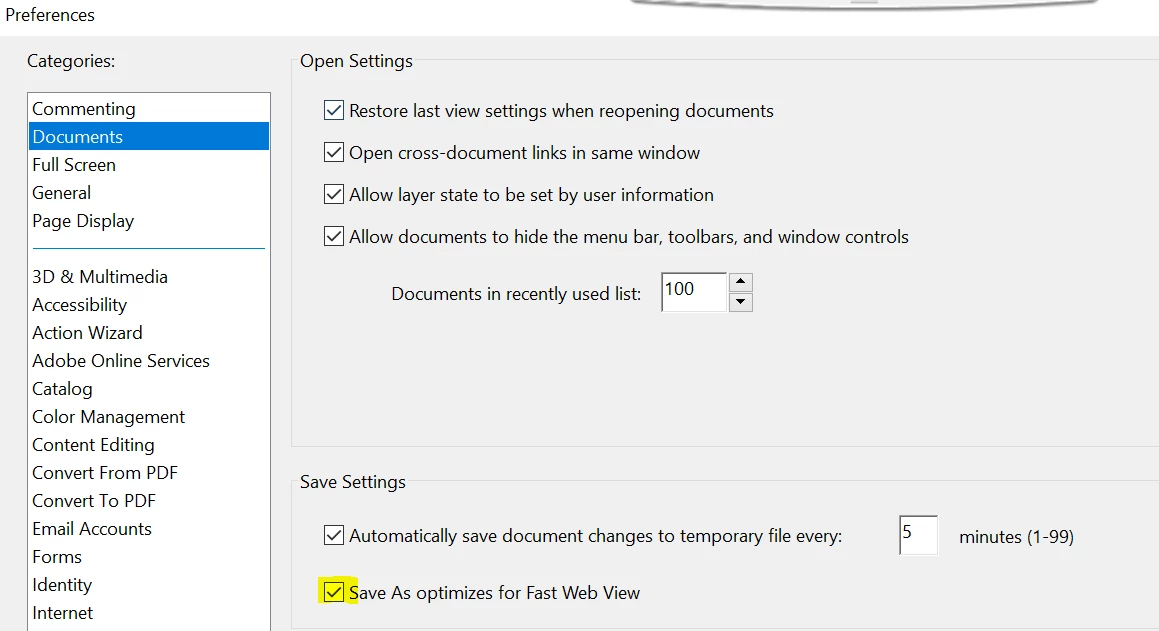
Also, navigate toe Acrobat's preferences once, from Edit>Preferences>Documents>Uncheck "Save as optimizes for Fast web view", then try saving the file.
Is it specific to one PDF file or with all the PDF files? Is it possible to share the PDF file with us so that we can try it at our end? To share the file, please use Adobe Send feature, upload the file, share the link to files via private message only, How Do I Send Private Message
Also, what is the dot version of Acrobat installed? To identify refer to Identify the product and its version for Acrobat and Reader DC
Is it a Mac or Windows machine?
Let us know how it goes and share your findings.
Regards,
Anand Sri.




 AdChoices