


New Participant
May 29, 2019
Answered

Reduced Size PDF "Conversion Warning"

  • May 29, 2019
  • 2 replies
  • 7713 views

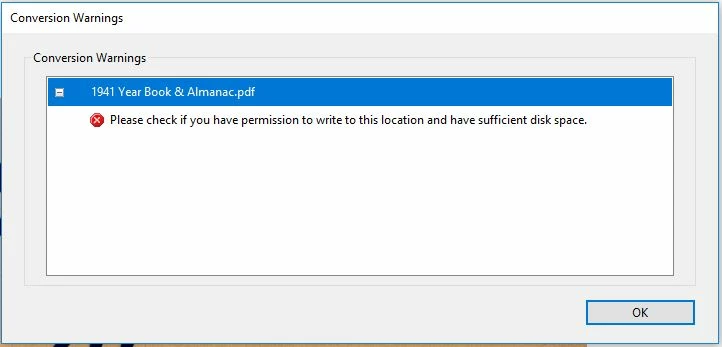
I have several files that I am trying to save as "Reduced Size PDF".  They are documents that were scanned as a PDF on an Epson ES-500W at 600 dpi and are approximately 250 pages in all.  I am also running Windows 10 (64-bit) and have Adobe Acrobat Pro DC version 2019.012.20034.  Adobe customer support indicated this was the most current version.  When trying to save as a Reduced Size PDF, I receive a "Conversion Warning" that reads, "Please check if you have permission to write to this location and have sufficient disk space".  I have included a screenshot of the "Conversion Warning".  This is happening to many files and just started in the past few days.  Up until now, I have had no issues in this area.  I have tried the following:

  1. Checked to see if any updates for Adobe Acrobat PRO were available..
  2. Ran "Repair Installation" via the Help menu in Adobe Acrobat.
  3. Checked for any Windows updates.
  4. Checked available disk space.
  5. Attempted to save in multiple different locations, including USB drive.
  6. Attempted to save the file under different file names.
  7. Contacted Adobe support and worked with a representative for over an hour.  The only advice that could be provided was to print the current file as an "Adobe PDF" file and then try to run the "Reduced Size PDF" option.

Any help and support is greatly appreciated.
Correct answer AnandSri

Hi DigitalArchivist,


We're sorry for the trouble you had, would you mind sharing more details about the issue for better understanding and for investigation so that we can assist you in getting the issue resolved?


What is the version of Acrobat DC installed? To identify, please take help from the article https://helpx.adobe.com/acrobat/kb/identify-product-version.html

Are you on a Mac or Windows machine and what is the version?

Have you tried saving the PDF file as Print as Adobe PDF and then running the Reduced PDF size and Optimize Scanned Pages tool?

If not, please try once and see if this makes any difference.


For testing purposes, disable the Enhanced Security, and Protected View in Acrobat's Preferences from Edit (Windows)/Acrobat (mac)>Preferences>Security(Enhanced)>Click OK>restart the application and check.

Note: Disabling the Enhanced Security and Protected View is only for testing purpose, please enable it back.


Would it be possible to share a sample file with us in which you are getting this error message so that we can test it at our end?

Please share the file in Private/Direct message only. Click on the 'Email' icon on top right corner new your profile icon to send the private/direct message.


Thanks,

Anand Sri.

2 replies

AnandSri
Community Manager
AnandSriCommunity ManagerCorrect answer
Community Manager
October 11, 2019

Hi DigitalArchivist,


We're sorry for the trouble you had, would you mind sharing more details about the issue for better understanding and for investigation so that we can assist you in getting the issue resolved?


What is the version of Acrobat DC installed? To identify, please take help from the article https://helpx.adobe.com/acrobat/kb/identify-product-version.html

Are you on a Mac or Windows machine and what is the version?

Have you tried saving the PDF file as Print as Adobe PDF and then running the Reduced PDF size and Optimize Scanned Pages tool?

If not, please try once and see if this makes any difference.


For testing purposes, disable the Enhanced Security, and Protected View in Acrobat's Preferences from Edit (Windows)/Acrobat (mac)>Preferences>Security(Enhanced)>Click OK>restart the application and check.

Note: Disabling the Enhanced Security and Protected View is only for testing purpose, please enable it back.


Would it be possible to share a sample file with us in which you are getting this error message so that we can test it at our end?

Please share the file in Private/Direct message only. Click on the 'Email' icon on top right corner new your profile icon to send the private/direct message.


Thanks,

Anand Sri.

Inspiring
November 26, 2020

How is this issue marked as "resolved"?

I exported a multi-page PDF from Photoshop, organized the pages in Acrobat, saved it as a PDF (6GB) and then went to save as an optimized file. 


New Participant
October 11, 2022

I had the same problem. The issue only occured when my file got larger than 5 GB. The same permissions/disk space error message, in spite of having plenty of space and no permission issues with smaller files.

THE SOLUTION
This is what worked for me:

  1. In Finder, I CTRL-clicked on the original PDF file name and chose "Open With" -->
  2. then picked the "Save As AdobePDF.app" from teh dropdown -->
  3. elected "Smallest File Size" in the next pop-up -->
  4. and voilà! The file size went from 5.21GB to 23.3 MB!

    Hope it works for you, too. Best of luck!
DigitalArchivist
New Participant
September 13, 2019

I have had the same issue recently. And I've tried all the steps you've outlined sans customer service. In my case, it only happens with certain PDF files when using 'advanced optimization'. I can use 'Reduced file size' and 'Optimize Scanned Pages" though.


This issue has been floating around for years, considering all the discussion threads floating around on this very topic. It would be nice if Adobe would fix it- or at least provide more diagnostic data.