


Participant
June 13, 2022
Question

Reducing size of form

  • June 13, 2022
  • 5 replies
  • 996 views

Good morning,


Complete Newbie here using Adobe Acrobat Pro DC (64-bit).


I have created a form in Adobe from a Excel document.

It is only a 1 page form with about 70 form fields.

The issue I am experiencing is that the total size of the form is 22.78 MB.


I have tried the following already:

Saving as Reduced Size PDF

Save as Other > Optimized PDF


Neither of these have reduced the size significantly.  I've also tried using a different 3rd party tool to Compress the PDF - also little difference was made.


When in the PDF Optimizer screen and navigate to the "Audit Space Usage", I can see that the Fonts are 99.44% of the total size:
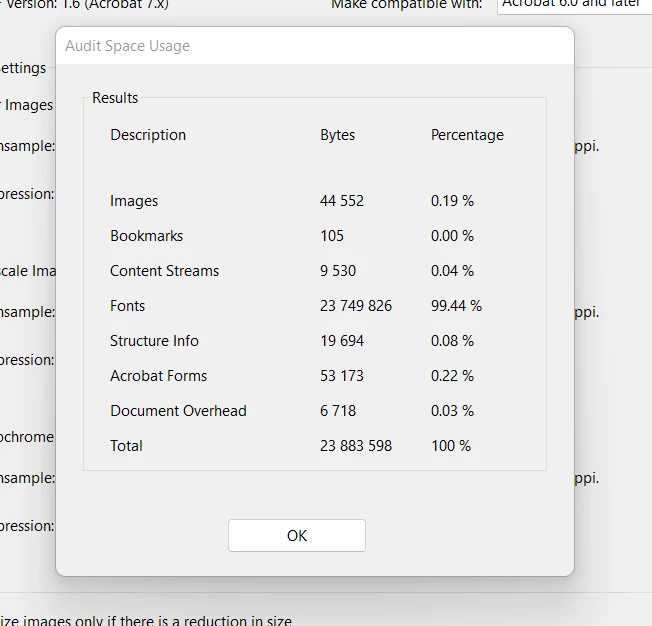


Anyone have any idea's how to reduce the size of my form please?


This topic has been closed for replies.

5 replies

JR Boulay
Community Expert
Community Expert
June 14, 2022

Can you share this form?

Acrobate du PDF, InDesigner et Photoshopographe
JR Boulay
Community Expert
Community Expert
June 13, 2022

Each text field requires the whole font to be embedded if it's not part of the 14 Standard PDF fonts.

Fonts used by text fields cannot be removed/unembedded.


You must therefore make sure that the fields in your form use the Helvetica or the Times font before using the PDF Optimizer.

Acrobate du PDF, InDesigner et Photoshopographe
Participant
June 13, 2022

I've removed each element individually to see what 'font' is causing the size to be soo big.

1) Removed all Text fields next to form fields

2) Removed all form fields completely

3) Removed all lines


I've even removed every single element on the form leaving me with a blank document - and the size remains the same?

Bernd Alheit
Community Expert
Community Expert
June 13, 2022

This doesn't remove the embedded font.

try67
Community Expert
Community Expert
June 13, 2022

Once the fonts are embedded it's very difficult to get rid of them. The easiest way is to create a new static version of the file, edit the fields in the original so that they don't use these heavy fonts any longer, and then copy them from the old file to the new one.

Participant
June 13, 2022

Thanks, the current font used throught the Form is Calibri.  Is there a font that I should use instead?

try67
Community Expert
Community Expert
June 13, 2022

One of the "built-in" fonts is your best option to reduce the file size. These are the fonts that appear above the first divider line in the list of fonts of a field.

Bernd Alheit
Community Expert
Community Expert
June 13, 2022

Which font does you use in the form fields?

Participant
June 13, 2022

Hi Bernd,

The text labels next to each form field is Calibri (size 5.16) and the text selected for the Form fields is Calibri (size 8).

I amended the text labels to Ariel to test if it made a difference, and the file size is still similar.