


jamesh16492013
Participating Frequently
May 8, 2019
Answered

Revert a signable form to an Acrobat Form

  • May 8, 2019
  • 1 reply
  • 9171 views

I seem to be missing quite  few field types.  Based on Q&A in the forum, I must have made teh mistake of selecting a signable form upon my initial start.  However I cannot find the navigation described in the Q&A to go to More tools in tight pane and select the Revert to Acrobat Form tool.

I am limited to the following tool list

Although I inserted a date field, it does NOT offer a date picker tool, which I wanted to use.

I also have several fields which need to be limited to numeric only, and do NOT have a number type field to select.

Can someone offer some guidance.  I am running Acrobat Pro DC on a windows 7 OS.

Thanks for any assistance you might offer.

JR
Correct answer Bernd Alheit

Hi all, 


I'm struggling to fine this option, is anyone able to help? 


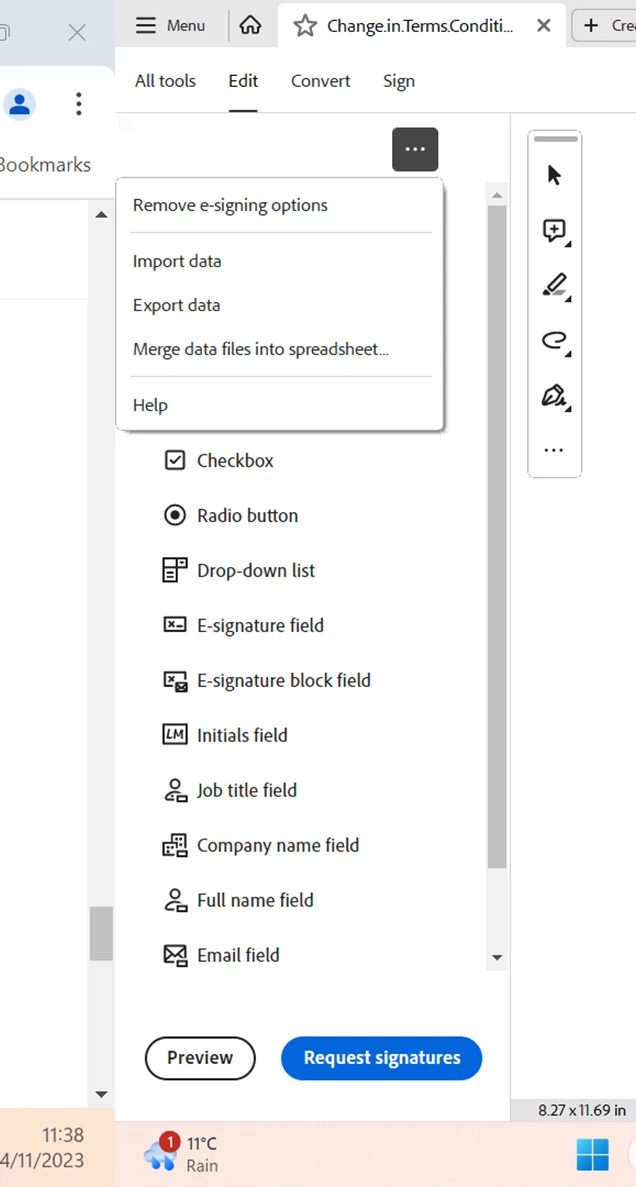
Use the first entry at the dropdown.

1 reply

Thom Parker
Community Expert
Community Expert
May 8, 2019

Look on the dropdown menu in the fields panel on the right side of Acrobat. The top entry is "Revert to Acrobat Form"

Thom Parker - Software Developer at PDFScriptingUse the Acrobat JavaScript Reference early and often
jamesh16492013
Participating Frequently
May 8, 2019

Here is what I am seeing on right side:

Then when I open the wrench+, i get

NOTE: this is Acrobat Pro DC

Thom Parker
Community Expert
Community Expert
May 8, 2019

You're screen shot shows Acrobat to be in "PDF Edit" mode. You need to put it into "Prepare Form" mode.

Thom Parker - Software Developer at PDFScriptingUse the Acrobat JavaScript Reference early and often