

Inspiring
March 7, 2025
Answered

Saving PDF as PDF/A error

  • March 7, 2025
  • 1 reply
  • 602 views

I am trying to save a pdf as pdf/a as apaprently this fixes an other bug in illustrator opening iot with garbled characters


I get the attached image.
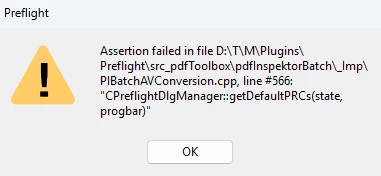


Any ideas how to fix this?


Cheers

Correct answer divyasin

Hi @garethirwin1234 ,


Thank you for reporting the issue and apologies for inconvenience caused. 

Save as PDF/A uses the Preflight conversion to save the document to required compliant standard. If you use Preflight Tool (All Tools-->Print Production-->Preflight) , most likely you would see some issues either in profiles loading blank or the issue you reported above. It appears to be some issue with Preflight Profiles getting corrupted or facing issue during install. 


Please try this suggested workaround and let me know if this resolves the issue :
 

  1. Disable the sandbox feature in Acrobat (under Preferences > Security (Enhanced) > Enable Protected Mode at startup (Preview)) , Quit Acrobat and Restart.
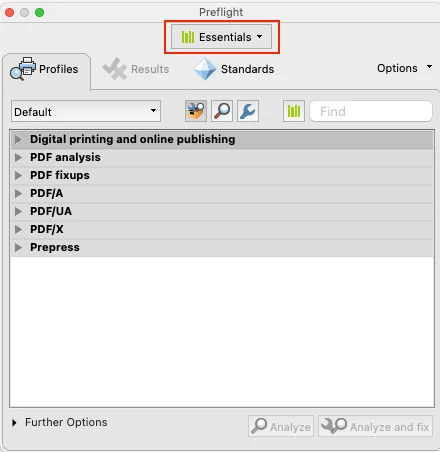
  2. In the case of empty Profiles (or generally), it is advisable to remove the Preflight preferences (%APPDATA%\Adobe\Acrobat\Preflight Acrobat Continuous) to get fresh libraries/profiles after the sandbox is disabled. Quit Acrobat , Remove Profiles from above mentioned path and Restart Acrobat. Try Preflight again after relaunch , it should then fetch the fresh libraries/profiles. Please select all libraries one by one from dropdown to fetch all the profiles (shown in screenshot). It will only take few minutes.

After the profiles have been fetched , then try to use your workflow . Let me know if this resolves your issue.


Note: Please keep a backup of folder before removing from appdata as any custom profiles might get lost during removing/renaming folder.

Once the issue is resolved , please enable sandbox feature again and continue to use Product. 


Regards,

Divya Kumar Singh

1 reply

Braniac
March 7, 2025

Hi @garethirwin1234 
This has been discussed before, as in the link below.
https://community.adobe.com/t5/acrobat-discussions/error-preflight-when-saving-as-pdf-a-on-windows-11/td-p/13566427


Have you tried updating Illustrator? You could try other things mentioned in the above discussion.

Inspiring
March 7, 2025

Meh like everything else adobe, I will just have to find a work around, its why I love paying them every month.


Thanks anyway.

divyasinCorrect answer
Adobe Employee
April 1, 2025

Hi @garethirwin1234 ,


Thank you for reporting the issue and apologies for inconvenience caused. 

Save as PDF/A uses the Preflight conversion to save the document to required compliant standard. If you use Preflight Tool (All Tools-->Print Production-->Preflight) , most likely you would see some issues either in profiles loading blank or the issue you reported above. It appears to be some issue with Preflight Profiles getting corrupted or facing issue during install. 


Please try this suggested workaround and let me know if this resolves the issue :


  1. Disable the sandbox feature in Acrobat (under Preferences > Security (Enhanced) > Enable Protected Mode at startup (Preview)) , Quit Acrobat and Restart.
  2. In the case of empty Profiles (or generally), it is advisable to remove the Preflight preferences (%APPDATA%\Adobe\Acrobat\Preflight Acrobat Continuous) to get fresh libraries/profiles after the sandbox is disabled. Quit Acrobat , Remove Profiles from above mentioned path and Restart Acrobat. Try Preflight again after relaunch , it should then fetch the fresh libraries/profiles. Please select all libraries one by one from dropdown to fetch all the profiles (shown in screenshot). It will only take few minutes.

After the profiles have been fetched , then try to use your workflow . Let me know if this resolves your issue.


Note: Please keep a backup of folder before removing from appdata as any custom profiles might get lost during removing/renaming folder.

Once the issue is resolved , please enable sandbox feature again and continue to use Product. 


Regards,

Divya Kumar Singh