


New Participant
November 19, 2021
Answered

Saving to PDF file from MS Office 365 applications

  • November 19, 2021
  • 2 replies
  • 2558 views

Hi All,


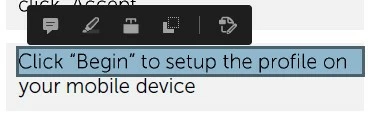
Does anyone having issue when saving file to PDF for example I save to PDF file from Microsoft Word and after completed when I open the file there are certain words that did not covert as text. When you click on it just select like it is a picture. You can see from screenshot that I attached below.


1) Not able to select as text
2) Able to select text
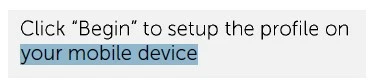
 

Is this normal issue? Appreciate if anyone can advice on this.


Thank you.

This topic has been closed for replies.
Correct answer gary_sc

Hi Yusran,


Gosh, if I had known you didn't have Acrobat Standard or Acrobat Pro, I'd have suggested you go off to MS for help much earlier. I strongly think you are witnessing the issues with OS-created PDFs.


You might try to use an MS font and see if it provides any better results. If it does, you can go to your supervisors and give them three options: (1) Go with what you have, (2) Change the font because it will give better results, or (3) have them supply you with Acrobat Pro so that they can have their desired font AND a good result.


Let me know what they choose; I'm curious.

2 replies

Bevi Chagnon - PubCom.com
Brainiac
November 27, 2021

This can happen when the font is a bitmapped font, or has restrictions on being enbedded into PDF files.


|    Bevi Chagnon   |  Designer, Trainer, & Technologist for Accessible Documents ||    PubCom |    Classes & Books for Accessible InDesign, PDFs & MS Office |
gary_sc
Community Expert
November 19, 2021

Hi Yusran,


Well no, that's not normal. But to help you here we need to know the origin of the original document (did you type this all out? Was it copied from another source? Etc.)


Also, when you state "…save to PDF…," that implies to me you did not use either "Save as Adobe PDF…," or use Acrobat option in the Ribbon.


Last, what version of Acrobat are you using (Standard or Pro) and what release. Also what is your OS (and what release)?


Thanks!

New Participant
November 20, 2021

Hi Gary,


Thank you for your respond.


Yes, I did type all the words by myself. I used the save to PDF function in Microsoft Office as I am not using Adobe Acrobat Pro. I'm just using Acrobat Reader to view the PDF files but it is a latest version. Running on latest Windows 10 Enterprise build as well. The only difference I can say is that I'm using custom font which is not standard as font that came with Windows. It is my company custom font. Not sure if that is the reason for that.

gary_sc
gary_scCorrect answer
Community Expert
November 20, 2021

Hi Yusran,


Gosh, if I had known you didn't have Acrobat Standard or Acrobat Pro, I'd have suggested you go off to MS for help much earlier. I strongly think you are witnessing the issues with OS-created PDFs.


You might try to use an MS font and see if it provides any better results. If it does, you can go to your supervisors and give them three options: (1) Go with what you have, (2) Change the font because it will give better results, or (3) have them supply you with Acrobat Pro so that they can have their desired font AND a good result.


Let me know what they choose; I'm curious.