


Known Participant
June 4, 2020
Question

Score calculation in pdf form having check boxes

  • June 4, 2020
  • 2 replies
  • 3292 views

Hello, I have created a score form having check boxes. I can easily calculate total score by assigning values 1 2 3 to check boxes and by giving same names in same row to the check boxes. 


But how is this possible to calculate sub total score of each column separately. See picture
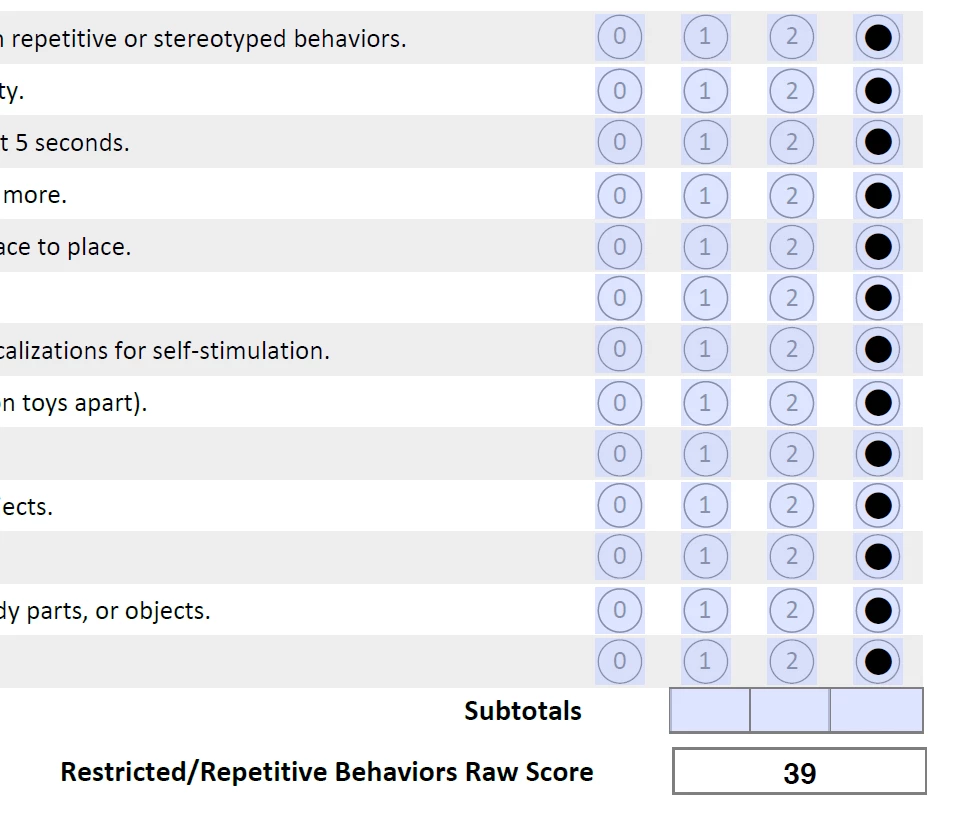
 

This topic has been closed for replies.

2 replies

Thom Parker
Community Expert
Community Expert
June 7, 2020

These look like Radio button groups. If this is true, then a script won't be able to identify the individual column fields by name. Instead you'll the script will need to count selected values.

 For example, lets say the radio button groups are named "Score1" thorough "Score10". The calculation script for the 0 column total would be this:


var nSum = 0, oFld;

for(var i=1;i<=10 ;i++)

{

    oFld = this.getField("Score" + i);

     if(oFld.value == 0)  nSum++;

}

event.value = nSum;


Thom Parker - Software Developer at PDFScriptingUse the Acrobat JavaScript Reference early and often
Participant
May 25, 2023

Hi Tom. I am creating some self-assessments in Adobe. I used Radio Buttons for the Selections. Do you know how I would be able to summarize the score by adding all choice 1's together, sum Choice 2's together, etc......?


Thom Parker
Community Expert
Community Expert
May 25, 2023

I would suggest that you first prefix the names of the radio button groups with a "group name". For example if the radio button groups are named "Question1", "Question2", etc. Then change them to "Assesment.Question1", "Assesment.Question2", etc.

Then if the export value of all choice 1's is "1", this code will create a sum for choice 1

Place this code in the custom calculation script of the field where the total for choice 1 will be shown. 


var aQuestionList = this.getField("Assesment").getArray();
var nSum = 0;
for(var i=0;i<aQuestionList.length;i++)
{
     if(aQuestionList[i].valueAsString == "1")
         nSum++;
}
event.value = nSum;


Thom Parker - Software Developer at PDFScriptingUse the Acrobat JavaScript Reference early and often
JR Boulay
Community Expert
Community Expert
June 4, 2020

You should structure the naming rule by column, as in this example that you should examine: https://documentcloud.adobe.com/link/track?uri=urn:aaid:scds:US:1c732995-09a8-4dc3-ab3b-661aa1d3f1ab

Acrobate du PDF, InDesigner et Photoshopographe