Participating Frequently
November 7, 2019
Answered

Script to Auto populate a field based on a another field input

  • November 7, 2019
  • 6 replies
  • 6361 views

I am trying to finish a form in Adobe for my sales team.  I have a field that is a drop down field and has three selections.   Based on what they select, i have another field that needs to auot populate the Terms and Conditions for that selection.  I keep getting so confused on this.   I don't know where to put the actual script and not sure if I am doing it correctly.  Here is what I did let me know what I need to tweek if at all possible.


var selectedVendor = this.getField("Vendor").value;

if (selectedVendor="IDI") event.value = "Only IDI will determine method of shipment and shipping arrangements. /Dealer or Sale Agent will immediately report to IDI any damage or missing items upon receiving and inspection of the demo equipment./Dealer or Sales Agent is responsible for enduring all accessories are with table for re-crating by shipper for return shipment!/Dealer of Sales Agent is responsible for lost items resulting from failure to have them available for repacking";

else if (selectedVendor="CV Medical") event.value = " Only Compview will determine method of shipment and shipping arrangements./Dealer or Sale Agent will immediately report to Compview any damage or missing items upon receiving and inspection of the demo equipment./Dealer or Sales Agent is responsible for enduring all accessories are with the system for re-crating by shipper for return shipment!/Dealer of Sales Agent is responsible for lost items resulting from failure to have them available for repacking.";

else if (selectedVendor=="Stille") event.value = " It is required to have a representative onsite at the time of delivery or same day and after the evaluation is complete to examine the product, verify accessories and conduct a functional test prior the evaluation and upon completion and repacking of the product. Report immediately any damages or missing accessories."; // etc.

else event.value = "";
This topic has been closed for replies.
Correct answer ls_rbls

Hey, actually, if you are only listing 3 items in your dropdwon menu there is a much more simpler way of doing this.


Please refer to the slides below:


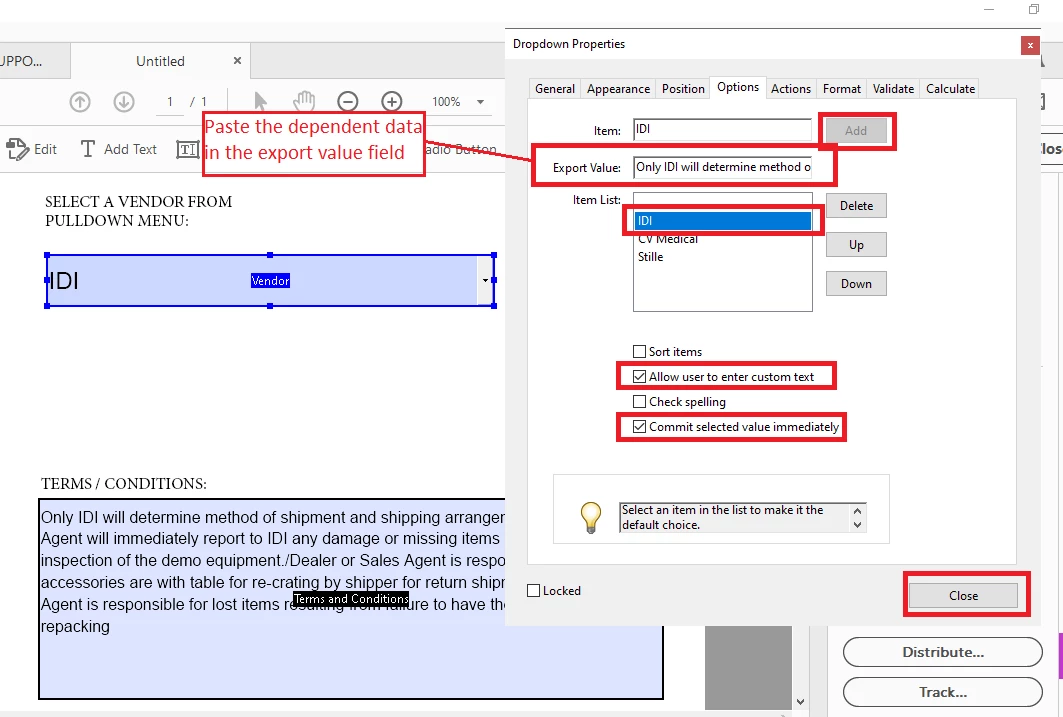
Enter your listed items as shown and copy and paste the terms and conditions in the export value fields then click add.

You have to this one by one. 


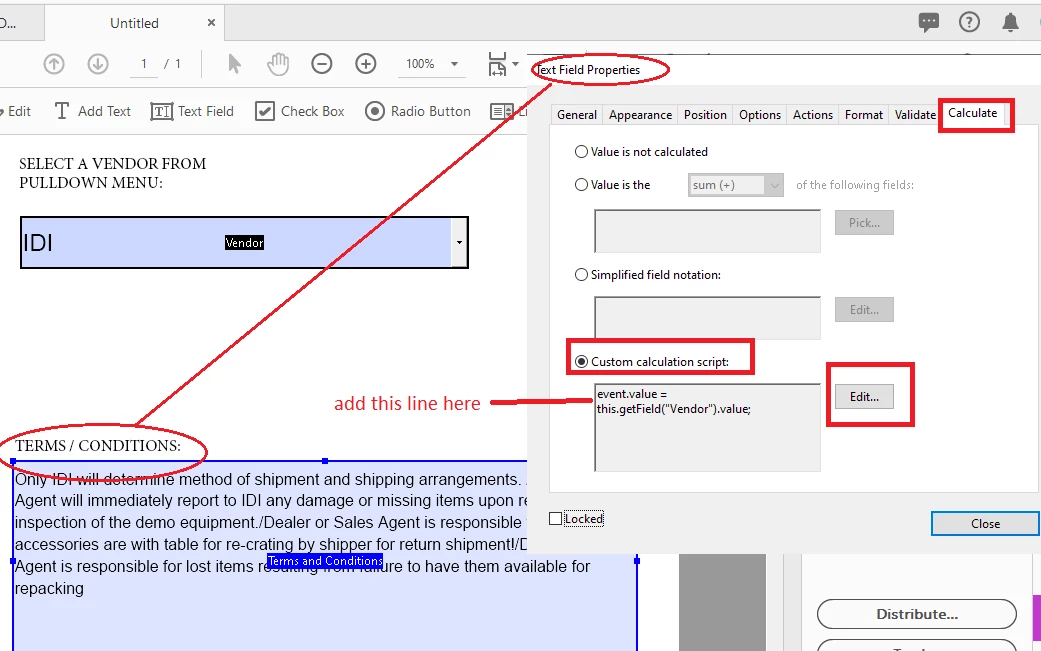
In your dependent text field , where your terms and conditions will appear do this:


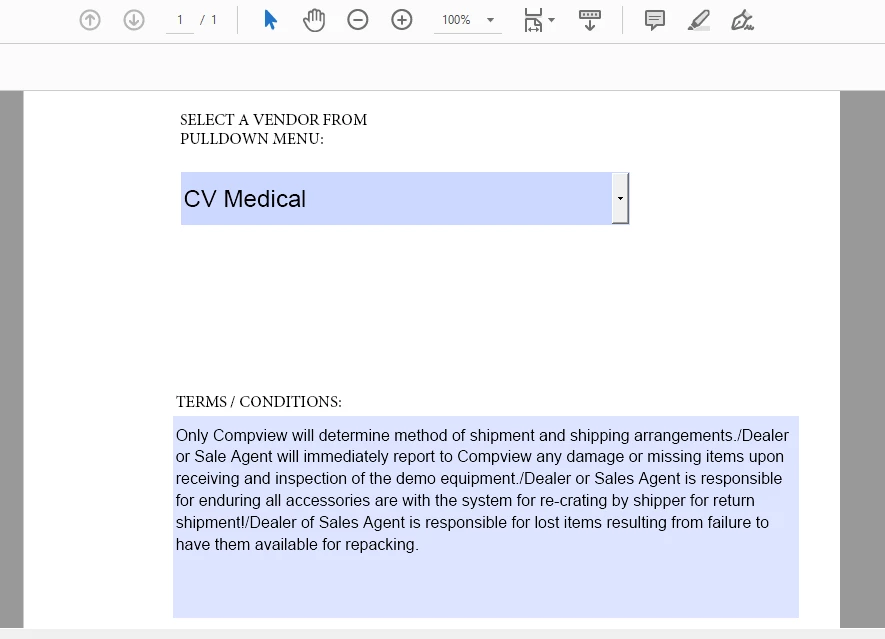
End result will display like so:


6 replies

Allison Hetrick
Participating Frequently
September 14, 2022

I think this might be what I'm looking for but I do not understand what I would put in the Java Script or where. I would like the fields under the line # column to autopopulate 1,2,3,4... if something is entered into a field under the item # column. I've attached a screen shot for reference. The item #'s would vary.

Thom Parker
Inspiring
November 8, 2019

Here is an article on this topic, and it includes a sample file

https://acrobatusers.com/tutorials/change_another_field


Thom Parker - Software Developer at PDFScriptingUse the Acrobat JavaScript Reference early and often
ls_rbls
ls_rblsCorrect answer
Braniac
November 7, 2019

Hey, actually, if you are only listing 3 items in your dropdwon menu there is a much more simpler way of doing this.


Please refer to the slides below:


Enter your listed items as shown and copy and paste the terms and conditions in the export value fields then click add.

You have to this one by one. 


In your dependent text field , where your terms and conditions will appear do this:


End result will display like so:


JsleesAuthor
Participating Frequently
November 8, 2019

this worked very well.  How did you get your's to wrap withing the Terms & Conditions box?

try67
Braniac
November 8, 2019

Define the field as multi-line, under Properties - Options.

try67
Braniac
November 7, 2019

You've made a classic mistake (although not consistently) of using the wrong operator for the comparisons.

The "=" operator is used to assign a value. To compare two values you need to use "==".

ls_rbls
Braniac
November 7, 2019

I forgot to add that this post is categorized in th wrong topic discussion.


Your inquiry appears under  "Bug, Feature Request".


This topic should be moved to "Acrobat SDK and Javascript" 

ls_rbls
Braniac
November 7, 2019

Hi,


You would use a dependent dropdown fields with a selection change script.


Use this free to copy and to distribute script from Joel Geraci, licensed under a Creative Commons Attribution 4.0 International License, and implement it in your work as a template from here:


 https://gist.github.com/JoelGeraci/f14d5277b910d9714a509c98f28e1e4b 


For your convenience, I've adapted the above mentioned script with the data that you posted, so just copy it from down below and paste it into your "Vendor" dropdown menu field.


  • Go to  --->>Properties--->> Format tab--->>> Custom Format Script:


  • You also need to add another line of script below that section, where it says "Custom Keystroke Script:"


                  if (!event.willCommit){this.getField("DependentFieldNameHere").value=event.changeEx;}


                 **NOTE: In the line of script above, change "DependentFieldNameHere" to the name of the text field where                       you want the dependent data to display


  • You also have to go to the "Options" tab and enter your items to be listed in the "Item:" section.


  • Type in IDI and click Add, type in CV Medical and click Add, type in Stille and click Add. (ensure the list value items are spelled exactly as in the script below (or just copy and paste to avoid spelling errors or the script won't execute); leave export value blank).


  • Then uncheck "Allow user to enter custom text" and check "Commit selected value immediately" (this is actually very important).


Here is your script:


/*
LICENSE:
acrojs_dependentList.js by Joel Geraci is licensed under a Creative Commons Attribution 4.0 International License.
https://creativecommons.org/licenses/by/4.0/

You are free to:
Share — copy and redistribute the material in any medium or format
Adapt — remix, transform, and build upon the material for any purpose, even commercially.

Setup:
For list boxes: Add this script to the "selection change" script of the master list box.
For combo boxes: Add this script to the "custom format" script of the dropdown box.

IMPORTANT!
Edit the following line to identify the field name of the dependent list box then edit the properties of the dependentListValues JSON object. Property names should correspond to the export values of the list items.
*/
var dependentListBoxFieldName = "Vendor";
var dependentListValues =
{
"IDI": [
["Only IDI will determine method of shipment and shipping arrangements. /Dealer or Sale Agent will immediately report to IDI any damage or missing items upon receiving and inspection of the demo equipment./Dealer or Sales Agent is responsible for enduring all accessories are with table for re-crating by shipper for return shipment!/Dealer of Sales Agent is responsible for lost items resulting from failure to have them available for repacking"],

],
"CV Medical": [
["Only Compview will determine method of shipment and shipping arrangements./Dealer or Sale Agent will immediately report to Compview any damage or missing items upon receiving and inspection of the demo equipment./Dealer or Sales Agent is responsible for enduring all accessories are with the system for re-crating by shipper for return shipment!/Dealer of Sales Agent is responsible for lost items resulting from failure to have them available for repacking."],

],
"Stille": [
["It is required to have a representative onsite at the time of delivery or same day and after the evaluation is complete to examine the product, verify accessories and conduct a functional test prior the evaluation and upon completion and repacking of the product. Report immediately any damages or missing accessories."],


]
};

/*
You probably don't need to change anything from here down
*/
if ((event.target.type == "combobox" && event.name == "Format") || (event.target.type == "listbox" && event.name == "Keystroke")) {
if (event.target.type == "combobox") {
if (dependentListValues.hasOwnProperty(event.target.value)) {
this.getField(dependentListBoxFieldName).setItems(dependentListValues[event.target.value]);
}
else {
this.getField(dependentListBoxFieldName).clearItems();
}
}
if (event.target.type == "listbox" && dependentListValues.hasOwnProperty(event.changeEx)) {
this.getField(dependentListBoxFieldName).setItems(dependentListValues[event.changeEx]);
}
}
else {
app.alert("This script was not intended for this field type or event.");
}

JsleesAuthor
Participating Frequently
November 8, 2019

two problems

1) Format tab - I don't have this option when I open properties up

2) getting error on this line when I posted the script

var dependentListValues =

ls_rbls
Braniac
November 8, 2019

What version of Adobe Acrobat Pro are you using?


Is it a paid subscription?


Have you tried to run your original script with keeping in mind the observation posted by Try67?