



Search for unapplied redactions in PDF file
A colleague of mine has a PDF file that he and another colleague have been editing with Acrobat’s comment features for a while. Recently, Acrobat has started complaining when saving the file that it contains unapplied redactions, and asking whether to apply these before saving.
The redactions were probably accidentally added by one of the two colleagues – neither of them is tech-savvy – and they are not needed or wanted. I would like to simply get rid of the redactions, which should be possible since they haven’t been applied yet.
The trouble is, I can’t find the redactions. The file is about 600 pages long, and I’ve skimmed through the entire file looking for black squares that might represent a redaction, with no luck.
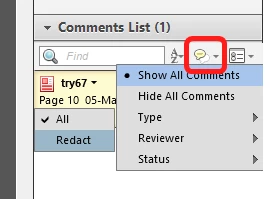
With regular corrections and comments, you can show the comment bar and simply jump form one correction/comment to the next, but no such feature seems to exist for redactions.
Is there no way to locate unapplied redactions in a PDF file in Acrobat?
(This is essentially the same question as Search for redactions in a pdf, except in that question, the redactions had already been applied; in this case, they haven’t.)
 AdChoices