


New Participant
October 9, 2015
Answered

Security Level is Set to High - Creating PDF

  • October 9, 2015
  • 7 replies
  • 39059 views

In the last two days I am unable to create a PDF from Microsoft Office dcouments (Excel, Word, Powerpoint). When I go to combine the files, I get the following error box:
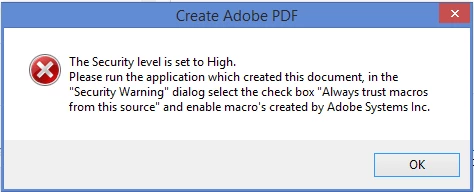
There is no "Security Warning" dialog in Word, Excel or Powerpoint.

I have changed the macro's settings on all three programs and it doesn't fix the problem. I have installed and un-installed both Acrobat and my entire Microsoft suite. I still cannot combine files to create a PDF.  Other users in my office do not have the same issue. Any suggestions or help is appreciated.

Running Office 2013, and Adobe Acrobat XI.

Thanks!
Correct answer jamies9255606

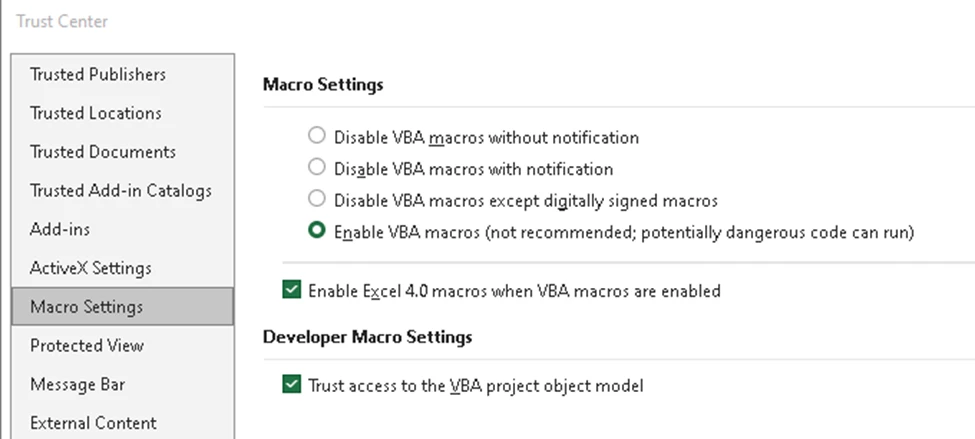
I know this is a really old post, and I don't know if anyone still needs the answer, but today I encountered this issue and could not resolve it using any of the means posted here. I ended up contacting my IT support, and they opened Excel and updated the macro settings there - why Excel, I don't know because I'm trying to convert Word files..., but it worked! 


7 replies

jamies9255606Correct answer
New Participant
July 17, 2023

I know this is a really old post, and I don't know if anyone still needs the answer, but today I encountered this issue and could not resolve it using any of the means posted here. I ended up contacting my IT support, and they opened Excel and updated the macro settings there - why Excel, I don't know because I'm trying to convert Word files..., but it worked! 


Participating Frequently
July 18, 2023

Hi jamies9255606! Your information is increadibly useful since making a change in Excel in order to successfully convert Word files is not very intuitive. I am assumng you had already tried all of the "historical" suggestions  and none of them worked. I really hope that someone with knowledge better than mine sees your post and explains why a security setting in Excel was preventing conversion of Word files. Thanks again for your post!

New Participant
May 16, 2022

I'm running into the same issue currently with my renewal of Adobe Acrobat Pro DC (32-bit) on my Windows 10; Microsoft Office 365.  I have had no issues before creating a fillable PDF from an excel file and now it no longer works and my company IT department has gone through every single suggestion possible.  I also, get Script Errors and Security Alert upon signing into it; which I hadn't had to do until trying to figure out why it won't allow me to create a fillable PDF.  I have no issue creating a PDF via "Save As" from the excel or word file.  It's simply not doing it through the software/program.  Has anyone gotten rid of it??

Participating Frequently
October 8, 2022

I found that setting the Macro Settings in Word to "Disable allmacros except digitally signed macros" worked for me.


New Participant
June 19, 2020

I was having the same issue of security , i fixed the issue by repairing the office365, it worked for me , Thank you for sharing solutions 

Participating Frequently
October 4, 2021

What is marked as the correct answer is not and my assessment has been echoed several times in this thread. It is inaccurate and proposes messages that appear after chosing certain options but in actuality do not. The need to run a quick repair on Office wastes as much time as opening the Word doc and saving it as a pdf, especially when all of the Office program are working. The option for converting a file into a pdf is meant to save time -- in this instance it has cost far more time than just opeing the Word doc and saving it as a pdf, plus the time to log in and type this response. But indeed, wouldn't it have been wonderful and saved time if this operation actually worked the way it was intended to?

Participating Frequently
October 4, 2021

Make a new thread. You're responding to a post originally from 2015. You likely are experiencing a different issue. If this didn't fix your issue, create a new thread.

New Participant
November 1, 2018

This is not helpful, answered, or solved. Yes, anyone can paste the official Microsoft response. It appears multiple times in this thread. Do not cite it unless you provide SPECIFIC EXAMPLES of terms 'new publisher', 'security warning area' and so on. These are not available options in any of the likely interfaces.

Something changed and now we're unable to convert excel files to pdf.

However, "Open the file from the new publisher" is a totally useless instruction. WHAT is meant by 'new publisher'? Excel? Adobe Acrobat? File Explorer? There is no file > enable content option, no 'security warning area', in any of those. "Trusted Publisher" is not found when I search for it in the Windows 10 search field or in Settings / Control Panel.

larrycarter
New Participant
April 30, 2018

My environment is Windows 10, Adobe Acrobat 2017, and Microsoft Office 365 ProPlus.  I experienced the same problem (Security Level is Set to High) when my company upgraded to Office 365.  I tried lots of Internet searches and security options with no success. 

I then tried the Office Change/Repair option as mentioned here and I did not expect this to work.  However, this repair did work for me. 

As part of my job, I combine many Word files into one large document and although it is now working, it seems a little slower in converting and creating the larger PDF file.  I'm not going to complain.  :-)

New Participant
May 17, 2019

When I saw this solution, I thought it was impossible.

I ran the change (repair) on my Office 365 (Office 2016) installation and no more 'Security Level Set to High'.

I don't know who the "Correct Answer" works for, certainly not me.

New Participant
December 19, 2017

So tired of seeing this garbage copy and pasted.

IT DOESN'T WORK. Try something else.

AadeshSingh
Community Manager
Community Manager
October 10, 2015

Hi jessicab29717914,

To add a publisher the Trusted Publishers list in the Trust Center, do the following:

  • Open the file from the new publisher.
  • Click File > Enable Content in the Security Warning area.
  • Click Advanced Options > Trust all documents from this publisher.

For detailed information, refer to the link below:

http://office.microsoft.com/en-001/word-help/add-remove-or-view-a-trusted-publisher-HA0103 54309.aspx

You can also add the document path as a trusted location, refer to the link below:

http://office.microsoft.com/en-us/word-help/create-remove-or-change-a-trusted-location-for -your-files-HA010031999.aspx

Regards,

Aadesh

New Participant
January 21, 2016

I'm having the same issue (getting error message about security level being too high) and this is the only response that seems to keep getting cut and paste by moderators but it does not work. Very frustrating.

Running Adobe Acrobat Standard DC 2015 Release (Classic) Version 2015.006.30119 and Microsoft Office Professional 2016 Version 16.0.6366.2056 and Windows 7 Professional

New Participant
January 26, 2016

I am also experiencing this issue.  The solution does not work for me either as there is no "Security Warning Area".  I am using Adobe XI Pro and Office 2016.  Seems like many people are having this issue so hopefully we can get an answer.  Also, this happens if I create a brand new doc in office and then attempt to right click on the file in explorer and choose "convert to adobe pdf".