


Inspiring
March 17, 2025
Answered

Selecionar checkbox consoante select

  • March 17, 2025
  • 3 replies
  • 1643 views

Boa noite a todos, ca estou eu a pedir a vossa preciosa ajuda.

Tenho um campo select com o nome de "tipo_servico" e vários checkbox com os nome exemplos (total, parcial, noturno, etc)

fiz o script abaixo e coloquei no campo tipo_servico em "Ações" quando o select perder o foco executar o script:


// Obtém o resultado do campo 'select' e seleciona o 'checkbox' correspondente
var campo1 = this.getField('tipo_servico');
var checkbox1 = this.getField('total');
var checkbox2 = this.getField('parcial');

// Função para verificar a seleção e marcar/desmarcar o checkbox2
campo1.setAction('Keystroke', function() {
    // Usando switch para verificar o valor selecionado no campo1
    switch(campo1.value) {
        case 'total':
            // Marca o checkbox total quando 'total' for selecionado
            checkbox1.checkThisBox(0, true);
            break;
        case 'parcial':
            // Marca o checkbox parcial quando 'parcial' for selecionado
            checkbox2.checkThisBox(0, true);
            break;
        default:
            // Caso nenhum item específico seja selecionado, desmarcar os checkbox
  checkbox1.checkThisBox(0, false);          
checkbox2.checkThisBox(0, false);
            break;
    }
});

Mas não funciona, o que fiz de errado? 
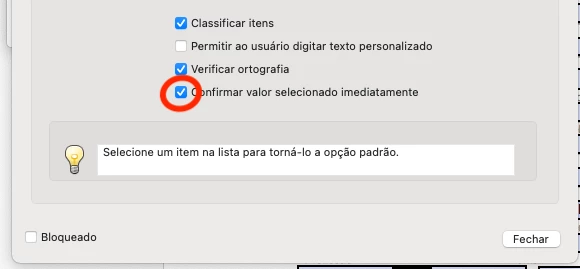
Correct answer John280476216b9o

Vejá se fiz correcto agora, mas se fiz, mesmo assim não dá


Deixo aqui o que faltava para funcionar, não sei se foi o que indicaram.

Todas as respostas estão correctas, mas faltava selecionar o campo da imagem.

3 replies

PDF Automation Station
Community Expert
March 18, 2025

The cScript paramater of the field setAction method must be in quotes and you either have to remove all the line breaks, or concatenate all of them with + and quotes.

Inspiring
March 20, 2025

Boa tarde, penso eu que fiz tudo correcto.


Bernd Alheit
Community Expert
March 20, 2025

Why do you use setAction in the script?

Nesa Nurani
Community Expert
March 17, 2025

If you wish to use script as 'On Blur' you can use this:

var campo1 = event.target.value;
var checkbox1 = this.getField('total');
var checkbox2 = this.getField('parcial');

checkbox1.checkThisBox(0,(campo1 == "total")? true : false);
checkbox2.checkThisBox(0,(campo1 == "parcial")? true : false);
Inspiring
March 17, 2025

talvez para duas opções, sim.

Mas caso seja um select com 5 ou mais tipos de seleções talvez seja melhor usar o case

Bernd Alheit
Community Expert
March 17, 2025

Check the Javascript console for errors.

Inspiring
March 17, 2025

Esse é o erro:
SyntaxError: function statement requires a name

1:Field:Keystroke

SyntaxError: function statement requires a name

1:Field:Keystroke

SyntaxError: function statement requires a name

1:Field:Keystroke

PDF Automation Station
Community Expert
March 18, 2025

You didn't name the function.  MyFunction function().  You also need to run the function after defining it.